Windows to Data: A Comprehensive Guide to PostgreSQL Window Functions

Have you ever wondered how window functions in PostgreSQL are analogous to windows in buildings? These parallels offer fascinating insights, here are a few parallels:
Enhanced Visibility: Window functions in PostgreSQL allow users to look beyond the available rows and impute further calculations from existing rows by relating with other rows just as windows in buildings allow residents to look outside and see beyond their immediate surroundings.
Energy efficiency: Just as windows in buildings help in regulating the temperature, provide natural sunlight to residents similarly window functions in PostgreSQL improve query efficiency by reducing the need for complex joins or subqueries or creating new columns.
Diversity: PostgreSQL offers diverse range of window functions enabling users to perform different analytical needs which are flexible as well just as windows for buildings have a diverse geometrical range with respect to size, shape.

Based on this understanding, window functions in PostgreSQL can be viewed as powerful analytical tools that enable users to perform calculations across a set of rows without collapsing or altering the original data. These functions operate on a window of data, which is a specific subset of rows defined by the over clause.
The Key characteristics can be summarized below,
· Unlike group by, window functions retain the original rows preserving the original database.
· Flexible calculations, make complex analysis simple.
· User can specify the mode and define calculation path.
History of Window Functions:
PostgreSQL, which began its journey in 1986, introduced window functions in version 8.4 (July 2009), aligning with the SQL:2003 standard. This innovation transformed PostgreSQL's analytical capabilities, enabling efficient, readable queries for complex tasks. Over the years, window functions have become indispensable for developers and analysts, supporting calculations like running totals, row ranking, and trend identification with ease.
Window Functions advantages:
Window functions are useful to users when one wants to,
Perform calculations like running totals, moving averages or ranking without modifying the dataset, while preserving the original data structure.
Access data from other related rows without or subqueries, improving query efficiency, thereby making query simple.
Window functions provide a comprehensive toolkit for intricate computations across related rows, particularly useful in time series analysis.
Syntax of Window Functions
A window function in PostgreSQL follows this general syntax:
Function_name(expression) OVER (
[PARTITION BY column_name]
[ORDER BY column_name [ASC|DESC]]
[ROWS or RANGE specification]
)
SELECT column_1, column2,
aggfunction(column3) OVER (
PARTITION BY column_name
ORDER BY column4
) AS name desired
FROM table name
Where,
Function_name refers to the specific window function, one wants to apply (for e.g.: Sum, Rank, Row_number etc.)
Expression is the column or calculation you want the function to work on.
Over defines the window of rows on which function operates, in other words it tells PostgreSQL that we are using a window function, without over, we are just performing an aggregate calculation across the entire dataset.
Partition by separates the rows in dataset into small groups or subsets (could be compared to group by) or divides the data into groups
Order by lists the order of rows within each partition or orders the rows within each group.
Rows or Range define the window frame for calculations or specifies the exact set of rows for calculation, this could be optional.
You partition (group) the data and order it and then apply the function over each group. That’s what the OVER clause does.
In above syntax, mandatory functions are Function_name, Over.
Types of Window functions:
Based on functionality, windows functions can be further classified into:
Aggregate functions:
Perform aggregate calculations (like SUM, COUNT, AVG, MIN, MAX) over a specified window of rows.
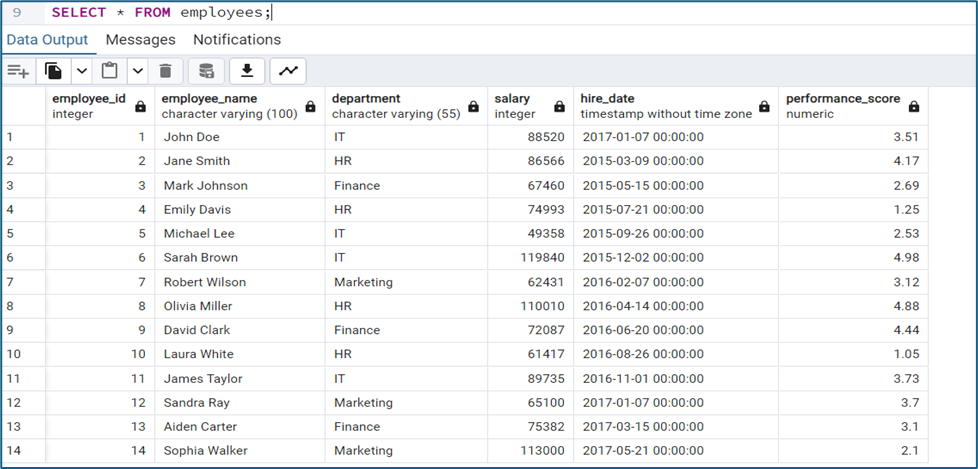
Created a table “employees” for better understanding of functions usability.
The table details are shown below,
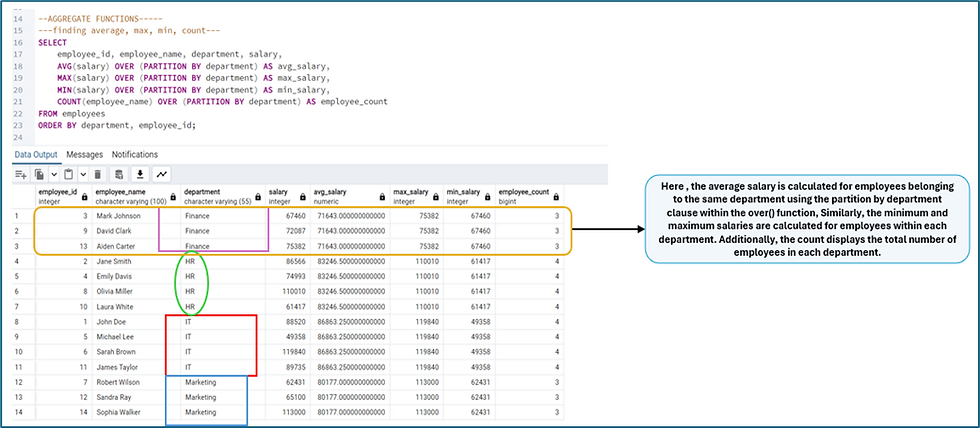
Example 1 shows the COUNT, AVG, MIN, MAX salary for employee within a department, we can use below query, we can club multiple window functions into a single query.
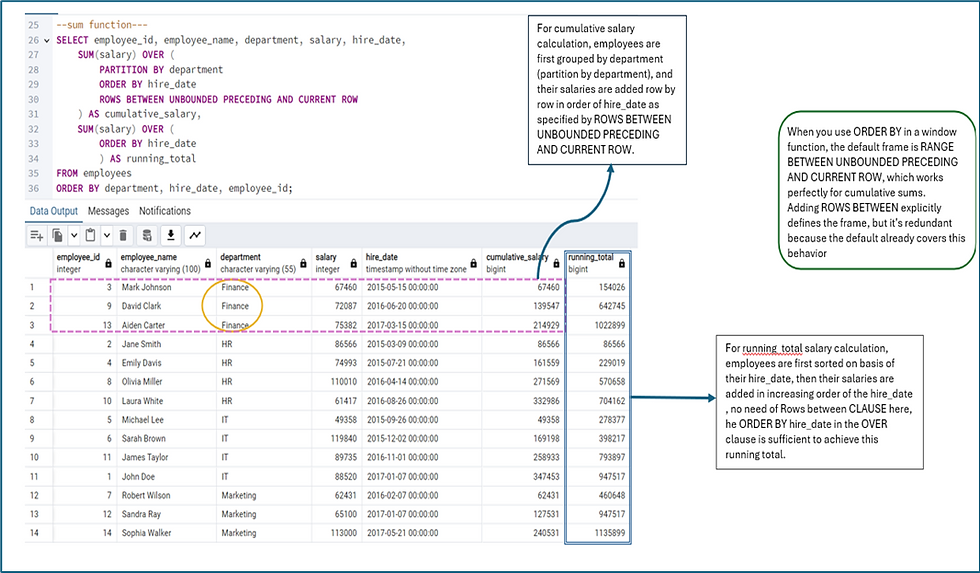
Example 2 demonstrates the calculation of cumulative salary and running total for employees. This query allows you to see both department-specific salary growth and overall company salary growth over time.
Example 3 demonstrates the importance of the “ROWS BETWEEN clause”.
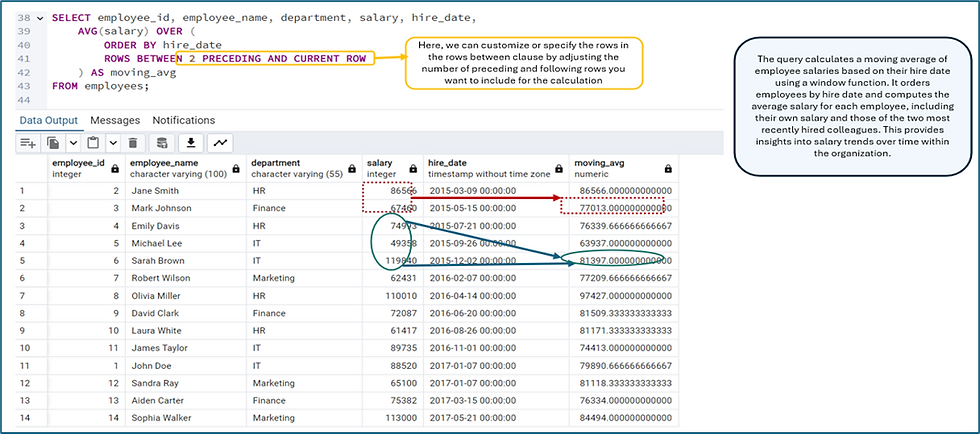
ROWS BETWEEN is best used for creating windowed aggregates that require a defined range of rows, either relative to the current row or over an entire partition of the dataset. It is particularly effective for moving averages, cumulative sums, ranking, and comparing current rows with others in the same dataset.
b. Ranking Functions
These functions assign a rank to each row within a window, based on a specified order. Common functions are RANK(), DENSE_RANK(), ROW_NUMBER(), NTILE().
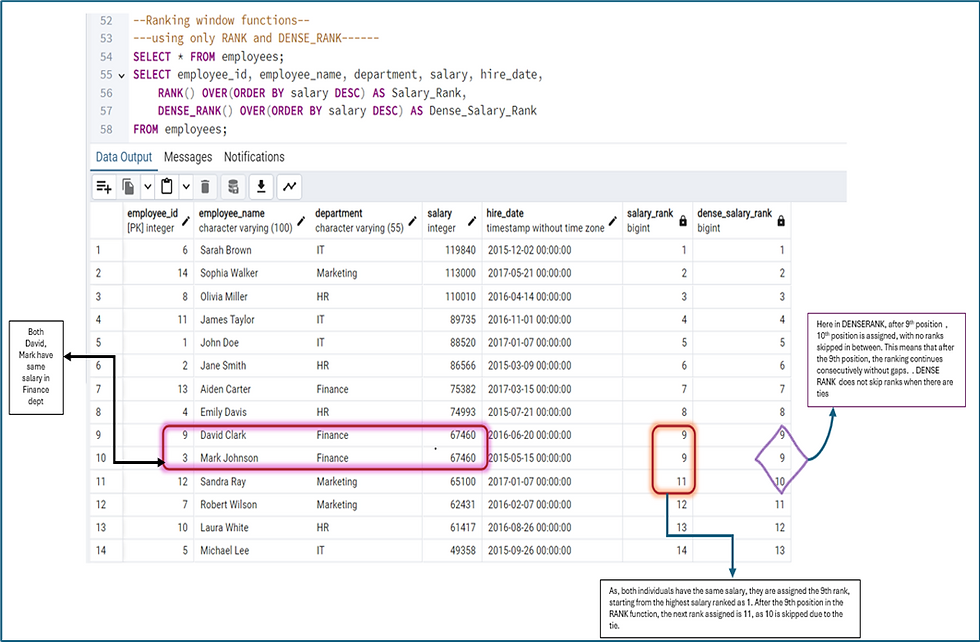
RANK(): This function assigns a rank to each row within the result set. If two or more rows have the same value, they receive the same rank, and the next rank is skipped.
DENSE_RANK(): Like RANK(), but it does not skip ranks when there are ties.
Below example shows the Rank and Dense rank functions usage,
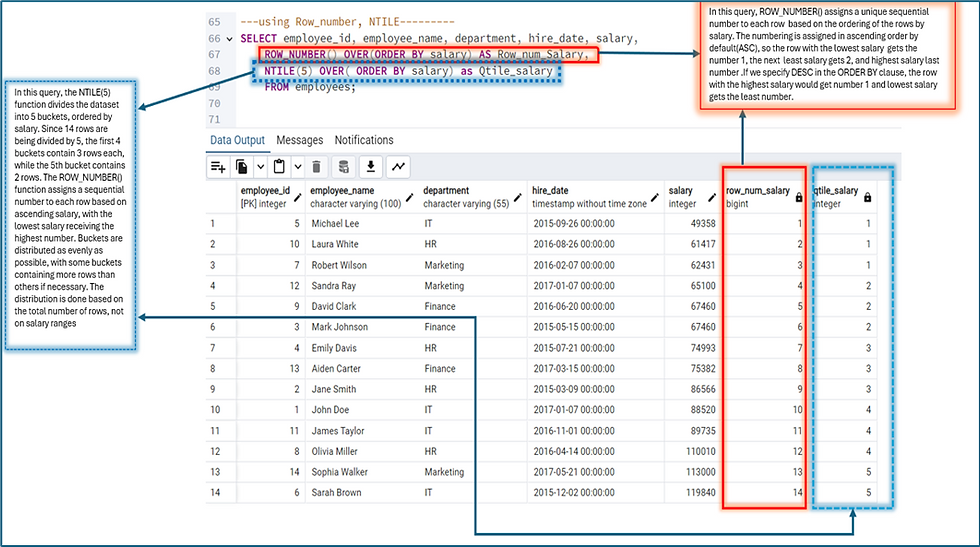
ROW_NUMBER(): This function assigns a unique sequential integer to each row in the result set, regardless of any ties. It does not consider duplicate values; each row gets a distinct number based on the specified order.
NTILE(n): This function divides the result set into 'n' number of groups (or buckets) and assigns a bucket number to each row. For instance, if you use NTILE(4), it will divide the data into four groups.
Below example shows the Row_number and Ntile functions usage,
One can use even partition function to get more detailed information.
c. Value Functions
Value Functions, as in the name suggests return values from user specified rows in relative to the current row, in other words, they look at specific values within a group of data. In layman terms they are like picking specific items from the list. These functions are useful when one wants to compare values, find trends, or analyze how data changes from one row to the next. They help you see your data in context, making it easier to spot patterns or anomalies.
Common Value functions are:
FIRST_VALUE(): Grabs the first item in a list or takes the first value in your window. Think of it as choosing the last person in a line.
LAST_ VALUE(): Grabs the last item in a list or takes the first value in your window. Think of it as choosing the last person in a line.
LAG(): This function looks at the row that comes before the current one. It's like turning around to see who's behind you in a queue.
LEAD(): This does the opposite of LAG(). It peeks at the row that comes after the current one, like looking ahead to see who's in front of you in line.
NTH_VALUE(): This lets you pick any specific row in your window. It's like saying "I want to know who's in the 5th position" in a group.
Below example provides an overview of the above function’s usage.

d. Statistical Window Functions
Provide statistical calculations like the median, percentile, etc.
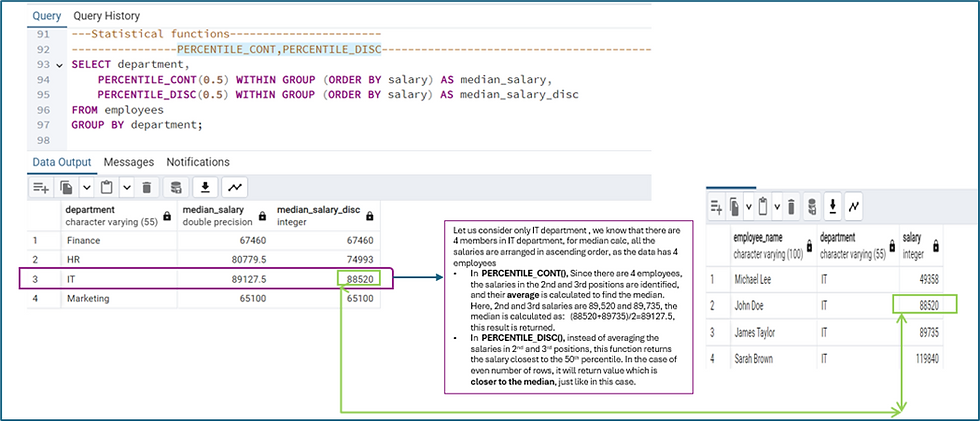
· PERCENTILE_CONT() and PERCENTILE_DISC(): Calculate continuous and discrete percentiles.
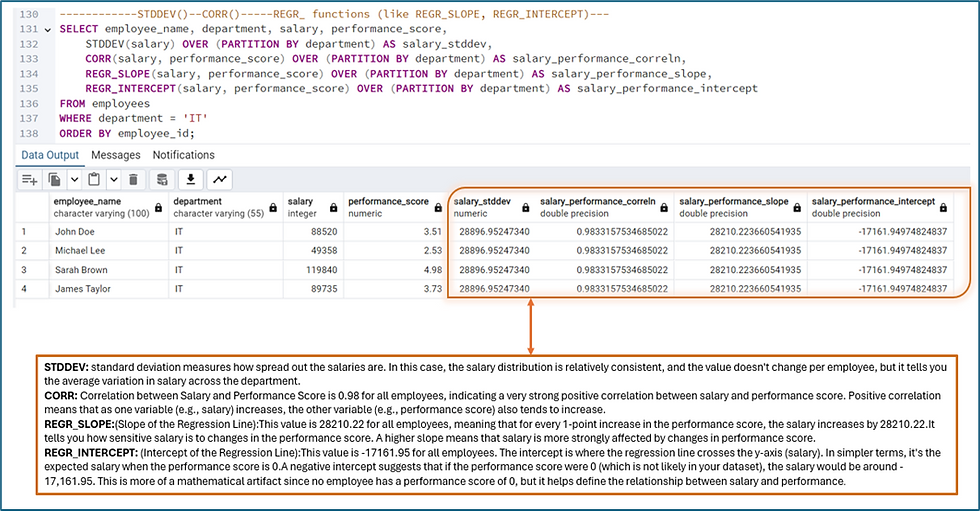
· STDDEV() and VAR(): Compute standard deviation and variance.
· CORR(): Calculates the correlation coefficient.
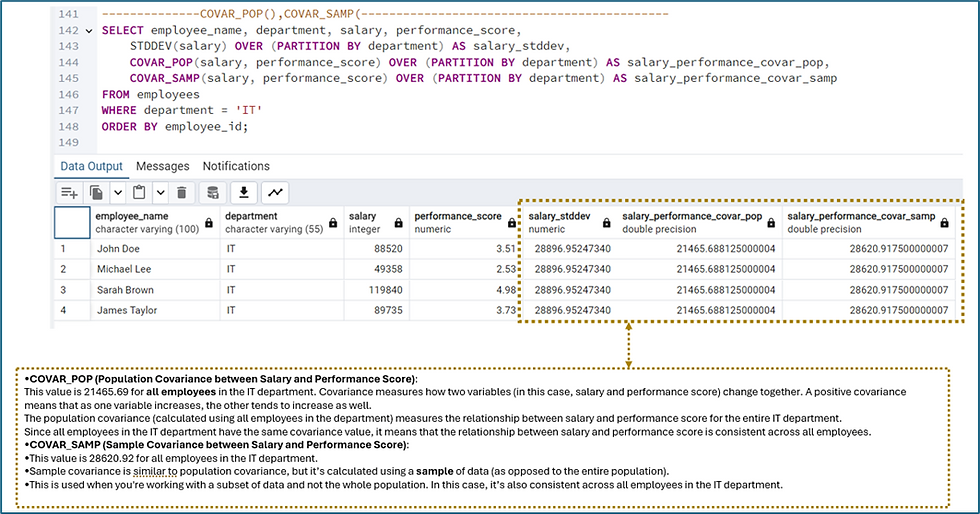
· COVAR_POP() and COVAR_SAMP(): Compute population and sample covariance.
· REGR_ functions (like REGR_SLOPE, REGR_INTERCEPT): Perform linear regression calculations.
Below example shows PERCENTILE_CONT, PERCENTILE_DISC use
Below example shows STDDEV(), CORR(), REGR_ functions (like REGR_SLOPE, REGR_INTERCEPT) usage
Below example shows COVAR_POP() and COVAR_SAMP() usage
All the above examples summarize window functions to a larger extent.
Disadvantages of window functions:
On the other side of the flip coin, windows functions also have few disadvantages which are,
Performance overhead, especially on large datasets, due to the need for sorting and partitioning.
They may also result in high memory usage and suboptimal query plans, as indexing is less effective.
Additionally, window functions have a steeper learning curve and can be less intuitive, making queries harder to maintain.
Conclusion:
Window functions, when used thoughtfully, can greatly enhance our ability to analyze and manipulate data in PostgreSQL as they are powerful tools in performing complex calculations like rankings, moving averages, and cumulative sums without the need for cumbersome subqueries. Just like windows in a building that open up new perspectives, window functions offer a broader view of the data, allowing for more efficient and elegant solutions. However, like any powerful tool, they require careful consideration, as overuse or improper application can lead to performance issues and increased complexity. When used appropriately, window functions can be a key asset in unlocking deeper insights and more efficient queries.
References:
employees table was autogenerated


