Rank Window functions in SQL
Updated: Jan 22, 2025
Window Functions: It performs calculations, e.g., aggregations, on a specific subset of data without losing the level of detail of rows.
Difference between Group By and Window Functions
Group By returns a single row for each group, whereas Window functions return a result for each row.
Group By changing the granularity, whereas granularity remains the same in Window functions.
For simple data analysis, we use Group By, but for advanced data analysis, we use Window functions.
Group By has only aggregate functions, whereas window functions whereas Window functions has aggregate functions, rank functions, and analytics functions.
Example of GROUP BY Clause:
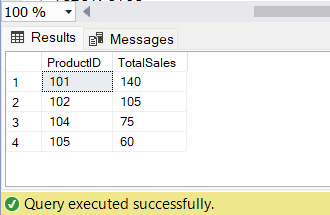
Find Total Sales for each product
SELECT
ProductID,
SUM(Sales) AS TotalSales
FROM Sales.Orders
Group By ProductID
Output:
Example of Window functions:
Find the Total Sales for each product.
Additionally provide details such as orderId and orderDate
SELECT
OrderID,
OrderDate,
ProductID,
SUM(Sales) OVER(PARTITION BY ProductID) AS TotalSales
FROM Sales.Orders
Output:
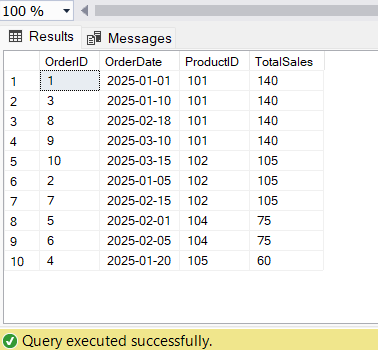
In both examples, it is clearly shown that with GROUP BY clause, it is not possible to get the additional information such as OrderID, OrderDate but with Windows functions, it is possible to get all the additional information as well.
Syntax of Window Functions:
Window Function + Window definition with Over Clause
Over Clause: Defines the window or subset of data. It tells SQL that the function used is a window function. It contains 3 parts: Partition By Clause, Order Clause and Frame Clause.
Partition By Clause: Divides the result set into partitions (windows). Just like Group By Clause.
Example:
Find the Total Sales for each product.
Additionally provide details such as orderId and orderDate
SELECT
OrderID,
OrderDate,
ProductID,
SUM(Sales) OVER(PARTITION BY ProductID) AS TotalSales
FROM Sales.Orders
Output:

Order By Clause: It sorts the data within a window (ASC | DES). It must be used with rank and value functions.
Example:
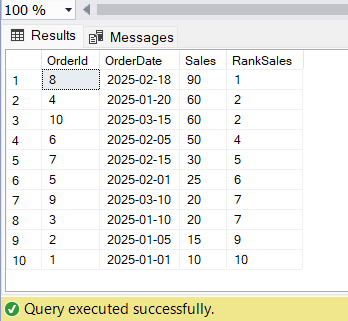
Rank each order based on their sales from highest to lowest
Additionally provide details such as orderId,Orderdate
SELECT
OrderId,
OrderDate,
Sales,
RANK() OVER(ORDER BY Sales DESC)RankSales
FROM Sales.Orders
Output:
Frame Clause: Define a subset of rows within each window that is relevant for calculations. It is used together with Order By Clause.
Example:
SELECT
OrderID,
OrderDate,
OrderStatus,
Sales,
SUM(Sales) OVER(PARTITION BY OrderStatus ORDER BY OrderDate ROWS BETWEEN CURRENT ROW AND 2 Following) TotalSales
FROM Sales.Orders
Output:

Types of Window Functions
Aggregate Functions.
Rank Functions.
Value (Analytics Functions)
Rules for Window Functions
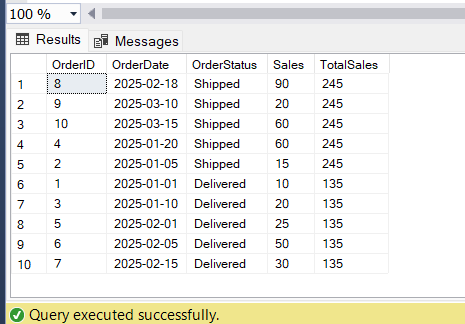
Window functions can only be used in SELECT and ORDER By Clause.
Example:
SELECT
OrderID,
OrderDate,
OrderStatus,
Sales,
SUM(Sales) OVER(PARTITION BY OrderStatus) TotalSales
FROM Sales.Orders
ORDER BY SUM(Sales) OVER (PARTITION BY OrderStatus) DESC;
Output:
Window functions cannot be used to filter data; they are not used in the WHERE and HAVING Clause.
Nesting of Window functions is not allowed.
SQL executes window functions after the WHERE clause.
Example:
SELECT
ProductID,
OrderID,
OrderDate,
OrderStatus,
Sales,
SUM(Sales) OVER(PARTITION BY OrderStatus) TotalSales
FROM Sales.Orders
WHERE ProductID IN (101,102);
Output:
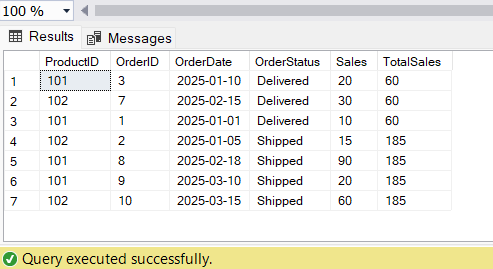
Window functions can be used together with GROUP BY in the same query, only if the same columns are used.
Example:
SELECT
CustomerId,
SUM(Sales) TotalSales,
RANK() OVER(ORDER BY SUM(Sales) DESC) RankCustomer
FROM Sales.Orders
GROUP BY CustomerID;
Output:
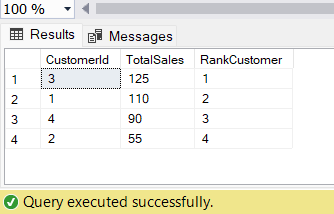
or
Example:
SELECT
CustomerId,
SUM(Sales) TotalSales,
RANK() OVER(ORDER BY CustomerId) RankCustomer
FROM Sales.Orders
GROUP BY CustomerID
Output:
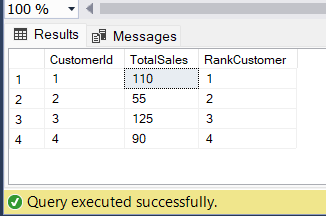
Let's discuss Rank Functions.
ROW_NUMBER()
RANK()
DENSE_RANK()
CUME_DIST()
PERCENT_RANK()
NTILE(N)
Note: Order By Clause is required by all the rank functions.
Ranking can be Integer Based Ranking and Percentage Based Ranking.
Integer Based Ranking : SQL assigns an integer to each row. It is a discrete value. It is used for Top/Bottom analysis.
Example: Find the top 3 products.
It includes ROW_NUMBER(), RANK(), DENSE_RANK(), NTILE().
Percentage Based Ranking : SQL assigns a percentage to each row. It is a continuous value between 0 to 1.
Example: Find the top 20% of products.
It includes CUME_DIST(), PERCENT_RANK()
RANK FUNCTIONS
ROW_NUMBER(): It assigns a unique number to each row. It does not handle ties.
RANK(): It assigns a rank to each row. It handles ties. It leaves gaps in ranking.
DENSE_RANK(): It assigns a rank to each row. It handles ties. It doesnot leave a gaps in ranking.
Example:
SELECT
Sales,
ROW_NUMBER() OVER(ORDER BY Sales DESC)RankSales1,
RANK() OVER(ORDER BY Sales DESC)RankSales2,
DENSE_RANK() OVER(ORDER BY Sales DESC)RankSales3
FROM Sales.Orders
Output:
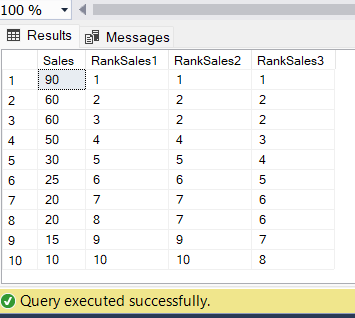
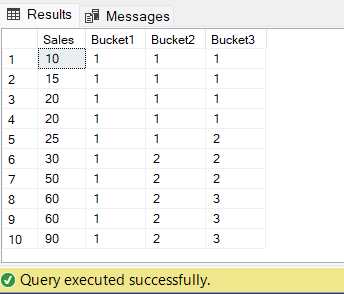
NTILE(N): It divides the rows into a specified number of approximately equal groups (buckets). In SQL, larger groups come first.
Bucket Size=No. of rows/no of Buckets
Example:
--NTILE(BucketSize)
--Larger Group Come First
--Create Bucket with Sales column
SELECT
Sales,
NTILE(1) OVER(ORDER BY Sales)Bucket1,
NTILE(2) OVER(ORDER BY Sales)Bucket2,
NTILE(3) OVER(ORDER BY Sales)Bucket3
FROM
Sales.Orders
Output:
CUME_DIST(): Cumulative distribution calculates the distribution of the data points within a window.
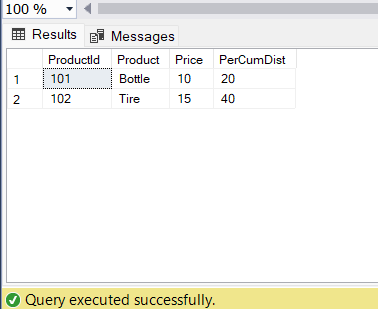
Cume_dist = position no. / no. of rows
Example:
Find the products that fall within 40% of the prices using CUME_DIST()
SELECT
*
FROM
(
SELECT
ProductId,
Product,
Price,
CUME_DIST() OVER(ORDER BY Price)*100 PerCumDist
FROM
Sales.Products
)t
WHERE PerCumDist<=40
Output:
PERCENT_RANK(): It calculates relative position of each row.
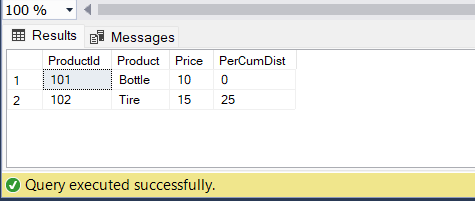
Percent_Rank = Cume_dist = position no.-1 / no. of rows-1
Example:
Find the products that fall within 40% of the prices
SELECT
*
FROM
(
SELECT
ProductId,
Product,
Price,
PERCENT_RANK() OVER(ORDER BY Price)*100 PerCumDist
FROM
Sales.Products
)t
WHERE PerCumDist<=40
Output:
Conclusion: SQL window functions performed calculations on a subset of data without losing the details. Window functions are more powerful and dynamic and perform advanced analysis of data.


