What is TestNG and TestNG Annotations


TestNG:
TestNG is a testing framework for the Java programming language, inspired by JUnit and NUnit. It allows you to write and organize test cases, execute them efficiently, and generate detailed test reports.
TestNG gives the developer the ability to write more flexible and powerful tests. As it heavily borrows from Java Annotations (introduced with JDK 5.0) to define tests, it can also show you how to use this new feature of the Java language in a real production environment.
Why TestNG is valuable in Selenium
Why TestNG is valuable because its ability to write powerful test cases with the help of annotations, grouping, and parametrizing.
It also saves time because TestNG supports parallel execution, allowing you to run multiple test cases simultaneously
Its generates detail HTML reports which an helps to identifying the root cause of failures, tracking test execution progress, and understanding the overall health of the tests.
TestNG also supports cross-browser testing, allowing you to test your application across different browsers and configurations. Overall TestNG play valuable role in selenium.
How to Install TestNG
Steps to Install TestNG in Eclipse
Step 1: Launch eclipseIDE ->click on help option -> eclipse-> marketplace option.
Step 2: Enter the keyword “TestNG “in the search box and then click "go".
Step 3: Click "install".
Step 4: A confirmation window will open, click "confirm".
Step 5: The application will prompt you to accept the license and then click "finish".
How to write Test case using TestNG (Example)
To write test cases in TestNG, you annotate your test methods with "@Test". You can then add code within these methods to perform specific test actions, such as interacting with your application, making assertions, and verifying expected outcomes. Test cases can also include setup and teardown methods annotated with "@BeforeMethod" and "@AfterMethod" to prepare the test environment before each test and clean up resources afterward.
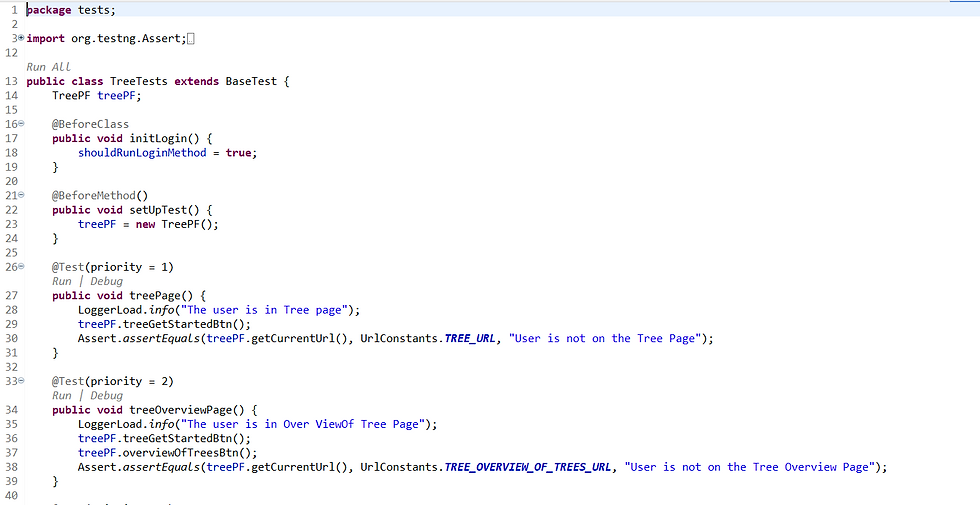
What is Annotation in TestNG
In TestNG, annotations are special markers (metadata) that provide instructions to the framework on how to execute test methods and manage the testing lifecycle. They allow you to define things like test case execution order, setup and teardown routines, and even data-driven testing.
Annotations are used to tell TestNG how to handle test methods and the overall test execution.
Types of Annotations
@Test
@BeforeSuite,
@AfterSuite
@BeforeTest
@AfterTest
@BeforeClass
@AfterClass
@BeforeMethod
@AfterMethod
@BeforeGroups
@AfterGroups
@DataProviders
@Parameters
@Factory
@Listeners
@Ignore
Explore How to use and where we can use this Annotations
@Test: Marks a method as a test case, specifying the order of execution and any additional attributes.
@BeforeMethod: This will be executed before every @test annotated method.
@AfterMethod: This will be executed after every @test annotated method.
@BeforeClass: This will be executed before first @Test method execution. It will be executed one only time throughout the test case.
@AfterClass: This will be executed after all test methods in the current class have been run
@BeforeTest: This will be executed before the first @Test annotated method. It can be executed multiple times before the test case.
@AfterTest: A method with this annotation will be executed when all @Test annotated methods complete the execution of those classes inside the <test> tag in the TestNG.xml file.
@BeforeSuite: It will run only once, before all tests in the suite are executed.
@AfterSuite: A method with this annotation will run once after the execution of all tests in the suite is complete.
@BeforeGroups: This method will run before the first test run of that specific group.
@AfterGroups: This method will run after all test methods of that group complete their execution.
@DataProviders: DataProvider , you can parameterize your tests, meaning you can pass different values to your test methods dynamically. Benefit: This allows you to test how your application behaves with different inputs, including valid, invalid, and edge cases.
@Parameters: parameters are nothing but the arguments that we pass to the given test methods. The data is provided in the main XML file. These testNg parameters can either be applied inside the tags or outside the tags.
@Factory : It is used on a method that returns an array of objects (Test Instances). Each object in the array represents a new instance of the test class. TestNG will then create a new instance of the test class for each object in the array.
@Listeners: It interfaces that allow you to hook into the TestNG framework's execution flow and customize its behavior. They enable you to monitor events like test failures, successes, and skips, and perform actions like logging, reporting, or taking screenshots. Essentially, they provide a way to extend TestNG's functionality and tailor it to your specific testing needs.
Types of Listeners in TestNG
ITestListener Tracks test method events — start, success, failure, skip. Most commonly used.
ISuiteListener Runs before and after the entire test suite.
ITestNGListener Marker interface — parent of all listeners.
IReporter Creates custom reports after test execution.
IAnnotationTransformer Lets you change annotations (@Test) at runtime (e.g., set retry logic).
IConfigurationListener Tracks configuration methods like @BeforeClass, @AfterMethod.
IInvokedMethodListener Tracks every method, including test and config methods, when they are called.
@Ignore: If you want to temporarily disable a test or a group of tests. Methods annotated with Test that are also annotated with @Ignore will not be executed as tests. Also, you can annotate a class containing test methods with @Ignore and none of the containing tests will be executed.


