View and Stored Procedure

Define a view: A view is an alternative way of representing data that exists in one or more tables or views. A view can include all or some of the columns from one or more base tables or existing views.
When should you use a view in a database? How do views help in:`
Views can:
Show a selection of data for a given table.
Combine two or more tables in meaningful ways.
Simplify access to data.
Show only the portions of data in the table.
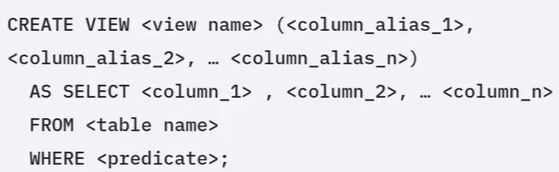
Syntax for creating a view :
To define a view, use the CREATE VIEW statement and assign a name (up to 128 characters in length) to the view. List the columns that you want to include. You can use an alias to name the columns if you wish. Use the AS SELECT clause to specify the columns in the view, and the FROM clause to specify the base table name. You can also add an optional WHERE clause to refine the rows in the view.
Example1:Create a view to display only non-sensitive data from the Employees table; Employee ID, name, address, job ID, manager ID, and department ID.
This CREATE VIEW statement creates a view called EMPINFO based on the Employees table. The SELECT statement returns the data in the view, as shown in the table below.


Views are dynamic: They consist of the data that would be returned from the SELECT statement used to create them. When you use a view in another SQL statement, it behaves as though you have used a SELECT statement that returns the content of the view. The SELECT statement that you use to create the view can name other views and tables, and it can use the WHERE, GROUP BY, and HAVING clauses. It cannot use the ORDER BY clause or name a host variable.
Example 2:In below case,the EMPINFO view is created with only the rows where the MANAGER_ID is 30002. You can use a SELECT statement to show the information from the view, and verify that only rows where the MANAGER_ID is 30002 are included.

DROP VIEW :We can remove a view completely,you can use DROP VIEW and dropping it only involves changes to the database's metadata, not the underlying physical data in the base tables.
Example: DROP VIEW EMPINFO;
Conclusion:
Views can include specified columns from multiple base tables and existing views. Once created, views can be queried like a table, and the data in the base table can be modified through the view. You can also change the data in the base table by running insert, update, and delete queries against the view. When you define a view, the definition of the view is stored. The data that the view represents is stored in the base tables, not by the view itself.
Stored Procedure
What a stored procedure is?
A stored procedure is a set of SQL statements that are stored and executed on the database server. Instead of sending multiple SQL statements from the client to server, you encapsulate them in a stored procedure on the server and send one statement from the client to execute them. You can write stored procedures in many different languages.They can accept information as parameters, perform, create, read, update, and delete (CRUD) operations, and return results to the client application.

The benefits of stored procedures:
Benefits include reduction in network traffic because only one call is needed to execute multiple statements.
Improvement in performance because the processing happens on the server where the data is stored with just the final result being passed back to the client.
Reuse of code because multiple applications can use the same stored procedure for the same job.
Increase in security because
----> you do not need to expose all of your table and column information to client-side developers.
---->you can use server-side logic to validate data before accepting it into the system. Remember though, that SQL is not a fully fledged programming language. You should not try to write all of your business logic in your stored procedures.
How to create a stored procedure in SQL?
Firstly, you use the create procedure statement, specifying the name of the procedure, and any parameters which it will take. In this example, the UPDATE _SAL procedure will take an employee number and rating which it will use to update the employee's salary by an amount depending on their rating. Then you declare the language you are using. You then enclose your procedural logic and the begin and end statements. In this case, giving employees who have a rating of one, a 10% raise, and all others a 5% raise. Notice that you can use the information passed to the procedure, the parameters, directly in your procedural logic. Also, since the stored procedure is going to use multiple statements, it is prudent to change the delimiter, the character that marks the end of a statement, before we start defining the procedure.
Here it has been set to dollar sign dollar sign. Use of this delimiter dollar sign dollar sign in the code will then mark the end of the procedure commands. Finally, we change the delimiter back to semicolon when we are done.

To call the update _SAL stored procedure that we just created, we use the call statement with the name of the stored procedure and pass the required parameters. In this case, the employee ID and the rating for that employee.

Conclusion: Stored procedures are a set of SQL statements that execute on the server.
Stored procedures offer many benefits over sending SQL statements to the server. You can use stored procedures in dynamic SQL statements and external applications.


