Versioning an API and Managing Git Changes in Postman for an LMS API
Introduction
In this blog, we will explore how to version an API, manage API changes using Git, and collaborate seamlessly using Postman. These practices ensure that API updates are tracked, and developers can work together effectively.
1. Versioning an API in Postman
Postman makes it easy to manage API versioning, test different versions, and simulate requests to different API endpoints. Here's how you can version your LMS API in Postman:
Step 1: Create Separate Collections for Each Version
In Postman, you can create a collection for each version of your LMS API. For example:
LMS API v1
LMS API v2
Each collection will contain the endpoints and requests for a specific version of the API. This allows you to manage each version independently while having easy access to different API versions.
Step 2: Testing and Updating Endpoints
As new versions of the LMS API are introduced, you can create new requests for new endpoints or modify existing ones. Postman allows you to test changes locally and version them in the collections.
2. Managing Git Changes for API Development
Postman enables you to use Git-based version control for developing and managing changes to your API. You can connect your API to a remote GitHub, Bitbucket, GitLab, or Azure DevOps repository. The remote repository can be hosted in the cloud or on-premises.
Once your API is connected to a repository, you can switch branches, pull changes from the repository, and push changes to the repository, all from within Postman. When you're ready to share your changes with consumers, you can publish a version of your API to your team's Private API Network.
Here’s how to integrate Git with Postman and manage changes to your LMS API.
API version control workflow
Here's a typical workflow for API-first development with a connected repository:
Create an API in Postman using left side bar and add collection into the API
Connect the API to a remote Git repository.
Select an active branch. Make changes to the associated collections, then commit and push the changes to the remote repository.
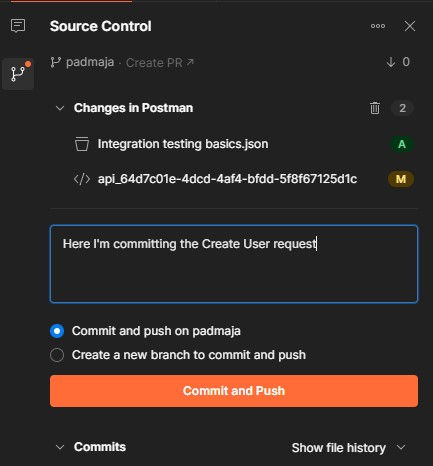
4.The Source Control pane displays the number of changes in the active branch in Postman.
To commit and push the changes to the remote repository, do the following:
Select Source Control in the right sidebar.
If you want to review the changes before committing and pushing them, hover over a file and select View Diff. You can discard changes in a file by selecting Delete next to it.
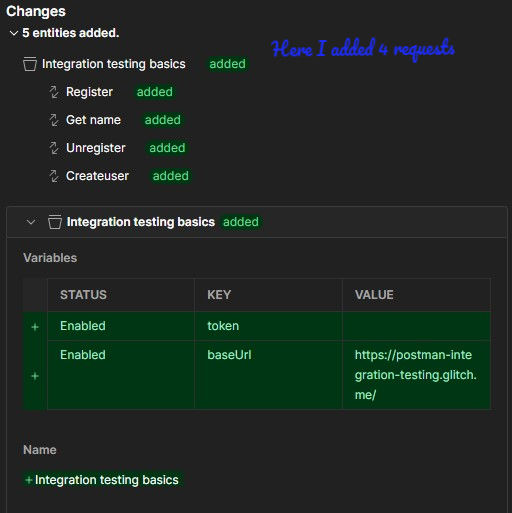
After you push a change, other producers on your team can switch to the branch, pull the changes, and view the updates you made.
Pull changes
If there are changes in the remote repository, you need to pull the changes before you can commit and push.
Pulling brings changes from the remote (origin) branch into your active branch.
To pull changes from the remote branch, do the following:
Select APIs in the sidebar and select an API.
Select Source Control in the right sidebar. The pull icon indicates the number of commits your active branch is behind the remote branch.
Select the pull icon to bring the changes into your active branch.
If there are any conflicts, you'll need to resolve the conflicts before you can finish pulling the changes.
Resolve conflicts
If a change in your active branch conflicts with a change in the remote (origin) branch, you must resolve the conflict before you can pull changes.
To resolve a conflict, do the following:
Next to each affected file, select either Keep remote file or Keep local file.
When you're finished, select Pull Changes.
3. Conclusion
Versioning your LMS API and managing changes using Git and Postman is essential for maintaining smooth operations, avoiding breaking changes, and collaborating effectively within a development team. By following versioning best practices and utilizing Git for source control, you can ensure that your LMS API evolves smoothly, is easy to manage, and is always in sync with your team’s development efforts.
By combining Postman’s powerful API testing features with Git’s robust version control, your API development lifecycle can be streamlined, efficient, and collaborative.
Call to Action
Do you use versioning and Git in your API development process? How do you manage updates and collaboration with your team? Share your experiences and thoughts in the comments below!


