Window Functions in SQL: Aggregate and Value Functions.
Window Functions: It performs calculations, e.g., aggregations, on a specific subset of data without losing the level of detail of rows.
Syntax of Window Functions:
Window Function + Window definition with Over Clause
Over Clause: Defines the window or subset of data. It tells SQL that the function used is a window function. It contains 3 parts: Partition By Clause, Order Clause and Frame Clause.
Types of Window Functions
Aggregate Functions.
Rank Functions.
Value (Analytics Functions)
Let's discuss Aggregate Functions and Value Functions one by one.
Aggregate Functions: These are the functions that calculate a single value from a set of values in a column or multiple rows. They are often used with GROUP BY clause in the SELECT statement.
Types of Aggregate Functions
COUNT(EXPR)
SUM(EXPR)
AVG(EXPR)
MIN(EXPR)
MAX((EXPR)
Let's discuss Aggregate functions one by one:
COUNT(EXPR): It returns the number of rows within a window. COUNT(*) counts all the rows in a table regardless of whether any value is null. COUNT(column) counts the non-null values in the column.
Example:
--Find total number of orders.
--Additionally provide details such as orderdate, orderId
SELECT
OrderDate,
OrderID,
COUNT(*) OVER()TotalOrders
FROM Sales.Orders
Output:

SUM(EXPR): It returns the sum of values within the window.
Example:
--Find the percentage contribution of each product sales's to the total sales
SELECT
SUM(Sales) OVER() TotalSales,
ROUND(Cast(Sales As Float)/SUM(Sales) OVER() *100,2)PercentageOfTotal
FROM Sales.Orders
Output:

AVG(EXPR): It returns the average of values within the window. In the example, the COALESCE() function replaces null with a specific value.
Example:
--Find the Avg scores of customers
--Additionally provide the details such as customerId and Lastname
SELECT
CustomerId,
Lastname,
Score,
AVG(Score) OVER()AvgScores,
COALESCE(Score,0)CustomerScore,
AVG(COALESCE(Score,0)) OVER()AvgScoresWithoutNull
FROM Sales.Customers
Output:

MIN(EXPR): It returns the lowest value within the window. In MIN() function, a null value is ignored.
MAX((EXPR): It returns the highest value within the window.
Example:
-- Find Highest and Lowest sales across all orders.
--Find Highest and Lowest sales for each product
--Additionally provide details such as OrderId and OrdeDate
SELECT
OrderId,
OrderDate,
MIN(Sales) OVER() MinSales,
MAX(Sales) OVER() MaxSales,
MIN(Sales) OVER(PARTITION BY ProductID) MinSales,
MAX(Sales) OVER(PARTITION BY ProductID) MaxSales
FROM Sales.Orders
Output:

Let's discuss Running and Rolling Total.
NOTE: Always used Aggregate functions + ORDER BY clause.
Running Total: Aggregate all values from beginning upto the current point without dropping off older data.
It gives the correct result with default frame. ORDER BY Clause has default frame, i.e. ROWS BETWEEN UNBOUNDED PRECEDING AND CURRENT ROW. In UNBOUNDED PRECEDING first row is fixed. There is no need to mention the FRAME clause. It is also known as moving.
Example:
--Calculate moving/running average of sales for each product
--Must use OrderBy clause and default frame
SELECT
Sales,
AVG(Sales) OVER(PARTITION BY ProductId Order By OrderDate)MovingAvg
FROM
Sales.Orders
Output:

Rolling Total: Aggregate all values within a fixed time window (eg 30 days). As new data is added and oldest data point will be dropped. It is also known as shifting window. In this example, there are 2 rows in a window.
Example:
--Calculate shifting/rolling average of sales for each product, Including only next Order
--Must use OrderBy and Frame clause
SELECT
Sales,
AVG(Sales) OVER(PARTITION BY ProductId Order By OrderDate ROWS BETWEEN CURRENT ROW AND 1 FOLLOWING)RollingAvg
FROM
Sales.Orders
Output:

Value Functions: It accesses a value from another row for comparing.
For example: Compare sales.
Current Month Vs Previous Month
Current Month Vs Next Month
Types of Value Functions
LEAD()
LAG()
FIRST_VALUE(EXPR)
LAST_VALUE(EXPR)
NOTE: Order By clause is required in all value functions.
These functions are used for time series analysis. It is the process of analyzing the data to understand patterns, trends, and behaviour over time. Like year-over-year and month-over-month analysis.
year-over-year: It analyzes the overall growth or decline of the business's performance.
month-over-month: It analyzes short-term trends and discovers patterns in seasonality.
LEAD(): It accesses a value from the next row within a window.
Example:
--Inorder to analyse customer loyalty
--rank customers based on the avg days between their orders
SELECT
CustomerId,
AVG(DaysUntilNextOrder)AvgOrderDays,
RANK() OVER(ORDER BY COALESCE(AVG(DaysUntilNextOrder),999999))RankAvg
FROM
(
SELECT
CustomerID,
OrderId,
OrderDate AS CurrentOrder,
LEAD(OrderDate) OVER(PARTITION BY CustomerId ORDER BY OrderDate) NextOrder,
DATEDIFF(day,OrderDate,LEAD(OrderDate) OVER(PARTITION BY CustomerId ORDER BY OrderDate))DaysUntilNextOrder
FROM
Sales.Orders)t
GROUP BY CustomerId
Output:

LAG(): It accesses a value from the previous row within a window.
Example:
-- Analyze the month over month performanace by finding the percentage change
--in sales between current and previous month
SELECT
*,
CurrentMonthSales-PreviousMonthSales AS Diff,
ROUND(CAST((CurrentMonthSales-PreviousMonthSales) As Float)/PreviousMonthSales*100,2) As ChangeInSales
FROM
(
SELECT
MONTH(OrderDate) MonthDate,
SUM(Sales) CurrentMonthSales,
LAG(SUM(Sales)) OVER(Order By MONTH(OrderDate))PreviousMonthSales
FROM
Sales.Orders
GROUP BY MONTH(OrderDate))t
Output:

FIRST_VALUE(EXPR): It accesses a value from the first row within a window. It gives the correct result with default frame. ORDER BY Clause has default frame, i.e. ROWS BETWEEN UNBOUNDED PRECEDING AND CURRENT ROW. In UNBOUNDED PRECEDING first row is fixed. There is no need to mention the FRAME clause.
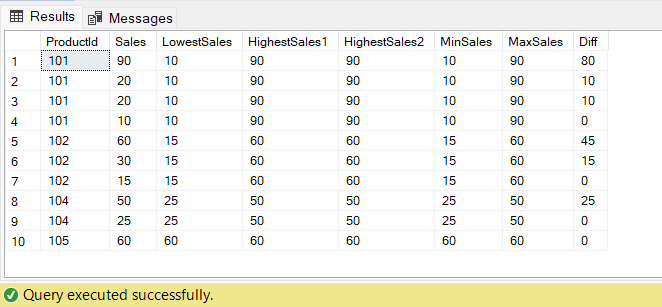
LAST_VALUE(EXPR): It accesses a value from the last row within a window. It does not give the correct result with the default frame, so you need to customize the frame. LAST_VALUE Should have Window Frame ROWS BETWEEN CURRENT ROW AND UNBOUNDED FOLLOWING.
Example:
--Find the Lowest and Highest Sales for each product
--Difference between current and LowestSales
SELECT
ProductId,
Sales,
FIRST_VALUE(Sales) OVER(PARTITION BY ProductId ORDER BY Sales ) LowestSales,
LAST_VALUE(Sales) OVER(PARTITION BY ProductId ORDER BY Sales ROWS BETWEEN CURRENT ROW AND UNBOUNDED FOLLOWING) HighestSales1,
FIRST_VALUE(Sales) OVER(PARTITION BY ProductId ORDER BY Sales DESC) HighestSales2,
MIN(Sales) OVER(PARTITION BY ProductId )MinSales,
MAX(Sales) OVER(PARTITION BY ProductId )MaxSales,
Sales-FIRST_VALUE(Sales) OVER(PARTITION BY ProductId ORDER BY Sales ) Diff
FROM Sales.Orders
Output:
Conclusion: SQL window functions performed calculations on a subset of data without losing the details. Window functions are more powerful and dynamic and perform advanced analysis of data.


