Rerun Failed Scenarios in Cucumber

Updated: Mar 20, 2025
In cucumber we created two Test Runner class
1.TestRunner.java: Executes all tests and logs and failed tests in a text file.
2.failedtestrunner.java: Reruns only the failed test scenarios.
Cucumber provides a rerun plugin option in the Test Runner class that generates a file which contains the information about the failed tests.
Now, let us add a rerun plugin to the Cucumber Runner class. Here, we are creating a failedrerun.txt file that contains the information about the failed test. This file will be created under the target folder.
Here we add rerun plugin in Test Runner class.[plugin={"rerun:target/failedrerun.txt"}

We run that test runner class it will be generated on failedrerun.txt file under the target folder.

After generated the failedrerun.txt file ,In cucumber writes the failed scenarios line numbers in failedrerun.txt as shown below.
file:src/test/resources/Featurefiles/Registrationpage.feature:13:21:25:35:36:37:38:41
Create a Second Runner Class
The next step is to run failed test scenarios existing in the text file. We need to create a class same as our runner class which will contain the location of the file that we want to execute to rerun our failed scenarios. In the ‘features’ variable, you need to mention the failedrerun.txt file, and don’t forget that you must mention the ‘@’ symbol before the file path.[features={"@target/failedrerun.txt"}
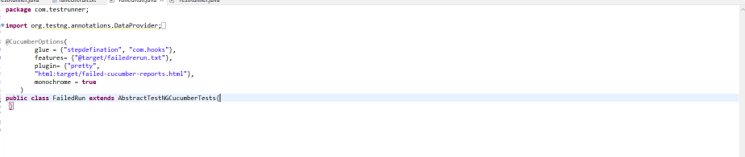
After we run the Failed Runner class it will be execute only failed scenarios, what we stored in cucumber writes the failed scenarios line numbers in failedrerun.txt that will be executed only ,After that one failed cucumber reports.html file also generated under target floder.
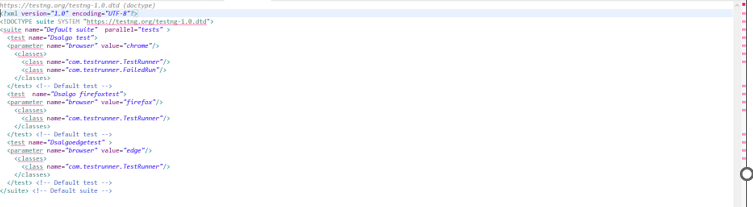
Mention both Test Runner details in the testng.xml
Conclusion: Rerunning Failed Scenarios in Cucumber
Rerunning failed scenarios in Cucumber is essential for efficient test execution and debugging. There are two main approaches to achieve this:
Using Cucumber's Rerun Plugin:
Failed scenarios are logged in target/failedrerun.txt.
A separate runner (FailedTestRunner.java) re-executes only those failed scenarios.
This approach is simple and works well with Cucumber’s built-in rerun mechanism.
2.Using TestNG’s failedtestcases.xml:
TestNG automatically generates test-output/testng-failed.xml after execution.
Running this XML file executes only failed test cases.
Suitable for projects using TestNG with Cucumber.


