USING SQL TRIGGERS TO DETECT FRADULENT BOOKING PATTERNS IN MOVIE THEATRES
Movie theatres run on fast, real‑time operations like ticket bookings, seat availability, show timings, cancellations, and customer notifications. Behind the scenes, the database must stay perfectly in sync to avoid double booking seats or showing incorrect availability.
SQL triggers are a great way to automate these actions. Triggers allow the database to automatically react to events such as inserts, updates, or deletes. A trigger lets the database respond automatically whenever something changes like when a customer books a ticket or cancels one.

Trigger in SQL:
A trigger is a special piece of SQL code that runs automatically when a specific event happens in a table.
A trigger activates when one of these events occurs:
INSERT - when a new row is added
UPDATE - when a row is modified
DELETE - when a row is removed
We do not call a trigger manually. The database calls it automatically.
Let’s see a real‑world example of how SQL triggers can help manage a movie theatre booking system.
Why Triggers Matter in Movie Theatres
A movie theatre handles:
Multiple shows per day
Hundreds of seats
Continuous bookings and cancellations
Real‑time seat availability
Audit requirements for every transaction
Without automation, developers would need to manually update seat counts, validate bookings, and maintain logs. Triggers eliminate this manual work by enforcing rules directly inside the database.
Database Tables:
I'm using three simple tables:
Shows
Bookings
Booking Audit
1. Shows
This SQL query creates a table called Shows, which is used to store information about each movie show happening in the theatre.
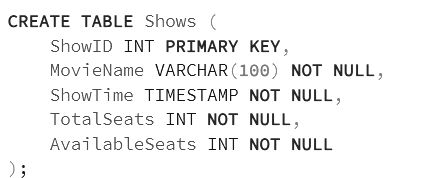
ShowID : A unique number for each show. No two shows can have the same ID.
MovieName : The name of the movie being shown.
ShowTime : The date and time when the movie will start.
TotalSeats : The total number of seats available in the theatre for that show.
AvailableSeats : The number of seats still left for booking.
This table keeps track of which movie is playing, when it is playing, and how many seats are available.
2. Bookings
The SQL query creates a table called Bookings, which stores the details of every ticket booking made by customers. Each row in this table represents one booking.
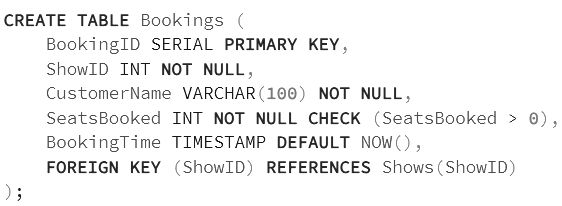
Here is what each column means in simple terms:
The Bookings table stores every ticket booking made by customers.
It records who booked, how many seats they booked, and for which show.
BookingID is auto‑generated so each booking has a unique identity.
It also saves the booking time automatically and links each booking to a valid show using ShowID.
FOREIGN KEY (ShowID) - This ensures the booking is always linked to a valid show in the Shows table.
3. BookingAudit
Stores logs of every booking.
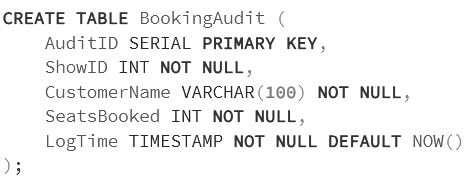
BookingAudit stores a history of all bookings made in the system.
Each row records which show was booked, who booked it, and how many seats they took.
It automatically logs the date and time of every booking for tracking and audit purposes.
CREATING TRIGGER AND TRIGGER FUNCTIONS
Let's create the trigger functions and the triggers that handle the BEFORE and AFTER actions in our booking system.
Prevent Overbooking
Before inserting a booking, we must ensure enough seats are available. In PostgreSQL, this requires a function and trigger.
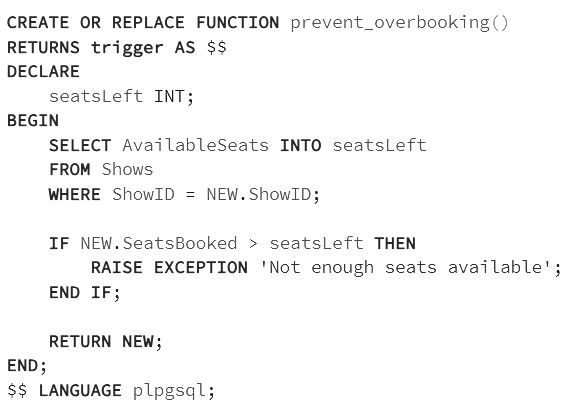

This function checks how many seats are left for the show the customer is trying to book.
It compares the seats the customer wants with the available seats in the Shows table.
If the booking requests more seats than available, the function stops the booking by raising an error.
If everything is valid, it allows the booking to continue by returning the new row.
How the Trigger Works
It checks how many seats are left for the selected show. It compares the seats the customer wants with the available seats in the Shows table. If the request is more than what’s available, it stops the booking by raising an error. If everything is valid, it allows the booking to continue.
What it does
Stops invalid bookings
Ensures no show is ever overbooked
Making sure two people cannot book the same seat at the same time.
Reduce Available Seats After Booking
Once a booking is successfully inserted, the available seats must decrease.
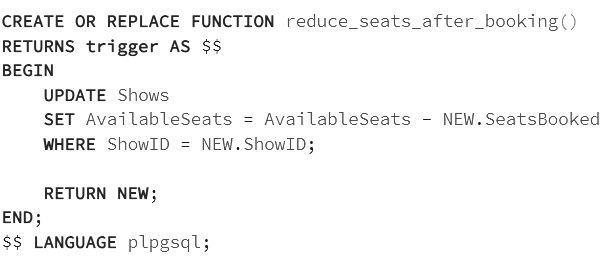
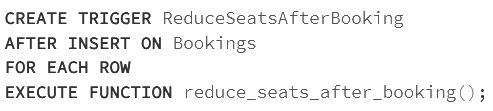
This function automatically updates the number of available seats after a booking is made.
It subtracts the booked seats from the show’s current available seats in the Shows table.
After updating, it returns the new booking record, so the process continues normally.
How the Trigger Works
The function automatically updates the available seats after a booking is made. It subtracts the number of seats booked from the show’s current availability in the Shows table. After updating, it returns the new booking record, so the process continues normally.
What it does
Automatically updates seat availability
Ensures dashboards always show real‑time data
Removes the need for manual updates
Log Every Booking
Audit logs play a key role in customer support, refunds, and data analysis
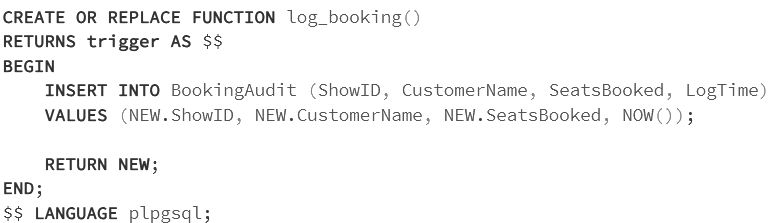
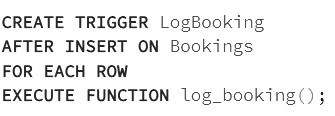
How the Trigger Works
This function creates a log entry every time a booking is made.
It copies the booking details (show, customer, seats, time) into the BookingAudit table.
This ensures a permanent record of all bookings for tracking and analysis.
What it does
Keeps a history of all bookings
Helps with customer support and refund verification
Provides clean data for reporting and analytics
Booking a Seat: What Happens Behind the Scenes
Let’s say a customer books seats for ShowID .
1: Insert booking : By inserting values into a table.
Insert into Bookings (ShowID, CustomerName, SeatsBooked)
values
(1, 'KAMALA', 2, '2026-01-12 14:00:00'),
(1, 'JESSIE', 3, '2026-01-12 14:05:00'),
(2, 'RAMYA', 1, '2025-01-12 15:10:00'),
(3, 'THAMIZH', 4, '2024-01-12 16:20:00'),
(2, 'POO', 2, '2025-01-12 17:00:00');
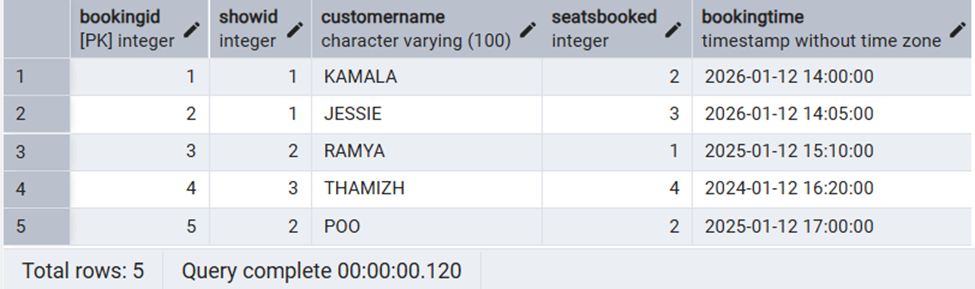
2: Triggers fire in this order:
PreventOverbooking - Checks if seats are available
ReduceSeatsAfterBooking - Decreases AvailableSeats
LogBooking
Inserts a row into BookingAudit
3: Final state:
Bookings have a new row
ShowsAvailableSeats decreases
BookingAudit logs the transaction
Putting it all together
SQL triggers are powerful tools for enforcing business rules and maintaining data. Using SQL triggers to detect fraudulent booking patterns gives movie theatres a powerful layer of protection built directly into the database. By automatically monitoring unusual activity such as rapid‑fire bookings, repeated seat selections, or suspicious customer behavior triggers help identify problems the moment they occur. This not only prevents revenue loss but also keeps the booking system accurate, secure, and trustworthy.
By letting the database handle these responsibilities, our application becomes cleaner, safer, and easier to maintain.


