Understanding Stored Procedures Across Databases :

Managing student batches is a common requirement in learning platforms like NumPy Ninja, where each batch contains multiple students. Instead of repeatedly writing the same SQL queries, you can use stored procedures to automate operations such as adding students, fetching details, or counting students per batch.
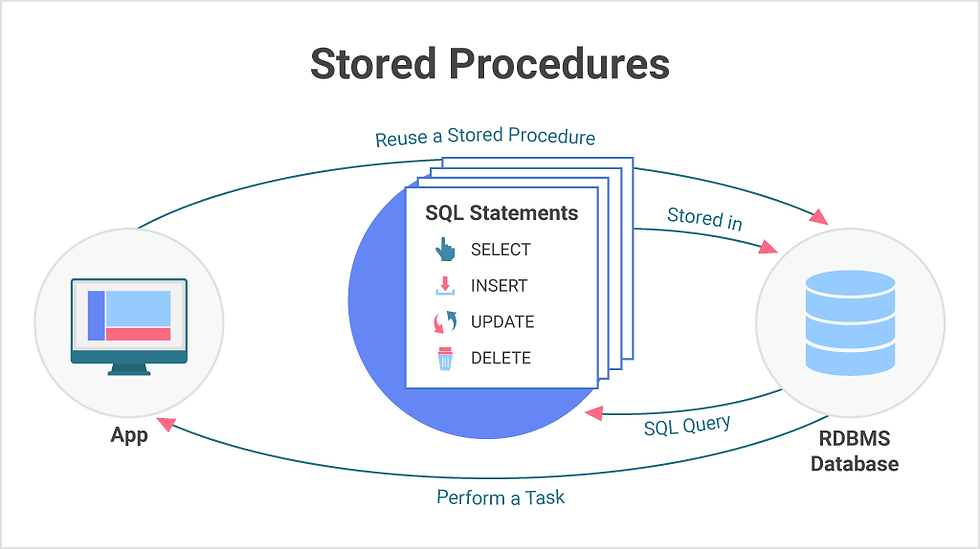
A stored procedure is a collection of SQL statements stored in the database, which can be executed as a single call. They improve performance, reusability, and security, and simplify complex operations.
Here’s how you can work with a batches table that stores batch IDs and student details in MySQL, PostgreSQL, and Oracle.
PostgreSQL Example:
Insert a New Student:
CREATE OR REPLACE PROCEDURE AddStudentToBatch(
    p_batch_id INT,
    p_name VARCHAR,
    p_email VARCHAR
)
LANGUAGE plpgsql
AS $$
BEGIN
    INSERT INTO batches(batch_id, student_name, student_email, join_date)
    VALUES (p_batch_id, p_name, p_email, CURRENT_DATE);
END;
$$;

CALL AddStudentToBatch(2, 'Aiswarya', 'aiswarya@ninja.com');
This procedure is like a small program inside the database. It takes three pieces of information — the batch number, student name, and email — and adds that student to the batches table automatically with today’s date.
When we use CALL AddStudentToBatch(2, 'Aiswarya', 'aiswarya@ninja.com');, it runs the program and adds Aiswarya to batch number 2.
It’s like telling the database: “Here’s a new student, please put them in the right batch for me!”
Fetch Students by Batch:
CREATE OR REPLACE FUNCTION GetStudentsByBatch(p_batch_id INT)
RETURNS TABLE(
    student_name VARCHAR,
    student_email VARCHAR,
    join_date DATE
) AS $$
BEGIN
    RETURN QUERY
    SELECT student_name, student_email, join_date
    FROM batches
    WHERE batch_id = p_batch_id;
END;
$$ LANGUAGE plpgsql;
This function GetStudentsByBatch takes a batch ID as input and returns all students in that batch, including their name, email, and the date they joined.
Count Students in a Batch:
CREATE OR REPLACE FUNCTION CountStudents(p_batch_id INT)
RETURNS INT AS $$
DECLARE
    total INT;
BEGIN
    SELECT COUNT(*) INTO total
    FROM batches
    WHERE batch_id = p_batch_id;
    RETURN total;
END;
$$ LANGUAGE plpgsql;
This function CountStudents takes a batch ID as input and counts how many students are in that batch.
It stores the result in a variable called total and then returns that number as output.
MySQL Example:
Database Table Structure:
CREATE TABLE batches (
    batch_id INT,
    student_name VARCHAR(50),
    student_email VARCHAR(50),
    join_date DATE
);
This table keeps a record of all students, which batch they are in, their contact info, and when they joined.
Insert a New Student:
DELIMITER //
CREATE PROCEDURE AddStudentToBatch(
    IN p_batch_id INT,
    IN p_name VARCHAR(50),
    IN p_email VARCHAR(50)
)
BEGIN
    INSERT INTO batches(batch_id, student_name, student_email, join_date)
    VALUES (p_batch_id, p_name, p_email, CURDATE());
END //
DELIMITER ;
Call this procedure, give it a batch number, name, and email, and it will add that student to the table with today’s date automatically.
Usage:
CALL AddStudentToBatch(1, 'Aiswarya', 'aiswarya@ninja.com');This will insert Aiswarya into batch 2 with the current date as her join date.
Fetch All Students:
DELIMITER //
CREATE PROCEDURE GetAllBatchStudents()
BEGIN
    SELECT * FROM batches ORDER BY batch_id, student_name;
END //
DELIMITER;
Call this procedure and it will show all students from all batches, neatly sorted by batch and name.
Usage:
CALL GetAllBatchStudents();
This will list every student in every batch in an organized order.
Fetch Students by Batch:
DELIMITER //
CREATE PROCEDURE GetStudentsByBatch(IN p_batch_id INT)
BEGIN
    SELECT student_name, student_email
    FROM batches
    WHERE batch_id = p_batch_id;
END //
DELIMITER;
Give the batch ID, and this procedure will show all students in that batch along with their emails.
Usage:
CALL GetStudentsByBatch(2);
This will list all students in batch 2.
Count Students in a Batch:
DELIMITER //
CREATE PROCEDURE CountStudentsInBatch(IN p_batch_id INT, OUT p_count INT)
BEGIN
    SELECT COUNT(*) INTO p_count
    FROM batches
    WHERE batch_id = p_batch_id;
END //
DELIMITER ;
Give the batch ID, and this procedure will tell you how many students are in that batch.
Usage:
CALL CountStudentsInBatch(1, @total);
SELECT @total;
This will return the total number of students in batch 2.
Oracle Example:
Insert a New Student:
CREATE OR REPLACE PROCEDURE AddStudentToBatch(
p_batch_id IN NUMBER,
   p_name IN VARCHAR2,
    p_email IN VARCHAR2
)
AS
BEGIN
    INSERT INTO batches(batch_id, student_name, student_email, join_date)
    VALUES (p_batch_id, p_name, p_email, SYSDATE);
END;
/
Call this procedure, give it a batch number, name, and email, and Oracle will add that student to the table with today’s date.
Usage:
EXEC AddStudentToBatch(1, 'Aiswarya', 'aiswarya@ninja.com');This will insert Aiswarya into batch 2 with the current date as her join date.
Display All Students:
CREATE OR REPLACE PROCEDURE ShowAllStudents AS
BEGIN
    FOR rec IN (SELECT * FROM batches ORDER BY batch_id) LOOP
        DBMS_OUTPUT.PUT_LINE(
            'Batch: ' || rec.batch_id ||
            ' | Student: ' || rec.student_name ||
            ' | Email: '  || rec.student_email
        );
    END LOOP;
END;
/
This procedure reads every student from the table and displays their batch, name, and email one by one.
Usage:
SET SERVEROUTPUT ON;
EXEC ShowAllStudents;
This will print all students on your screen in a neat format.
Count Students in a Batch:
CREATE OR REPLACE PROCEDURE CountStudentsInBatch(
    p_batch_id IN NUMBER,
    p_count OUT NUMBER
)
AS
BEGIN
    SELECT COUNT(*) INTO p_count
    FROM batches
    WHERE batch_id = p_batch_id;
END;
/
Give the batch ID, and this procedure will tell you how many students are in that batch.
Comparison Table:
Feature | MySQL | PostgreSQL | Oracle |
Insert Student | CALL AddStudentToBatch(...) | CALL AddStudentToBatch(...) | EXEC AddStudentToBatch(...) |
Fetch Students | Procedure SELECT | Function RETURN TABLE | Procedure LOOP + DBMS_OUTPUT |
Count Students | OUT parameter + CALL | Function RETURN INT | OUT parameter + EXEC |
Complexity | Low | Moderate | High |
Use Case | Startups / Small Apps | Analytics / Reports | Enterprise / LMS Platforms |
Transaction Support | Basic Transactions(START/ COMMIT) | Complex Transactions | Advanced Transactions |
Error Handling | Limited | TRY-CATCH in procedures, EXCEPTION block | Advanced EXCEPTION handling |
Performance | Fast for simple CRUD | Very efficient with indexing, complex queries | Highly optimized for enterprise workloads |
Real World Use Case — NumPy Ninja
With these stored procedures, you can:
1.Add students to batches automatically
You don’t have to type the insert query every time. Just call the procedure and it adds the student to the correct batch.
2. Get all students from any batch easily
For your dashboards or lists, you can quickly pull all students in a batch with one call.
3. Find how many students are in each batch
The procedure can directly give you the count, which helps in reporting and checking batch strength.
4. Update or delete student details quickly
If a student changes their email or needs to be removed, the procedures make it simple and safe.
5. Connect easily with websites, apps, or APIs
Your front-end (React, Angular), mobile apps, or backend APIs (Node, Python) can call these procedures.This keeps your code clean and makes the app faster.
Conclusion:
Stored procedures help you manage batch and student data efficiently. Whether you’re retrieving, counting, or processing student information, knowing the syntax differences across MySQL, PostgreSQL, and Oracle makes your code portable, efficient, and maintainable.


