Understanding PostGIS: The Spatial Extension for PostgreSQL
- ctsanthafl2024
- Jan 13
- 4 min read
Geospatial Data in modern digital systems
Geospatial data has become a cornerstone of modern digital systems. From ride‑sharing apps and logistics platforms to urban planning tools and environmental monitoring systems, location‑aware data powers decisions across industries.

Geospatial data represents objects, events, or phenomena that have a location on Earth. This location can be expressed in many ways:
Points (e.g., a store location)
Lines (e.g., a road or river)
Polygons (e.g., a city boundary)
Multi‑geometries (e.g., a group of islands)
Raster data (e.g., satellite imagery)
Geospatial data is typically stored using coordinate systems such as:
Geographic Coordinate Systems (GCS) – latitude/longitude
Projected Coordinate Systems (PCS) – flat, map‑based coordinates like UTM
Handling this data efficiently requires specialized data types, indexing methods, and functions—this is where PostgreSQL and PostGIS helps us.
Why PostgreSQL?
PostgreSQL is widely considered the most advanced open‑source relational database, and its extensibility allows it to support complex data types and operations. The PostGIS extension transforms PostgreSQL into a full‑fledged spatial database that rivals commercial GIS systems.
PostGIS Datatypes
PostGIS adds spatial capabilities to PostgreSQL by introducing:
1. Spatial Data Types
GEOMETRY: Supports planar (projected) coordinates
GEOGRAPHY: Supports spherical (lat/long) coordinates
RASTER: Stores pixel‑based data
2. Spatial Functions
Below are the sample Spatial Functions.
ST_Distance – measure distance between geometries
ST_Within – check if a geometry lies inside another
ST_Intersects – detect overlapping shapes
ST_Buffer – create a buffer zone around a geometry
ST_Transform – convert between coordinate systems
3. Spatial Indexing
PostGIS uses GiST and SP‑GiST indexes to accelerate spatial queries. Without these indexes, spatial operations can become computationally expensive
Getting Started: Installing PostGIS
If you already have PostgreSQL installed, adding PostGIS is straightforward:

You can verify installation using:

This enables all spatial types, functions, and indexing capabilities.
Working with Spatial data in PostgreSQL
Step 1: Creating a table with spatial columns

Here you can also use Geometry data type as below
location GEOMETRY(Point, 4326) -> 4326 refers to the WGS84 coordinate system (lat/long)
Step 2: Inserting Spatial data

Step 3: Querying Spatial data
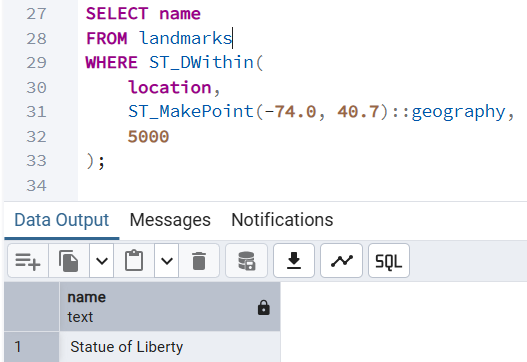
Find all landmarks within 5 km of a given point:
Calculate distance between two points:

Spatial Indexing for Performance
Spatial queries can be expensive without indexing. A GiST index dramatically improves performance:

This index allows PostgreSQL to quickly filter candidate geometries before performing precise calculations.
Advanced Spatial Operations
PostGIS supports sophisticated spatial analytics used in mapping, logistics, and environmental modeling.
1. Buffering
Create a 1 km radius around a point:

Similarly we can find some of the advanced functions as below -
Find overlapping areas using ST_Intersects
Check if a point lies inside a polygon using ST_MakePoint
Core Geospatial Queries
Calculating Distance between two locations

Finding Near By locations(Radius Search)
Query to find all cities within 1500 km of Chicago

You can use this query to “find nearby restaurants,” “drivers near me,” or “alerts within radius” features.
Nearest Neighbor Search (KNN)
PostGIS supports K‑Nearest Neighbor queries using <->.

Why PostgreSQL+PostGIS stands out?
1. Richest Spatial Function Library
PostGIS offers hundreds of spatial functions—far more than MySQL Spatial Extensions and even more flexible than SQL Server’s geography/geometry types. We get advanced capabilities like:
KNN nearest‑neighbor search
Raster support
Topology
3D/4D geometries
Geocoding extensions
Most other databases only cover the basics.
2.Indexing: GiST, SP‑GiST, BRIN, R‑Tree–like indexes; excellent performance for large datasets.
3.Standards: Strong OGC compliance; seamless with QGIS, GeoServer, GDAL, Mapbox.
4.Cost: Completely free and open source.
5.Use cases: GIS platforms, logistics, mobility, environmental modeling, analytics.
Real‑World examples for Spatial Data usage
🚗 Ride‑Sharing & Navigation
Matching drivers and riders based on proximity
Calculating optimal routes
Geofencing restricted areas
🏙️ Urban Planning
Mapping zoning boundaries
Analyzing land use
Modeling population density
📦 Logistics & Supply Chain
Route optimization
Warehouse location planning
Delivery zone mapping
🌱 Environmental Monitoring
Tracking deforestation
Flood risk modeling
Wildlife habitat mapping
🛒 Retail & Marketing
Store catchment analysis
Customer location clustering
Territory planning
PostGIS is used by companies like Uber, OpenStreetMap, and numerous government agencies because of its power and flexibility.
Tools That Integrate with PostgreSQL + PostGIS
QGIS – Open‑source GIS desktop tool
GeoServer – Publish spatial data as web services
GDAL/OGR – Data conversion and processing
Leaflet / Mapbox / OpenLayers – Build interactive maps
This ecosystem makes PostgreSQL a central hub for spatial data workflows.
Conclusion
Geospatial data is no longer a niche requirement—it’s a foundational element of modern applications. PostgreSQL, enhanced with PostGIS, offers one of the most powerful and accessible platforms for storing, querying, and analyzing spatial data. Whether you're building a location‑based service, analyzing environmental patterns, or visualizing complex geographic relationships, PostgreSQL provides the tools you need to work efficiently and at scale.
Some of the powerful PostgreSQL tools are
Native spatial types such as GEOMETRY and GEOGRAPHY
Hundreds of spatial functions for analysis, measurement, and transformation
High‑performance spatial indexing using GiST and SP‑GiST
Standards compliance with OGC (Open Geospatial Consortium)
Integration with GIS tools like QGIS, ArcGIS, GeoServer, and MapServer
As organizations increasingly rely on spatial intelligence, mastering geospatial data in PostgreSQL becomes a valuable skill for developers, data engineers, and analysts. With its rich feature set, strong community support, and seamless integration with GIS tools, PostgreSQL continues to be the go‑to choice for geospatial workloads.
For developers building location‑aware applications, PostgreSQL + PostGIS provides a scalable, production‑ready solution without licensing costs.


