Triggers in PostgreSQL
Updated: Feb 14, 2025
Electrical Switch: It’s a manual control that initiates a physical change, such as turning on a light or activating a machine. It’s user-driven, requiring direct human interaction (or an automated system, in some cases, like a thermostat-controlled switch).
SQL Trigger: It operates within the database system, performing automatic actions based on specific conditions like changes in data (inserts, updates, deletes). The user doesn’t directly intervene when these events occur, making it a more behind-the-scenes form of automation.
Both are control mechanisms that trigger actions automatically based on certain conditions, but the nature of the actions—one impacting physical system and the other impacting digital data—distinguish them.

Uses of triggers:
Maintain Data Consistency — Triggers help maintain data consistency by automatically enforcing rules and validations, reducing the risk of inconsistent or invalid data.
Automation of Routine Tasks — They automate routine tasks, such as updating timestamps, generating audit logs, or implementing complex default values, reducing the burden on application code.
Effective Logging and Auditing — Triggers facilitate the creation of detailed logs and audit trails, crucial for compliance, troubleshooting, and understanding the history of data changes.
Security Measures — Triggers can be employed to implement security measures, such as restricting access or masking sensitive data based on certain conditions.
Automated Timestamps — Triggers can automatically update timestamp fields, ensuring that records reflect the latest modification time without relying on application code.
Enforcing Data Integrity — Enforcing Data Inte Triggers can be used to enforce rules and constraints on the data, ensuring that it meets specific criteria before being inserted or updated. For example, preventing the insertion of negative values or ensuring referential integrity.:
Here the events will be SQL events like insert, update, Delete, truncate etc.

DDL triggers:
DDL triggers can fire in response to a Transact-SQL event processed in the current database, or on the current server.
DDL triggers are not scoped to schemas only works for database and server levels.
Uses:
•Prevent certain changes to your database schema.
•Monitoring in response to any change in schema/database/server.
Record changes or events in the database schema
Logon Triggers:
Logon triggers fire stored procedures in response to a LOGON event.
Logon triggers fire after the authentication phase of logging in finishes, but before the user session is established.
Uses:
1.Audit and control server sessions
2.Tracking login activity
3.Restricting logins to SQL Server
4.Limiting the number of sessions for a specific login.
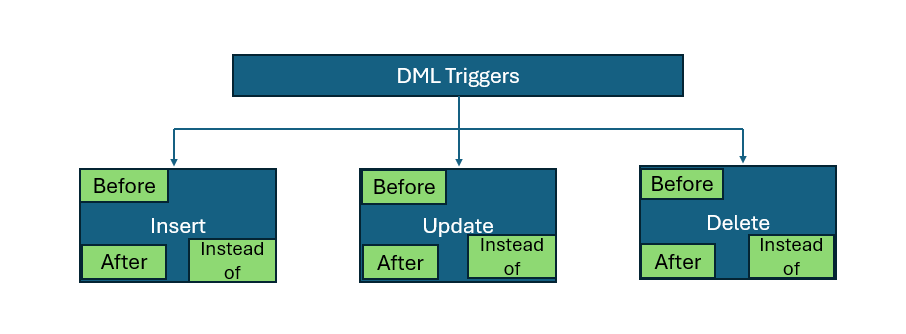
DML Triggers
DML triggers can fire in response to a Transact-SQL event processed in the current schema or table.
Trigger syntax:
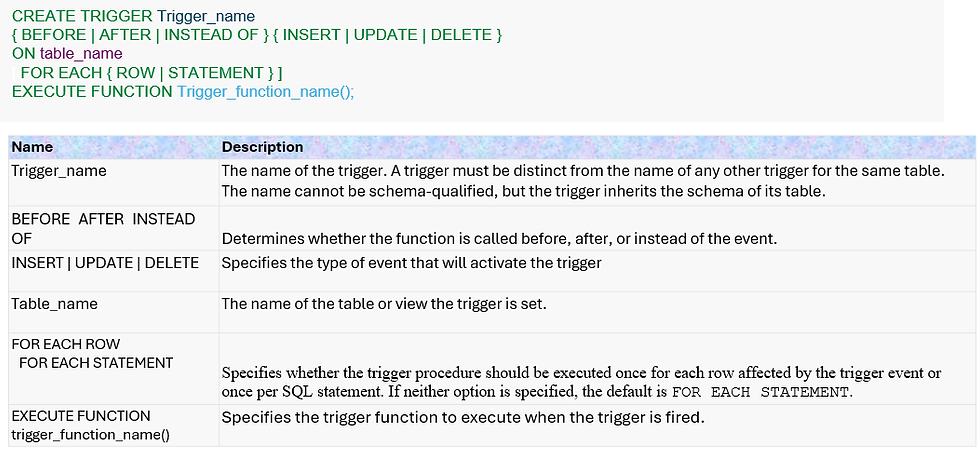
Trigger Function:
In postgresql triggers always calls to function called trigger function. A trigger function is created with the CREATE FUNCTION command, declaring it as a function with no arguments and a return type of trigger (for data change triggers) or event_trigger (for database event triggers).This feature mainly supports re-useability of function in many trigger statement
When a PL/pgSQL function is called as a trigger, several special variables are created automatically in the top-level block. Some frequently used keywords are

Syntax for trigger function:

DML is further classified into:
Row-level Triggers
Row-level triggers in PostgreSQL are a specific type of database trigger designed to run separately for each affected row. These triggers are linked to a particular table and are triggered by events like INSERT, UPDATE, DELETE, or TRUNCATE. They prove valuable when you want to execute actions or checks specific to each row that undergoes modification.
Statement-level Triggers
A statement-level trigger in a database, often referred to as a “summary” trigger, operates on the entirety of a given SQL statement. This type of trigger executes once for the entire statement, offering a mechanism to carry out actions based on the collective outcome of the operation, as opposed to focusing on individual rows
Before trigger:
BEFORE triggers are fired before the execution of the associated event (e.g., before an INSERT, UPDATE, DELETE, or TRUNCATE operation). They are commonly used to validate or modify data before it is actually written to the table. If a BEFORE trigger returns NULL or an empty result set, the original operation (e.g., INSERT, UPDATE) is canceled
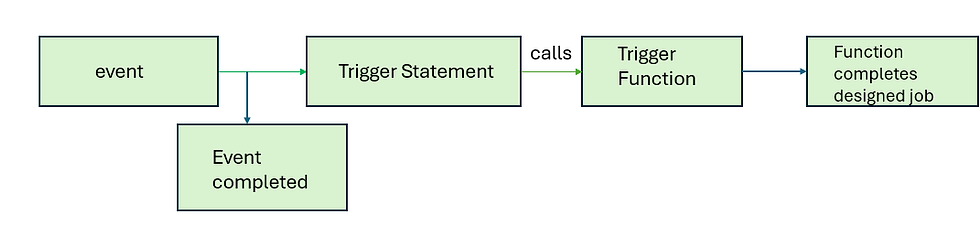
Before triggers can be triggered on tables for each row and on views/table for each statement triggers.

Example:
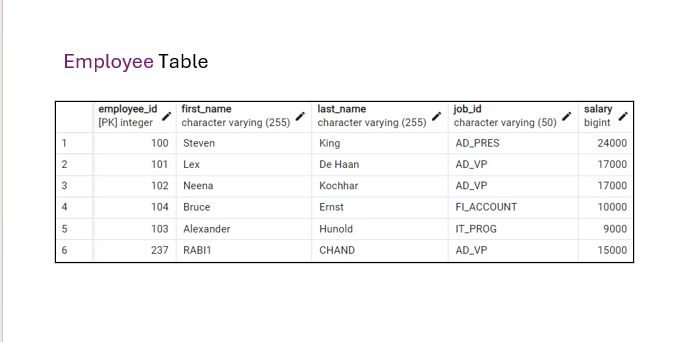


whenever insert event happens it checks for white space to left of first_name and last_name and coverts job_id to upper case in employee table.
After Trigger:
AFTER triggers are fired after the execution of the associated event. They are useful for tasks that should occur after the data has been modified in the table, such as logging changes or updating other related tables
Before triggers can be triggered on tables for each row and on views/table for each statement triggers.


Example:
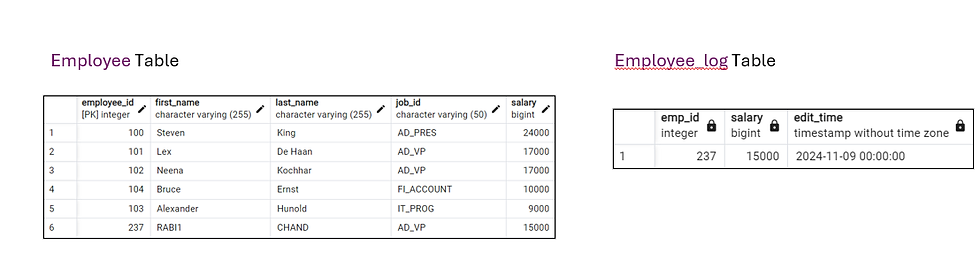

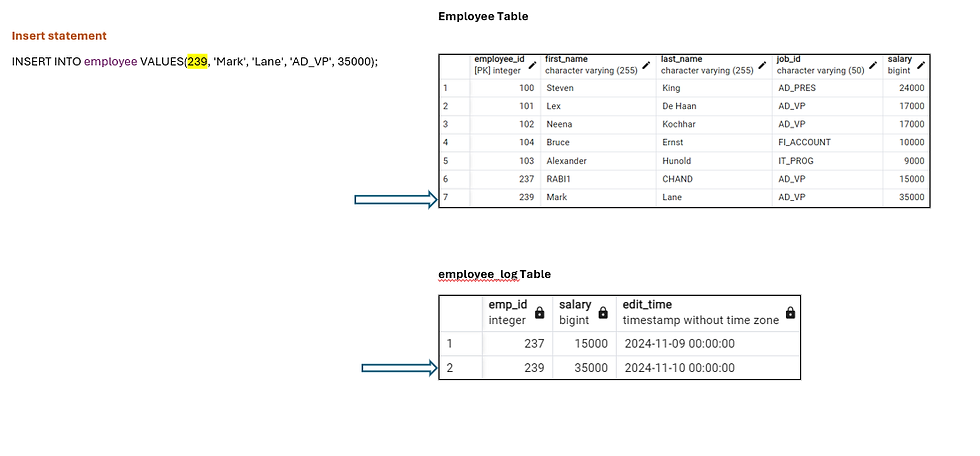
write trigger function which inserts into employee_log table whenever an insert happens in employee table.
Instead-of triggers:
INSTEAD-OF triggers are fired instead of the execution of the associated event. They are useful for tasks that should not occur on related Views.
Instead of triggers are different from other triggers as they can be created on views to make them updateable views.
Views are not updateable unless created with single table without group by/ order by/window functions. This is because there is no one to one relationship between views and underlying table/tables.
Instead of trigger function includes this row-to-row relation between views and underlying tables and help them to make views updateable.
Let’s see an example of instead of trigger for delete event and triggering before the event .


Example:
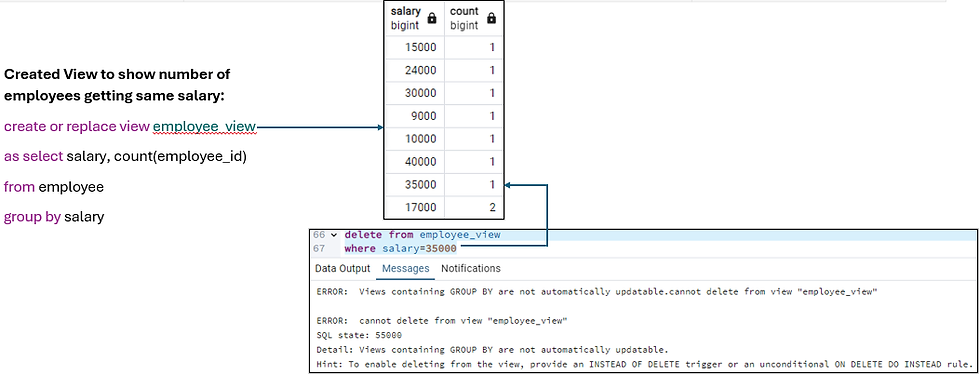
created a simple view called employee_view with group by clause. Hence delete is not possible on view as it is not updateable.
Now let's see how to delete on underlying table through a view using instead of trigger.

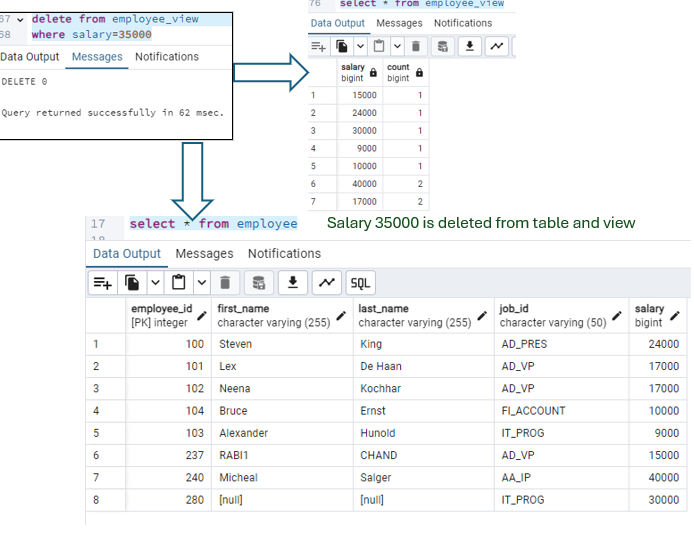
Here you can see that salary value 35000 is deleted in the respective table. Hence, we can understand that instead of trigger can be used to perform any DML operations on view and giving the underlying logic of tables in the function called in instead of trigger.
Hope this blog help to get some insights on triggers in PostgreSQL


