The Role of Azure DevOps(ADO) in Streamlining QA Processes

Updated: May 30, 2025
Role of ADO in QA Testing ?
ADO( Azure DevOps) for QA refers to using Microsoft Azure DevOps service as a comprehensive platform to manage and automate the QA processes which includes Test Planning, Execution , Defect Tracking , Reporting and integration to CI/CD pipelines.
Below listed are the key components of Azure DevOps (ADO) service.
Main components :
-Boards - used to track the progress of the work (statuses include - To Do, In-Progress, Done
Boards in Azure DevOps provide various tools to efficiently track and plan the across the teams.
-Repos
-Pipelines
-Test Plans

a) Azure Boards facilitates Agile several management tools to plan , track the progress of the work within the teams.
-Work Items - All the Epics , Features, User Stories, sub tasks and Defects are logged against the work items.
-Boards - Visual Board that is used to track work progress(statuses include -> To Do -> In Progress -> Done)
-Backlogs - this is used for prioritization of work items like features, user stories).
-Sprints - Create sprint in Agile Model
-Queries - Add filters to track statuses, work items for reporting purposes.
-Dashboards - Used to create interactive dashboards to track and visualize the trends , sprint burn down charts, resource work load tracking etc.,
Overall the Boards with all the key tools is used to link the test cases , user stories and track the sprint process .
b) Repos : Used to manage the source code .
It provides Git-based version control to manage the code securely.
Key branches include as below :
Branches - individual features tracked with bug fixes and code .
Pull Requests - code reviews and any changes before merge happens.
Commit
Developers and QA Automation engineers use to Repos to store code and automation script respectively.
c) Pipeline:
Azure pipeline enables CI/CD for build and test automation .
CI Pipelines - The test are run automatically when code is committed.
CD Pipeline - Deploy tested code to higher environments.
d) Test Plans :
Azure Test plans : Test Suites , Test Cases , Configurations, Shared Parameters :
Test Plan - Azure Test plan provide a Centralized hub for planning and execution .
Organize the testing cycles by release date, sprints and features.
Test Suites : similar Collection of group of test cases together .
Test Cases : Execute Manual and Automated Test Cases and corresponding expected results.
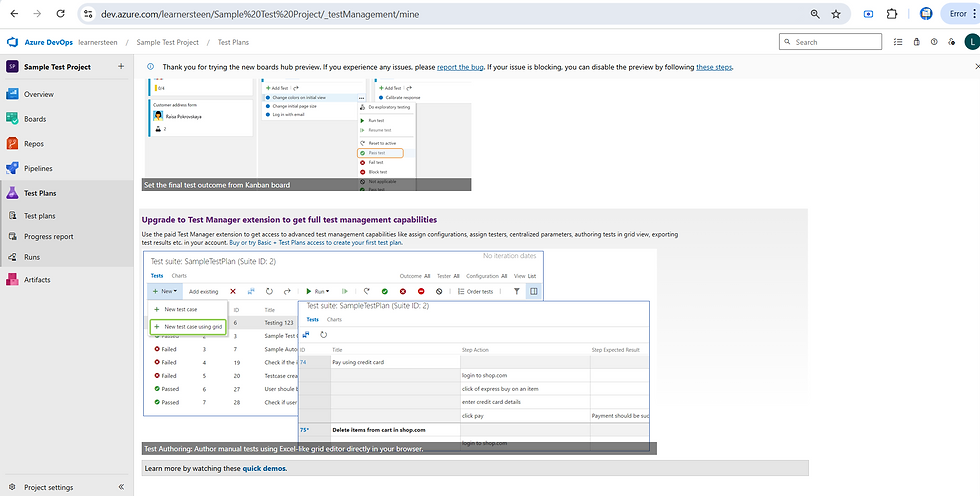
Traceability : Traceability in ADO can be achieved by linking test cases with the requirements and defects associated with it .
Defect Reporting : Defects can be logged directly from the test run .
Using ADO -> QA team can handle manual testing . Automation testing will be monitored via Pipelines.
Different types of Dashboards created using ADO :
Dashboards in Azure DevOps (ADO) are used to provide real time visibility on the project progress and quality at one place .
This is crucial for QA teams , Development teams and Management .
Dashboards in Azure DevOps are created for below purposes .
Track all QA Metrics
Visualize work progress
Track potential risks and Blockers
Team Collaboration
Sprint Review and Planning
Sample Demo on Creation of the Dashboards :
1) Create few tasks and bugs under Work Items :

2) Create Queries -> Queries in ADO are used to filter and retrieve work items such as user stories, bugs , tasks etc based on certain conditions.

All the Queries to be placed in Shared queries section as this is required for creating the charts from dashboard :
Queries help track , manage and make report on work items across projects .
Queries can filter data with Assigned to , State, Area path, Tags, etc.,
Having shared queries helps in reusing and thus efficiently generating the reports.
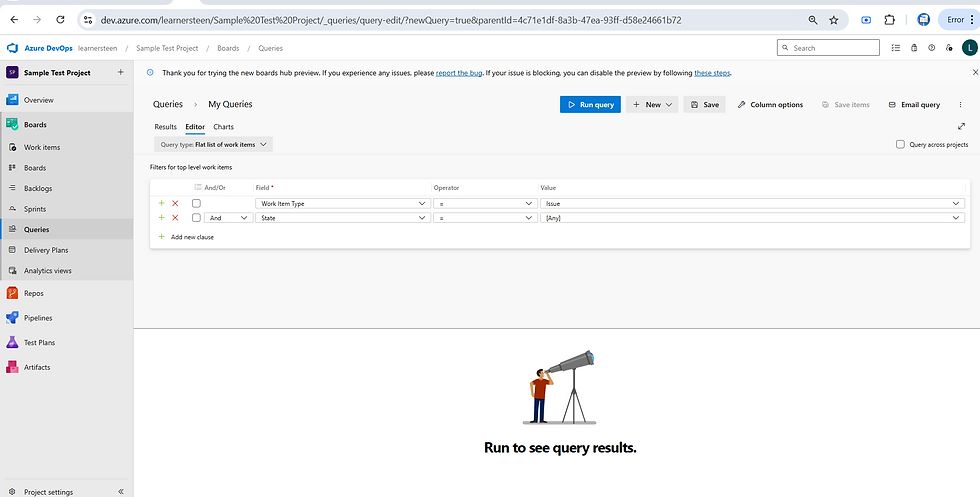
saved to shared query folder :

Run the query to get full list of Bugs :

Pull tasks and Bugs :

Create Dashboards :
Add widget :

Click on Add widget and Select the Chart type that we need for the dashboard :

click on settings icon from the configure widget and update the details as below :
Update the below listed details for the Dashboard :
Title : Give the title of the Dashboard
Width and Height of the chart to be made
Chart type - Selected as pie in current example .
Other available options are listed below :

There are various Chart type drop down options available - based on the requirement corresponding one should be selected .


Likewise we have provision to create various types of Dashboards as listed below :
Pie, Bar, Column, Stacked bar, Pivot table, Stacked Area, Area , Line etc.
Tracking Resource Load using Dashboard :

Group By state and Ascending :

Transitioning from manual test efforts to insightful automated dashboards in Azure world is not only just adopting as it is new but it enables smarter decision making .
Azure DevOps continues to evolve as a powerful platform for streamlining development , testing and delivering processes.


