TestNG framework
Hi everyone ,this is my first blog . I would like to share my knowledge on TestNG Framework. This blog will provide insights on how to create framework in TestNG .
What is TestNG?
TestNG is an automation testing Framework in which TestNG stands for next generation .
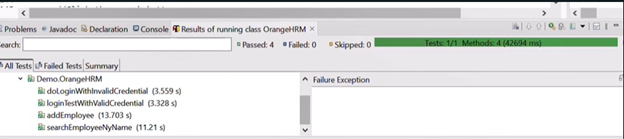
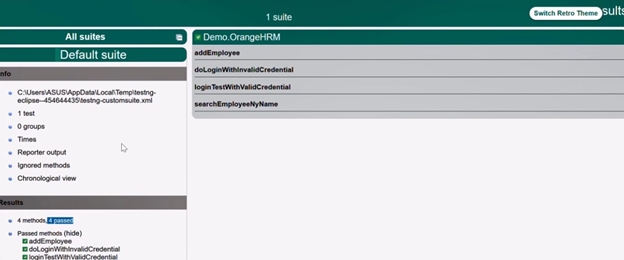
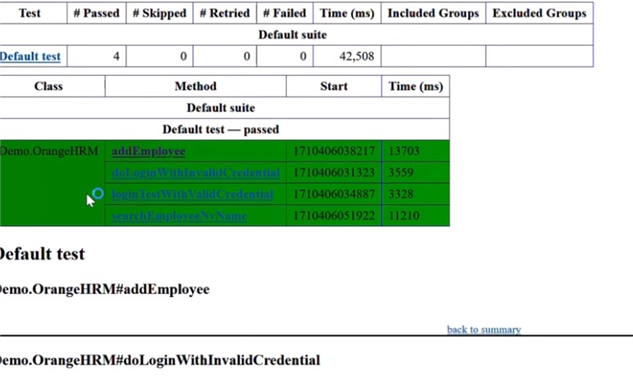
Using TestNG you can generate a proper report , and you can easily come to know how many test cases are passed ,failed and skipped ,you can execute the failed test cases separately.
TestNG allows you to easily manage and control the flow of your tests using annotations, which are special tags that instruct how tests should be executed.
Why Use TestNG with Selenium?
Majority of Selenium users use this framework more than Junit because of its advantages. There are so many features of TestNG, which we can use in Selenium. Following are the key features of Selenium TestNG:
Generate the report in a proper format including number of test cases runs and number of test cases passed / failed / skipped.
Multiple test cases can be grouped more easily by converting them into testng.xml file. In the XML file you can prioritize which test case should be executed first.
The same test case can be executed multiple times without loops just by using keyword called ‘invocation count.’
Using TestNG, you can execute test cases on multiple browsers, this is termed as Cross Browser testing.
The TestNG framework can be easily integrated with tools like Maven, Jenkins, etc.
Annotations used in the testing are very easy to understand ex: @BeforeMethod, @AfterMethod, @BeforeTest, @AfterTest
TestNG can generate the report in a readable format.
TestNG Annotations Order of Execution
@BeforeSuite
@BeforeTest
@BeforeClass
@BeforeMethod
@Test
@AfterMethod
@AfterClass
@AfterTest
@AfterSuite

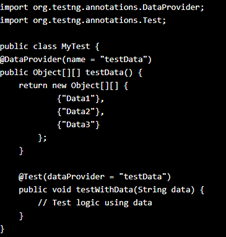
@DataProvider: This method provides data for parameterized testing and is specified by this annotation. By providing several types of data, it enables you to design parameterized tests. To get test data for your parameterized test methods, TestNG will call this function. For test data, the data provider method returns either a two-dimensional array or an IteratorObject.
1. Project Setup:
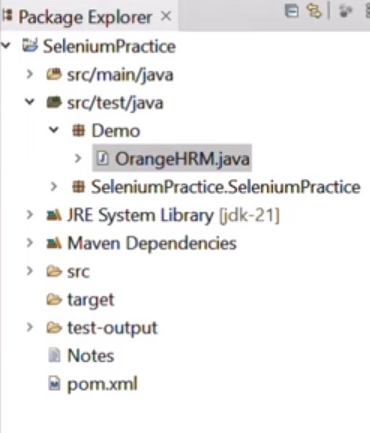
Create a Maven project, adding necessary dependencies (including TestNG, Selenium, and other required libraries), and configuring the TestNG execution within the Maven build process. Use an IDE like IntelliJ or Eclipse and create a new Maven project. Specify the project name, group ID, and artifact ID
2. Add Dependencies:
In the project's pom.xml file, add the necessary dependencies, including:
· TestNG: This provides the test framework.
· Selenium: For browser automation.
· Other Libraries: Depending on the project's needs, add other required libraries (e.g., JUnit, logging libraries).
3. Configure TestNG Execution:
Maven's Surefire plugin handles the execution of tests. You can configure the plugin to use TestNG, specifying:
· Suite XML Files: These files allow for flexible configuration of test execution.
· Test Classes: TestNG test classes are typically placed in the src/test/java directory.
4.Write TestNG Tests:
Create Java classes with test methods annotated with @Test, @BeforeTest, @AfterTest etc.
5. Run Tests:
Use Maven's command-line interface (CLI) or IDE to run the tests. The Surefire plugin will execute the tests based on the configuration.
TestNG listeners: it can be added to your test suite to monitor various execution-related events including test start, finish, and test failure. They enable you to create original reactions to these events.
TestNG listeners can track and react to various events that arise while running tests, classes referred to as listeners can be added to the testing process in TestNG. They may be utilized for bespoke reporting, logging, and other purposes.

Benefits of TestNG framework:
· Dependency Management:
Maven simplifies managing project dependencies, ensuring that the correct versions of libraries are used.
· Test Execution:
Maven's Surefire plugin integrates seamlessly with TestNG, making it easy to run tests as part of the build process.
· Organization and Scalability:
TestNG's features (like annotations, grouping, and prioritization) allow for better organization and management of large test suites
· Reporting:
TestNG generates reports that can be used to analyze test results.
· Integration with CI/CD:
The framework can be easily integrated with continuous integration/continuous deployment (CI/CD) tools


