SQL Joins

What is a SQL Join?
A join lets you combine rows from two or more tables based on a related column between them.
Why do we need Joins?
In most databases, data is split into multiple tables to keep data organized.
For example:
A Customers table (with customer info)
An Orders table (with order info)
If you want to know which customer placed which orders, that’s when Joins come in handy and connect the dots.
Types of SQL Joins
1. INNER JOIN - Returns records that have matching values in both tables

Syntax:
SELECT ProductID, ProductName, CategoryName
FROM Products
INNER JOIN Categories ON Products.CategoryID = Categories.CategoryID;
Example:


We will join the Products table with the Categories table by using the CategoryID field from both tables.
SQL Statement:
SELECT ProductID, ProductName, CategoryName
FROM Products
INNER JOIN Categories ON Products.CategoryID = Categories.CategoryID;

LEFT JOIN - Returns all records from left table and matched records from the right table.

Syntax:
SELECT column_name(s)
FROM table1
LEFT JOIN table2
ON table1.column_name = table2.column_name;
Example:


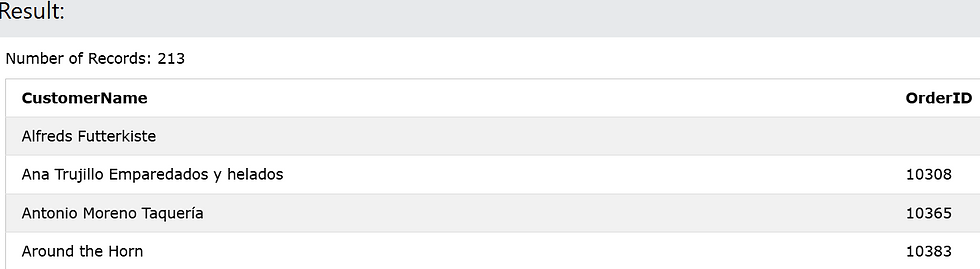
We will join the Orders table with the Customers table by using the CustomerID field from both tables.
SQL Statement:
SELECT Customers.CustomerName, Orders.OrderID
FROM Customers
LEFT JOIN Orders
ON Customers.CustomerID=Orders.CustomerID
ORDER BY Customers.CustomerName;
RIGHT JOIN - Returns all records from right table and the matching records from left table.

Syntax:
SELECT column_name(s)
FROM table1
RIGHT JOIN table2
ON table1.column_name = table2.column_name;
Example:

Orders Table 
Employees Table We will join the Orders table with the Employees table by using the EmployeeID field from both tables.
SQL Statement:
SELECT Orders.OrderID, Employees.LastName, Employees.FirstName
FROM Orders
RIGHT JOIN Employees
ON Orders.EmployeeID = Employees.EmployeeID
ORDER BY Orders.OrderID;
FULL JOIN - Returns all records when there is a match in left or right table records.
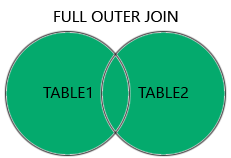
Syntax:
SELECT column_name(s)
FROM table1
FULL OUTER JOIN table2
ON table1.column_name = table2.column_name
WHERE condition;
Example:

Customers Table 
Orders Table We will join the Customers table with the Orders table by using the CustomerID field from both tables.
SQL Statement:
SELECT Customers.CustomerName, Orders.OrderID
FROM Customers
FULL OUTER JOIN Orders ON Customers.CustomerID=Orders.CustomerID
ORDER BY Customers.CustomerName;
Result:

SELF JOIN - A regular join were the table is joined with itself.
Syntax:
SELECT column_name(s)
FROM table1 T1, table1 T2
WHERE condition;
Example:

SQL Statement:
SELECT A.CustomerName AS CustomerName1, B.CustomerName AS CustomerName2, A.City
FROM Customers A, Customers B
WHERE A.CustomerID <> B.CustomerID
ORDER BY A.City;

SQL joins are like the glue that holds your data together, turning scattered pieces into meaningful insights.


