SQL Data Extraction with Regular Expression
It is little tricky to extract information from complex /huge data like text logs, documents, text columns. But here we have Regular Expression in arsenal which can be used in SQL queries effectively to get efficient result. Regular Expressions, is a sequence of characters, used to search and locate specific sequences of characters that match a pattern.
Regex is commonly used for a variety of tasks including pattern matching, data validation, data transformation, and querying. It offers a flexible and an efficient way to search, manipulate, and handle complex data operations.
Important Insights:
SQL Regular Expressions enables advanced pattern matching and data validation directly in queries.
Regular Expressions can streamline data processing and improve data quality.
Challenges in Extracting Data in SQL
Extracting information from Large Text Data is cumbersome and difficult with SQL Queries.
Incomplete or Inaccurate Data.

Overview about the Regular Expression
SQL REGEX refers to a powerful string-matching mechanism supported by MySQL for complex search operations. It allows developers to define custom search patterns to match strings, making it an essential tool for querying large datasets, filtering information, or validating data in database columns.
In MySQL, REGEXP and RLIKE are synonymous operators used for performing regular expression matching. The primary difference between REGEXP and RLIKE is that REGEXP is the standard operator, while RLIKE is just an alias for it.
Let's see How SQL REGEX Works in MySQL to extract information easily
The REGEXP operator allows advanced pattern matching capabilities, which are especially useful for performing complex searches or validations. It differs from the LIKE operator because it supports a wider variety of matching patterns and metacharacters.
Regular Expression Syntax Table
Regular Expression are constructed using a combination of characters and special symbols, each with specific meanings. This table format organizes regex elements and examples for quick reference, making it easy to understand and apply them in practical scenarios.
Pattern | Description | Example | Matches |
. | Matches any single character (except newline). | h.t | hat, hit, hot |
^ | Matches the start of a string. | ^A | And, Author |
$ | Matches the end of a string. | ing$ | Bring, Walking |
* | Matches zero or more of the preceding character. | ab* | a, ab, abc, abbb |
+ | Matches one or more of the preceding character. | ab+ | ab, abb, abbb |
? | Matches zero or one of the preceding character. | colou?r | color, colour |
{n} | Matches exactly n occurrences of the preceding character. | a{3} | aaa |
{n, m} | Matches between n and m occurrences of the preceding character | a{2,4} | aa, aaa, aaaa |
[abc] | Matches any of the enclosed characters. | [aeiou] | a, e, i, o, u |
[a-z] | Matches any character in the specified range. | [0-9] | 0,1,2,.....,9 |
[^abc] | Matches any character not enclosed. | [^aeiou] | Any non vowel character |
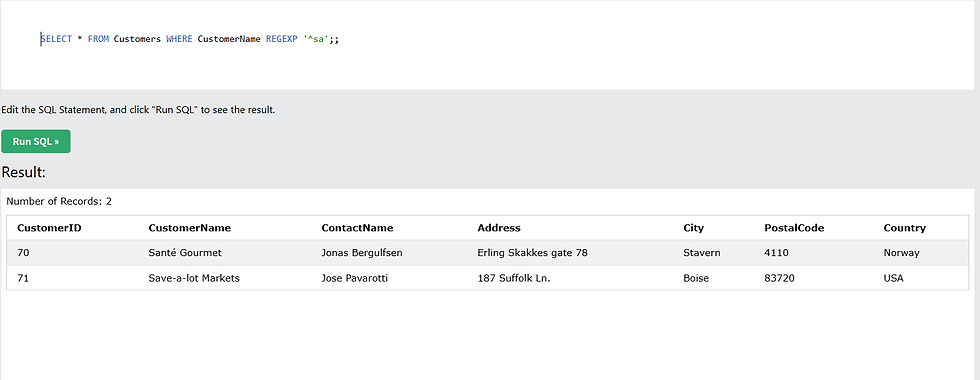
Let's start with simple Regular Expression?
SELECT * FROM Customers WHERE CustomerName REGEXP ' ^sa' ;
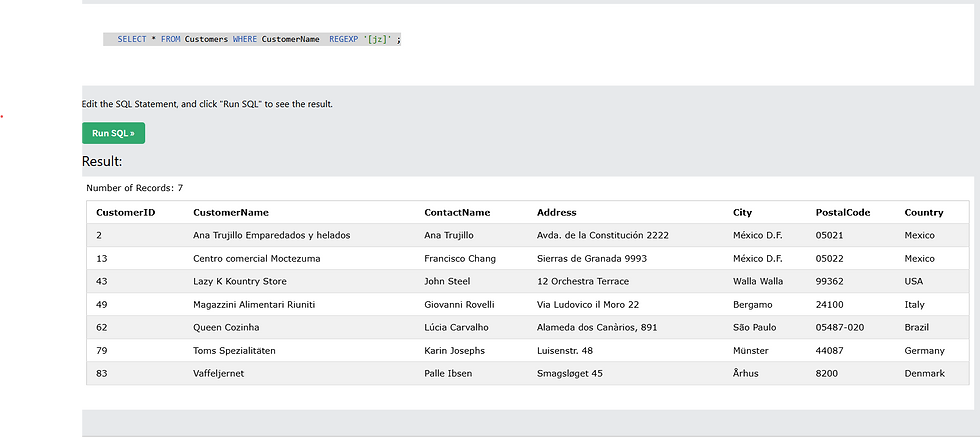
Regular Expression to find Alphabets?
SELECT * FROM Customers WHERE CustomerName REGEXP ' [jz] ' ;
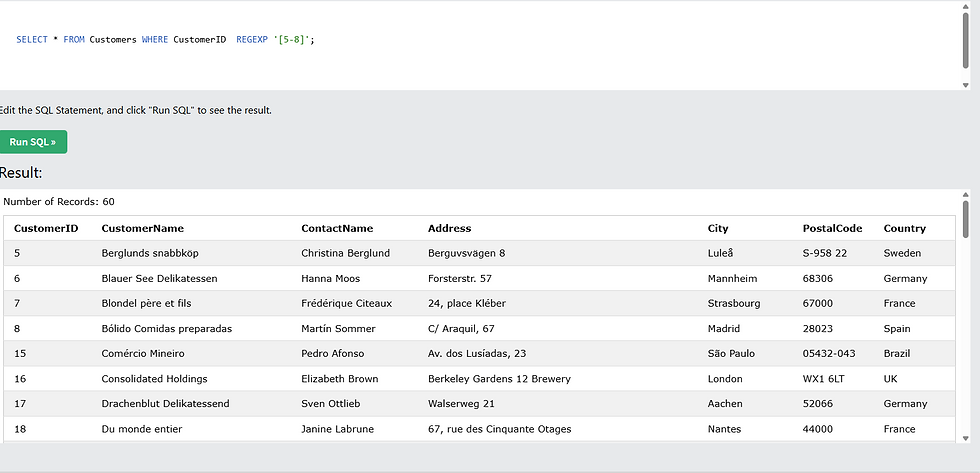
Regular Expression to find Number?
SELECT * FROM Customers WHERE CustomerName REGEXP ' [5-8] ' ;
Regular Expression to find AlphaNumeric?
SELECT * FROM Suppliers where PostalCode REGEXP '[A-Ea-e3-5]';
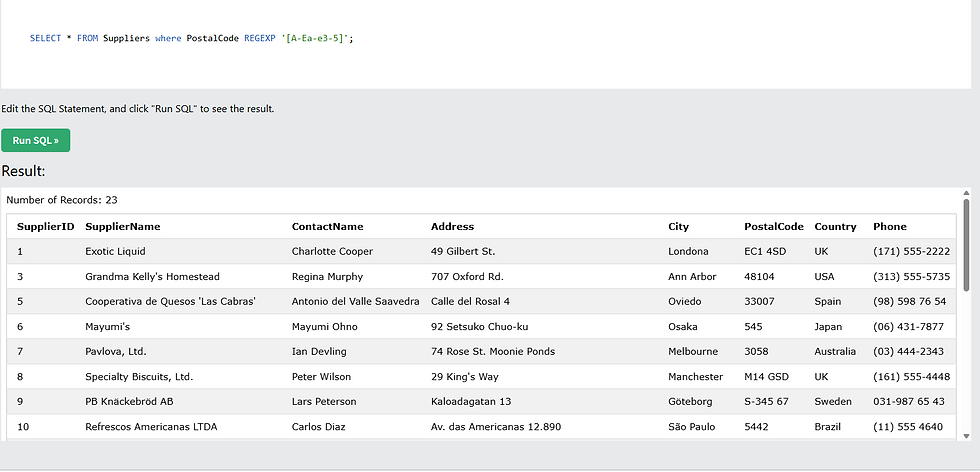
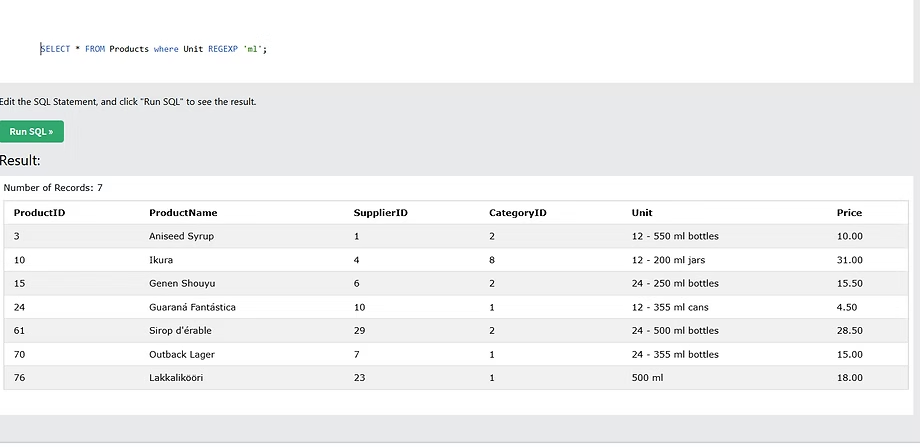
Regular Expression to Search a Pattern
SELECT * FROM Products where Unit REGEXP 'ml';
Regular Expression Functions:
Function | Description |
REGEXP_INSTR() | This function is used to Returns the starting index of substring matching regular expression. |
REGEXP_LIKE() | This function Returns whether the string matches the regular expression. |
REGEXP_REPLACE() | This function Replaces substrings matching the regular expression. |
REGEXP_SUBSTR() | This function is used to Returns substrings matching the regular expression. |
REGEXP_INSTR() Function
Syntax:
REGEXP_INSTR(expr, pattern[, pos[, occurrence[, return_option[, match_type]]]])
Note: The parameters in square brackets are optional. the required ones are only ‘string’ and ‘pattern’
Example of Using REGEXP_INSTR():
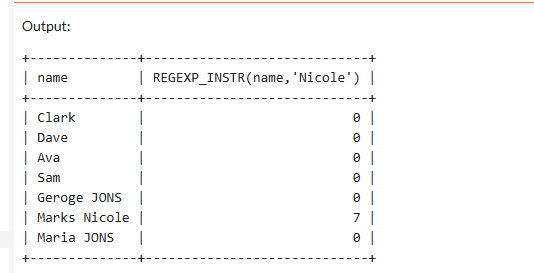
SELECT name, REGEXP_INSTR(name,'Nicole') FROM EMPLOYEE ;
Return the starting position of the word in column.
USE in a Where Clause:
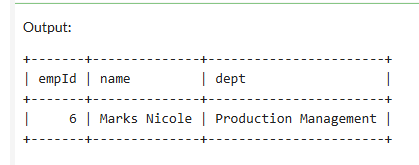
SELECT * FROM EMPLOYEE where REGEXP_INSTR(name,'Nicole') >0;
Find the Employee whose name has 'Nicole' in it.
2.REGEXP_LIKE() Function
Syntax:
REGEXP_LIKE(expr, pattern[, match_type])
Example of Using REGEXP_INSTR():
SELECT * FROM EMPLOYEE where REGEXP_LIKE(name,'^[aeiou]');
It returns the name which is starting with Vowels .
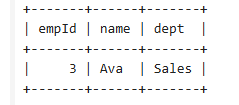
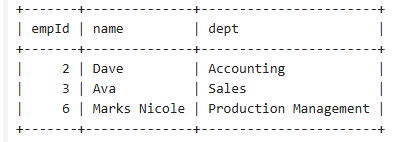
SELECT * FROM EMPLOYEE where REGEXP_LIKE(name,' [aeiou]$ ');
It returns the name which is ending with Vowels in the Name.
3.REGEXP_REPLACE() Function
Syntax:
REGEXP_REPLACE(expr, pattern, repl[, pos[, occurrence[, match_type]]])
example of Using REGEXP_REPLACE():
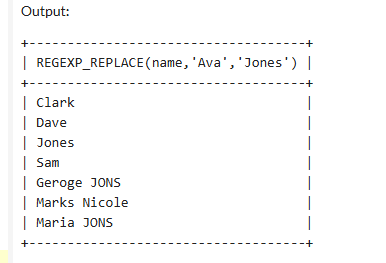
SELECT REGEXP_REPLACE(name,'Ava','Jones') FROM EMPLOYEE;
It Replace the name 'Ava' with 'Jones'
4.REGEXP_SUBSTR() Function
Syntax:
REGEXP_SUBSTR(expr, pattern[, pos[, occurrence[, match_type]]])
example of Using REGEXP_SUBSTR():
1. Find Sales Department in Employee Table.
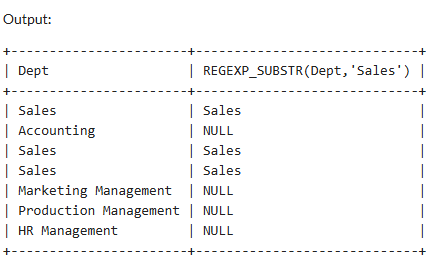
SELECT Dept, REGEXP_SUBSTR(Dept,'Sales') from EMPLOYEE;
As the Pattern is not present in string, the result is returned as NULL.
2. Find Sales Department in Employee Table.
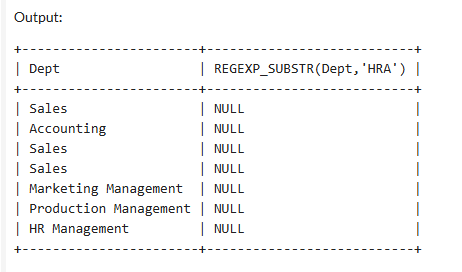
SELECT Dept, REGEXP_SUBSTR(Dept,'HRA') from EMPLOYEE;
The result is returned as NULL because pattern is not present in string.
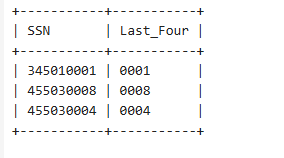
Find Four Digits of SSN from Department Table.
Select REGEXP_SUBSTR(SSN,'([0-9]{4})$') as Last_Four from Department;
The Result is returned Last Four Digits of Department Table.
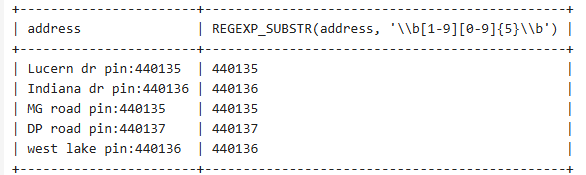
Find Addresses which has Valid Pin Code and Extract Pin Code from Address.
SELECT address, REGEXP_SUBSTR(address, '\\b[1-9][0-9]{5}\\b') from EMPLOYEE where REGEXP_LIKE(address, '\\b[1-9][0-9]{5}\\b');
It finds 6 Digit Pin Code in Address Which does not start with zero.
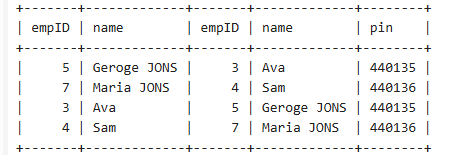
Find all the Employee who live in the same Pin Code.
Select e1.empID,e1.name,e2.empID, e2.name,
REGEXP_SUBSTR(e1.address, '\\b[1-9][0-9]{5}\\b') as pin
from EMPLOYEE e1 inner join EMPLOYEE e2
on REGEXP_SUBSTR(e1.address, '\\b[1-9][0-9]{5}\\b') = REGEXP_SUBSTR(e2.address, '\\b[1-9][0-9]{5}\\b')
and e1.empid != e2.empid;
Here Employee Table is Self Joined after extracting valid Pin Code from Address and avoiding same employee number.