Set Operators and Joins in PostgreSQL: What to Use and When?

When working with databases, especially in PostgreSQL, the two concepts set operators and joins often confuse beginners or even experienced software professionals. At first glance they both seem to be similar like "combine" data from different places but actually they work in different ways and understanding when to use which one can save time and effort.
In this blog, let's break down:
What are Set Operators?
What are Joins?
How are they different?
When to use which one?
Let's get into it,
What are Set Operators in PostgreSQL?
Postgres offers set operators that make it easy to query and filter the results of searches from the database. Set operators are used to join the results of two or more SELECT statements. The key requirement is that each SELECT query must return same number of columns, in the same order with compatible data types.
The primary set operators are
Set Operators | Description |
|---|---|
UNION ALL | Fetch all the records from both the queries, even with duplicates. |
UNION | Fetch distinct records from one or more queries |
INTERSECT | Fetch common distinct record present in one or more queries |
EXCEPT | Returns all rows that are in the result of query1 but not in the result of query2 |
UNION ALL
UNION ALL is an SQL set operator used to combine the results set of two or more SELECT queries and it retains all rows including duplicates.

Example Scenario: Find customers who have placed orders in both online and in-store.
We have two tables
online order
store order
SELECT order_id, customer_name, order_date
FROM online_order

UNION ALL

SELECT order_id, customer_name, order_date
FROM store_order
UNION
UNION is an SQL set operator used to combine the results set of two or more SELECT queries and it returns only distinct rows by removing duplicates.

Example Scenario: Find customers who placed an order in either online or in-store
SELECT order_id, customer_name, order_date
FROM online_order

UNION

SELECT order_id, customer_name, order_date
FROM store_order
INTERSECT
The INTERSECT set operator in SQL returns only the rows that are common between two SELECT queries. It keeps only distinct rows that appear in both results.
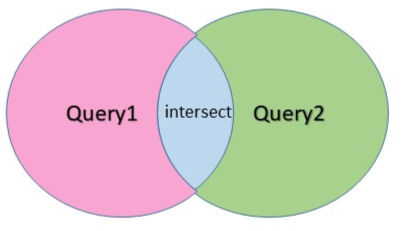
Example Scenario: Find customers who have placed orders in both online and in-store
SELECT order_id, customer_name, order_date
FROM online_order

INTERSECT

SELECT order_id, customer_name, order_date
FROM store_order
EXCEPT
The EXCEPT operator returns distinct row from the first(left) query that are not present in the second (right) query. Think of it as: Result = query1 - query2

Returns distinct row from query1 Example Scenario: Find customers who placed only online orders but not in-store
SELECT order_id, customer_name, order_date
FROM online_order

EXCEPT

SELECT order_id, customer_name, order_date
FROM store_order
What Are Joins
SQL joins are used to combine rows from two or more tables based on a related column usually a foreign key that connects them. This allows to retrieve data from multiple tables in a single query, making it easier to work with relational database. Some of the common SQL join types are
Joins | Description |
|---|---|
INNER JOIN | Returns only matching rows between tables |
LEFT JOIN | Returns all rows from left table, and matching rows from right table. NULL if not matched |
RIGHT JOIN | Returns all rows from right table, and matching rows from left table. NULL if not matched |
FULL JOIN | Returns all rows from both tables. If there is no match, it fills the missing values with NULL |
CROSS JOIN | Returns the cartesian product. Combines every row from the first table with every row from the second table |
SELF JOIN | Joins a table with itself to compare rows within |
INNER JOIN
The INNER JOIN is used to select records that have matching values in both the tables involved in the join.

Example Scenario: Find customers who ordered through both online and in-store
SELECT online_order.customer_name
FROM online_order
INNER JOIN instore_order
ON
online_order.customer_name = store_order.customer_name;
LEFT JOIN
LEFT JOIN also known as LEFT OUTER JOIN, used to fetch all records from the left table and the matched records form the right table. If there is no match for a specific record, the missing data will be filled in with NULLs.
The position of the table is important since the left table's rows are always returned, regardless of matches.

Example Scenario: List all online customers, including their store orders if available
Note: left table - online, right table - in-store
SELECT online_order.customer_name
FROM online_order
LEFT JOIN store_order
ON online_order.customer_name = store_order.customer_name;
RIGHT JOIN
RIGHT JOIN also known as RIGHT OUTER JOIN, used to fetch all records from the right table and the matched records from the left table. If there is no match for a specific record, the missing data will be filled in with NULLs.
The position of the table is important since the right table's rows are always returned, regardless of matches.

Example Scenario: List all in-store customers, including their online orders if available
Note: left table - online, right table - in-store
SELECT store_order.customer_name
FROM online_order
RIGHT JOIN store_order
ON online_order.customer_name = store_order.customer_name;
FULL JOIN
FULL JOIN also known as FULL OUTER JOIN, used to fetch all records from both left table and right table. It includes rows that have matching values in both tables, as well as rows from either table that do not have a match. If there is no match for a specific record, the missing data will be filled in with NULLs.
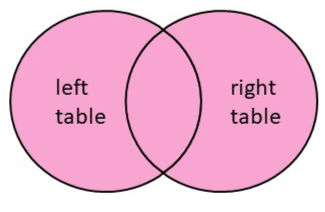
Example Scenario: List all customers from both online and in-store orders for comparison
 SELECT
 online_order.customer_name,
 store_order.customer_name
 FROM online_order
 FULL OUTER JOIN store_order
 ON online_order.customer_name = store_order.customer_name;
CROSS JOIN
A CROSS JOIN returns cartesian product of two tables. This means that each row from the left table is paired with each row from the second table, resulting in a combination of every possible pair of rows from the tables.

Example Scenario: Generate all possible customer pairs between online and in-store orders
SELECT
 online_order.customer_name,
 store_order.customer_name
FROM online_order
CROSS JOIN
store_order;
SELF JOIN
A SELF JOIN is a join where a table is joined with itself. It is used to compare rows within the same table, often to represent hierarchical relationships like employee - manager, parent- child, etc.

Example Scenario: List each employee with their manager. Both are stored in the same table.
SELECT
 e.employee_id
 e.employee_name,
 m.manager_name
FROM employees e
LEFT JOIN
 employees m ON e.reports_to = m.employee_id;
How are they different?
Joins and set operators look similar because they are used to combine data in SQL, but they serve different purposes and work in different ways.
JOINS combine data across multiple tables by matching rows based on related columns, typically using keys like customer_id. They are used to bring related information together from different tables into a single result.
SET OPERATORS, on the other hand are used to combine the results of two or more separate queries, not tables. They work when the queries return the same number and type of columns, and they stack or compare the entire sets.
Feature | JOIN | SET OPERATOR |
|---|---|---|
Combines | Columns | Rows |
Condition | Based on "ON" clause or common key | No condition required |
Combines what? | Two or more tables | Two or more SELECT queries |
Requirement | Column can differ in count and data type | Column must match in count and data type |
Use case | Relate rows from different tables | Merge or compare the query output |
When to use which one?
Use a JOIN when the goal is to bring related data together from two or more tables. For example, when a customer table and an order table need to be combined to list each customer along with their orders, a JOIN is used to fetch related columns from both tables into a single combined result.
Use SET OPERATORS to merge or compare the results of separate queries that has same number and type of columns. For example, to combine customer list from online and in-store orders where each list comes from a separate query, SET OPERATORS can be used to produce a single result that includes customers from both the tables.
While JOINS and SET OPERATORS are used to work with multiple sources of data in SQL. Understanding when and how to use each helps in writing more efficient, accurate and meaningful SQL queries.


