Revolutionizing Test Automation: AI and Selenium Unleashed


Introduction
Test automation is experiencing a groundbreaking transformation with the integration of Artificial Intelligence (AI). By enhancing efficiency, reducing manual effort, and boosting accuracy, AI is revolutionizing testing workflows. When paired with Selenium, AI unlocks advanced capabilities that optimize processes and deliver reliable outcomes through machine learning.
Selenium with AI enables test scripts to adapt to application changes, minimizing the necessity for manual revisions and proactively resolving issues, streamlining testing processes.
This article explores how combining AI with Selenium creates smarter, more efficient, and highly reliable test automation frameworks.
Benefits of AI-Powered Selenium Automation
AI elevates Selenium testing by enabling test scripts to:
Adapt to application changes: Proactively updating test scripts reduces manual intervention.
Learn and evolve: Machine Learning (ML) helps tests learn from past data, making them future-ready and resilient.
Streamline workflows: Automating repetitive tasks saves time and minimizes human errors.
Advanced AI Techniques That Improve Test Automation
Intelligent Locator Healing AI identifies elements through visual patterns, even when attributes change. This self-healing capability ensures UI changes don’t disrupt testing, making it ideal for applications with dynamic element identifiers.
Intelligent Test Case Creation AI selects key test cases, reduces redundancies, and predicts failures using historical data. This approach builds resilient scripts, requires minimal maintenance, and streamlines workflows.
AI-Driven Visual Testing Comparing application screenshots with reference images allows for efficient identification of UI discrepancies, such as text misalignment or button placement errors after design updates.
Intelligent Test Data Creation AI algorithms produce comprehensive test data, covering edge cases and diverse user inputs. This ensures thorough testing and robust functionality.
AI-Powered Frameworks for Streamlined Testing
The rise of AI-powered Selenium frameworks addresses common testing challenges with:
Self-healing capabilities: Reduced flaky tests and maintenance efforts.
Intelligent test creation: Enhanced test coverage and reliability.
Examples:
Healenium(Self-healing Selenium scripts) - Reduces test maintenance, flaky tests and improves reliability.
**Add Maven Dependency for Healenium.

**Sample code for Healenium using Flipcart.com application.

Headspin(AI-based element identification) - Offers AI-based element identification for improved accuracy and enhanced Test stability.
**Create a HeadSpin account on their platform and retrieve your API Key directly from HeadSpin after
signing up.
**Add Maven Dependency for Headspin.

** Sample code using Flipcart.com Application for executing Selenium tests on a real
browser (ex. Chrome) hosted on HeadSpin through a RemoteWebDriver.


Applitools Eyes(AI-driven visual testing solution) -
Provides AI-driven visual testing for responsive UI, visual regression testing and Cross-Browser testing.
**Add Maven Dependency for Applitools.

**Sample implementation for flipcart.com application

Leveraging AI-Powered Libraries for Enhanced UI Testing
AI-powered libraries such as OpenCV enhance Selenium's ability to detect UI bugs like image breaks or alignment issues:
Capture webpage screenshots using Selenium WebDriver.
Perform comparative analysis between baseline and new images to spot inconsistencies.
OpenCV (Open Source Computer Vision Library) uses AI-driven pattern recognition to detect changes or inconsistencies in the user interface.
Here’s how you can utilize OpenCV effectively:
Install OpenCV and set it up with Selenium WebDrive.
Load the OpenCV Native Library within your Java class.
Use Selenium WebDriver to capture a screenshot of the webpage for processing.


d. Identify differences between the captured screenshot and a baseline image by performing a comparative analysis.


Simplifying Test Data Creation with AI
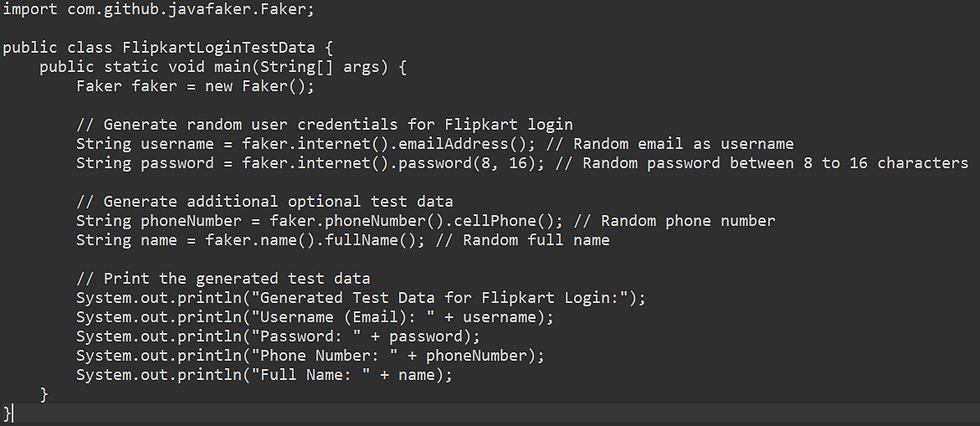
Manually generating test data is time-consuming and prone to errors. AI-powered frameworks like the Faker Java library automate the creation of realistic data, such as names, addresses, and phone numbers, ensuring comprehensive coverage.
Why Combine AI with Selenium?
Key Benefits:
AI-Powered Test Maintenance and Self-Healing
One of AI’s biggest advantages is self-healing tests—automatically updating test scripts when UI elements change. This prevents false failures caused by dynamic element identifiers.
i. Example: Healenium repairs broken locators without human intervention, ensuring test stability.
ii. How it helps: Reduces maintenance and enhances test reliability.
AI-Driven Test Insights for Smarter Debugging
Instead of relying solely on pass/fail outcomes, AI can provide root cause analysis when a test fails.
i. AI analyzes historical test results and suggests whether failures are due to script issues,
infrastructure problems, or actual defects.
ii. AI-assisted debugging saves developers hours of manual investigation.
AI-Powered Test Optimization for Continuous Delivery
Traditional test suites grow large over time, slowing execution. AI helps by:
Identifying redundant tests and optimizing execution speed.
Predicting flaky tests and alerting testers before failures occur.
Prioritizing impactful test cases that uncover critical defects early.
Potential Challenges of AI-Driven Selenium Test Automation:
1. Increased Resource Consumption
AI-driven frameworks require higher computational power and memory usage compared to traditional automation. This could slow down test execution, especially on large datasets or resource-limited environments.
2. Complexity in Implementation
Setting up AI-based test automation requires expertise in machine learning, data processing, and framework integration, making implementation more complex than traditional Selenium testing.
3. Unpredictable AI Behavior
Since AI learns from data, self-healing scripts may make unintended changes, leading to test failures that are hard to trace or debug.
4. Potential Overhead in Test Maintenance
While AI-powered tests reduce manual script updates, continuous optimization and tuning of AI models are required to ensure accuracy—adding maintenance overhead in some cases.
5. Integration Challenges
Some AI-powered tools, like Healenium and Applitools, may require third-party dependencies or cloud services, making them difficult to integrate into on-premise setups.
6. False Positives & Negatives
AI-driven element identification and visual testing might occasionally misinterpret UI changes, leading to incorrect defect identification or missed UI issues.
7. Security Concerns
AI-driven automation may expose test data vulnerabilities, such as unsecured API keys or excessive data collection, requiring careful security measures.
Mitigation Strategies:
Optimize Resource Usage – Run AI-powered tests on dedicated cloud environments to avoid bottlenecks.
Manual Verification – Maintain human validation checkpoints to confirm AI-driven updates.
Standardized AI Training – Continuously refine AI models to prevent unpredictable behavior.
Secure Sensitive Data – Encrypt API tokens and limit data exposure in automation scripts.
Conclusion
The fusion of AI and Selenium is transforming test automation by enabling smarter processes, reducing effort, and boosting reliability. With advancements in AI techniques and frameworks, the possibilities are boundless. It's time to explore, practice, and implement this revolutionary synergy!


