Response Validation in Postman: A Tester’s Perspective

Postman is an API(application programming interface) development tool. It helps to build, test and modify APIs.
When we send an HTTP or HTTPS request to a server, the server responds with data based on the request. This returned data is called the response.

Let us discuss how we can test postman Response.
What is postman Response Validation?
Postman offers powerful features for response validation that every tester should master. Validating an API response isn’t just a "nice to have" —
It's how you know whether the API is actually doing what it's supposed to do,
Are you getting the right status code?
Is the data in the format you expect?
Does the response time make sense?
Testing these details early can save a ton of trouble later on.
How to Write Test Scripts ?
Test scripts allow you to automate the validation of API responses. They are written in JavaScript and help to verify different parts of the response like Status code, Headers, Cookies, Response Body , Response Time, and Schema.
Test scripts will execute after sending the request — in the Scripts tab (Post-Response Scripts section).
Postman provides a special object called pm (short for Postman) that helps to interact with request and response data.
syntax:
pm.test("Your test name", function () { pm.expect(actualValue).to.eql(expectedValue); });
Types of Response Validations
Status code
Headers
Cookies
Response time
Response Body
What is Status code ?
When you send an API request through Postman, the server responds with a status code — a three-digit number that tells you whether the request was successful, failed, redirected, or had some error. Status codes help testers quickly understand the result of the API call without analyzing the entire response body.
In Postman, after you send a request, you can see the status code right next to the response.
example: Status: 200 OK, Status: 404 Not Found, or Status: 500 Internal Server Error.
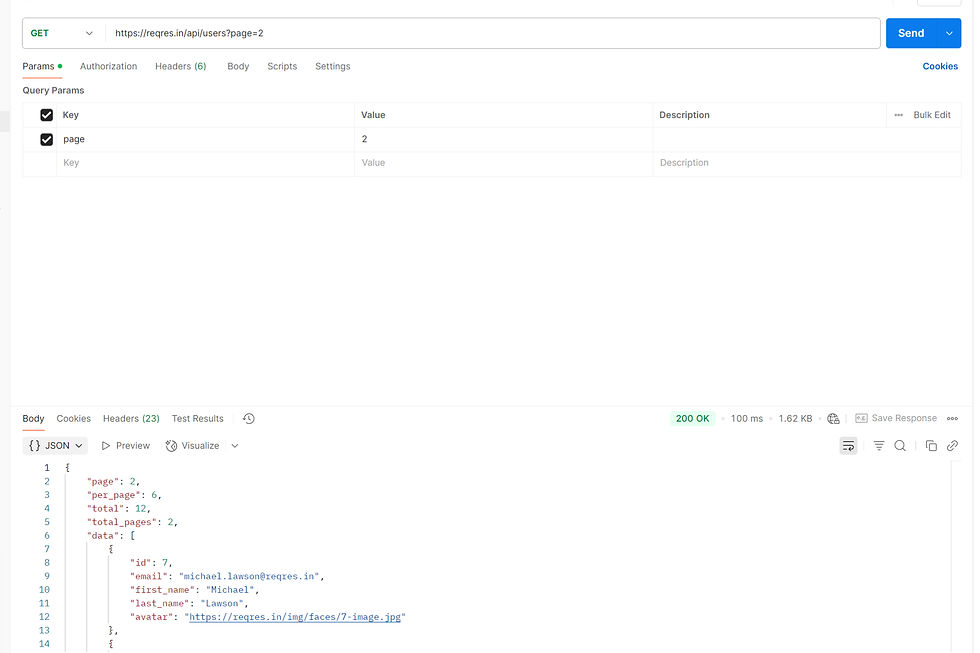
In the above example, we sent a GET request, and when the server processed it successfully, it returned a "200 OK" status code.
How to validate Status Code ?
To validate status code go to Post-Response Tab. Next, we need to write a Test script and validate Status code .
You can create the test using either an arrow function or a normal (traditional) function.
Below are examples of both approaches:
Arrow Functions
pm.test("validate status  code", ()=>{

    pm.response.to.have.status(200);

});
Normal (Traditional) Functions
pm.test is postman test function name and we will pass to parameters in function one is test result message and second one is validation step.
pm.test("status validation with message",function(){
pm.response.to.have.status("OK");

});
In the examples above, you can validate using either the status code (e.g., 200) or the status message (e.g., "OK").
Once the test runs, you can see whether it passed or failed under the Test Results tab.

What is Headers ?
When you send an API request in Postman, you not only get a status code and body in the response — you also get headers.
Response headers are key-value pairs that carry additional information about the response. They provide important metadata that helps the client (Postman, browser, or application) understand how to process the data received.
Headers do not contain the actual data instead, they describe the data or give instructions related to the communication.

How to Validate Headers in Postman ?
To validate the Headers, go to Post-Response Tab in Scripts .We can also write test scripts in Postman to validate response headers. Here is a example of a function to test Headers in postman .
pm.test("Content-Type header is application/json", ()=>{
    pm.expect(pm.response.headers.get('Content-Type')).to.eql('application/json; charset=utf-8');
});
What are Cookies ?
Cookies are small pieces of data that the server sends to your browser or client to store information about the session or user preferences.
In Postman, cookies play an important role in handling session states, user authentication, and more.

How to Validate Cookies in Postman ?
To validate cookies , go to Post-Response Tab in Scripts. We can write Test Scripts and we can check whether the expected and actual cookies values are matching or not . Here is the example function to test cookies .
pm.test("logged_in cookies has value yes" ,() =>{
    pm.expect(pm.cookies.get('logged_in')).to.eql('yes');
});
What is Response Time ?
When we send a request to a server, it takes some time for the server to process the request and send a response back to the client (such as Postman, a browser, or a mobile app). This processing duration — from the moment the request is sent to the moment the response is received — is called Response Time.
In Postman, the response time is automatically measured and displayed after every request you send.
Response time helps testers assess how fast an API or server is responding. Slow response times can impact the user experience, especially in real-time applications.
How to Validate Response Time in Postman Tests ?
To validate the Response Time, go to Post-Response Tab in Scripts . Next, We can write test scripts in Postman to automatically check if the response time meets our expectations. There are two different methods available in Postman for validating response time:
Above: To check if the response time is greater than a specific value.
Below: To check if the response time is less than a specific value.
Here are example functions to validate response time using both methods:
pm.test("execution time is above 500.", ()=>{
    pm.expect(pm.response.responseTime).to.be.above(500);
});
pm.test("respose time is below 500",()=>{
pm.expect(pm.response.responseTime).to.be.below(500);
});What is Response Body ?
Response Body is, when a request sent to server, server processes the request and sends back a response.
The Response Body is the main part of the server's reply — it contains the actual data requested. we can see Response Body at Body section . It is very important to validate Response Body here we will validate if the correct data is returned.

How to Validate the Response Body in Postman ?
To validate the Response Body, go to Post-Response Tab in Scripts . Next ,we need to write test scripts in Postman. First, we have to fetch the response data, and then we can validate the field values as well as their data types.
Here is an example function to test the Response Body:
const jsonData = pm.response.json();
pm.test("json data validation", ()=>{
    pm.expect(jsonData).to.be.an("Object");
    pm.expect(jsonData.name).to.be.a("string");
    pm.expect(jsonData.id).to.be.a("string");
    pm.expect(jsonData.job).to.be.a("string");

});
What is Schema Validation in Postman?
Schema Validation is the process of verifying that the API response follows a specific structure (schema) — meaning it has all the required fields and that each field has the correct data type. It helps Protects Frontend and Integrations
In Postman, you can perform Schema Validation by writing simple test scripts using JavaScript and JSON Schema.
Lets see how can we validate Schema .
First we have to generate Schema for our JSON Data to do that will use JSON Body and will provide the JSON Body to schema converter then it will generate Schema . we have many Free schema converters available in market .
Here is one of free tool to use Schema conversion ClickHere . Once we convert schema will use it to Validate.
How to Validate Schema ?
To Validate Schema first we need to open Post-Response Tab in Scripts. Next, create a variable and store the schema value (generated using a schema converter) inside that variable.
Then, write a test script to validate the response against the defined schema.
Below is an example of a schema validation function.
// Example Schema variable //
var schema = {
  "$schema": "http://json-schema.org/draft-04/schema#",
  "type": "object",
  "properties": {
    "name": {
      "type": "string"
    },
    "job": {
      "type": "string"
    },
    "id": {
      "type": "string"
    },
    "createdAt": {
      "type": "string"
    }
  },
  "required": [
    "name",
    "job",
    "id",
    "createdAt"
  ]
}

//Function for Schema Validation//
pm.test("Schema validation",()=>{
pm.expect(tv4.validate(jsonData,schema)).to.be.true;
});
Conclusion:
Validating API responses is a critical part of API testing, and Postman makes it easy with powerful features like test scripting and schema validation.
By validating status codes, headers, response times, response bodies, and schemas, testers can ensure that APIs are working correctly, returning the right data, and meeting performance standards. It helps catch errors early, improves the reliability of APIs, and builds confidence in the application's overall quality.
Happy Testing!


