Query Optimization Tools and Techniques

SQL (Structured Query Language) is a standardized programming language used to interact with relational databases .Query Optimization is primarily used for querying, updating, and managing data stored in relational database management systems (RDBMS) and query optimization plays a crucial part in writing efficient SQL queries. Query optimization improves the performance of SQL queries, making them faster and more resource-efficient, which is especially important for large databases, high-traffic systems, or applications that require fast response times. By optimizing queries, it is ensured that the database runs smoothly and scales effectively as the data grows.
So in order to achieve that, let's discuss some of the tools and techniques to write optimized queries which ensures efficient resource utilization and faster data retrieval.
QUERY OPTIMIZATION TOOLS
EXPLAIN: This explains the execution plan of a SQL query. The execution plan is a detailed description of how the database plans to execute the query, including information about which indexes will be used, the order of table scans, join types, and the overall cost of executing the query.
EXPLAIN SELECT * FROM customer;

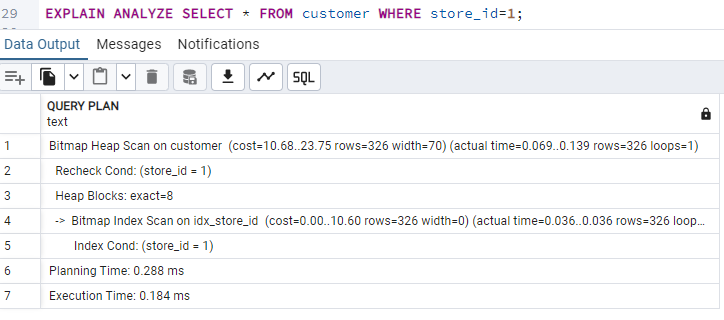
EXPLAIN ANALYZE - It is similar to EXPLAIN but it actually executes the query and provides detailed statistics on how the query was executed in practice. This includes the actual runtime, the number of rows processed, and the actual execution cost.
EXPLAIN ANALYZE SELECT * FROM customer;

VACUUM: This helps to remove all unused or redundant data in the table of a database.
• Vacuuming a specific table:
VACUUM table_name
• Advanced Options:
◦ FULL: Performs a more thorough cleanup, potentially rearranging data for better space efficiency
but requiring an exclusive lock on the table.
VACUUM FULL table_name
◦ FREEZE: Freezes the state of deleted rows, ensuring they are completely removed.
VACUUM FREEZE table_name
◦ ANALYZE: Performs a vacuum followed by an analyze operation, updating table statistics for better
query optimization.
VACUUM ANALYZE table_name
QUERY OPTIMIZATION TECHNIQUES
Use indexes:
Index acts as a reference to the data in the table. It basically sorts the data on the given columns and then stores that order, so when we want to find an item, the database can optimize by using binary search rather than looking at each individual row. Thus it creates a specific sorted lookup table which the database search engine uses for faster data retrieval.
Primary key by default is clustered index while others are non clustered index. Clustered indexes are useful for tables that are frequently accessed using a particular column, such as date or time. Non-clustered indexes are useful for tables that are frequently searched on multiple columns, or for tables that are frequently updated.
Screenshots below shows the execution of the query by not using index and by using it.
CREATE INDEX idx_address_id ON customer (address_id); |

So by creating and optimizing the indexes based on the specific use case and workload, SQL ensures that the database system performs optimally and meets the performance and scalability requirements.
Limitations:
Avoid using indexes for small tables. Long queries are not helped by indexes and creating too many indexes can also slow down write operations due to the overhead of maintaining them. In some cases as below, SQL could choose to perform a sequential scan even when it could use an index scan:
If the table is small
If a large proportion of the rows are being returned
If there is a LIMIT clause and it thinks it can abort early
Use Prepare Statements:
PREPARE - This specified statement is parsed, analyzed, and an execution plan is created.
EXECUTE - The prepared statement is that is already planned gets executed
This will prepare the query once and reuse the execution plan for each subsequent execution.
PREPARE get_cust_by_name(text) AS SELECT * FROM customer WHERE first_name=$1; EXECUTE get_cust_by_name('Jared'); EXECUTE get_cust_by_name('Linda'); |
Optimize SELECT clause:
Select statement can be much optimized with specifying specific column name
SELECT first_name,last_name FROM customer; |
Replace COUNT(*) with EXISTS wherever it is needed. COUNT(*) needs to return the exact number of rows. EXISTS only needs to answer a question like TRUE or FALSE.
SELECT COUNT(*) FROM customer c JOIN payment p USING (customer_id) WHERE c.last_name = 'Smith'; |
SELECT EXISTS (SELECT 1 FROM customer c JOIN payment p USING (customer_id) WHERE c.last_name = 'Smith'); |
Optimize WHERE clause:
Optimizing the WHERE clause ensures to follow the conditions below.
Order of the conditions is important
Indexed columns to be used for filtering
Functions on columns to be avoided
Queries to be rewritten to avoid conditions like OR, large IN lists, and NOT
Use appropriate data types:
Initially the store_id column was declared as integer type 4 and now it has been altered to integer type 2. So by using appropriate data types it helps to reduce the amount of memory required to store.
ALTER TABLE customer ALTER COLUMN store_id TYPE smallint; |
Limit the rows:
LIMIT restricts the number of rows returned by a query and thus it can improve performance for queries that need only a small subset of data.
SELECT first_name FROM customer LIMIT 100; |
Limitation: Avoid Using LIMIT on Large Tables Without Proper Filtering
Materialized view:
A materialized view is a database object that stores the precomputed results of a complex query, allowing for significantly faster query execution by directly accessing the stored data instead of recalculating it every time the query is run, especially beneficial when dealing with large datasets and frequent queries on the same data subset. This contributes to improved performance, reduced database load, and simplified complex query logic.
CREATE MATERIALIZED VIEW customers_view AS SELECT * FROM customer; |
Optimizing Subqueries:
A subquery in SQL is a query nested inside another query. Subqueries can be used in the SELECT, WHERE, FROM, and HAVING clauses. So by utilizing sub queries to filter data across tables is often effective in reducing query execution time and improving database efficiency.
SELECT * FROM payment p WHERE customer_id IN (SELECT customer_id FROM customer c WHERE c.last_name = 'Smith') |
A JOIN in SQL is a way to combine and retrieve rows from two or more tables based on a related column between them. So it also helps to filter data across tables more efficiently. A subquery is easier to write, but a join is more optimized by the server compared to subquery.
SELECT * FROM payment p JOIN customer c USING (customer_id) WHERE c.last_name = 'Smith' |
A CTE (Common Table Expression) is useful for breaking down complex queries and simplifying the logic. So breaking records of large tables using CTEs even before joining them with other tables can lead to substantial performance improvements.
WITH cte_customer AS (SELECT customer_id FROM customer c WHERE c.last_name = 'Smith') SELECT * FROM payment JOIN cte_customer ON payment.customer_id = cte_customer.customer_id; |
Limitations:
Replacing IN with EXISTS to improve execution efficiency.
Use UNION ALL instead of UNION when you don’t need to remove duplicates.
Consider using GROUP BY for aggregation instead of subqueries.
Avoid DISTINCT and ORDER BY unless necessary to prevent extra processing.
Minimize the use of complex subqueries, limit them to return a single row on possible scenarios and avoid correlated sub queries or larger joins.
The order of tables in the FROM statement can affect JOIN ordering, particularly when joining more tables.
USE CTEs in place of temporary tables as it can slow down execution.:
Recursive CTE queries can cause runaway recursion (recursive queries that don't stop until the system crashes) and can affect performance for larger datasets. So in such cases use nested queries or subqueries to traverse through hierarchical structures.
Conclusion:
So by using optimizing tools and applying the right optimization techniques, faster and more efficient SQL queries can be written, ensuring better system performance. Overall, a well-optimized query reduces resource consumption, improves response times, and ensures that databases can scale effectively while handling complex operations.
Hope this blog helps everyone to write a more optimized query in future!
Thanks for Reading!


