Python's Secret Weapons - The Libraries


Python libraries are collections of pre-written code, functions, and methods that allow developers to perform complex tasks without writing code from scratch. The ecosystem is broadly split into the Python Standard Library, which comes pre-installed with the language, and external third-party libraries available via the Python Package Index (PyPI).
Using Libraries in Python Programs
To use any library, it first needs to be imported into your Python program using the import statement. Once imported, you can directly call the functions or methods defined inside that library.
You can import libraries in three main ways:
1.Import the entire library: import name_of_library, Ex: import math
Ex: Program to import math library and uses one of its functions.

Explanation:
Here, the complete math library is imported and we use math.sqrt() to calculate the square root of 9.
Since the full library is imported, we must prefix the function with the library name (math.).
2. Import a specific function or class: from name_of_library import name_of_function, Ex: from math import sqrt
Ex: Program to import only selected functions from an external library.
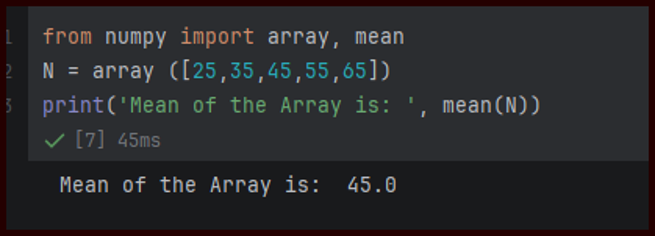
Explanation:
Only array () and mean () functions are imported from the NumPy library.
array () is used to create a NumPy array from a list and mean () calculates the average value of all elements in the array.
Since these functions are imported directly, we don’t need to use the numpy.
3. Import a library with an alias: import name of library as alias, Ex: import pandas as pd
Ex: Program to import library using alias.

Explanation:
· This standard approach shortens long library names.
Different Types of Libraries:
1.The Built-in Standard Library: It is a collection of modules that come bundled with every Python installation, we don’t need to install anything separately.
os: Interacts directly with the computer operating system to manage files and directories.

datetime: Essential module for parsing, formatting, and calculating differences between dates.

json: Built-in encoder and decoder to translate Python dictionaries to JSON format and back.

2.External Libraries by Category: External (third-party) libraries are not included with Python by default. Third-party libraries must be installed using a package manager like pip before you can import them into your script.
Below are a few external libraries:
a. Data Science & Analytics:
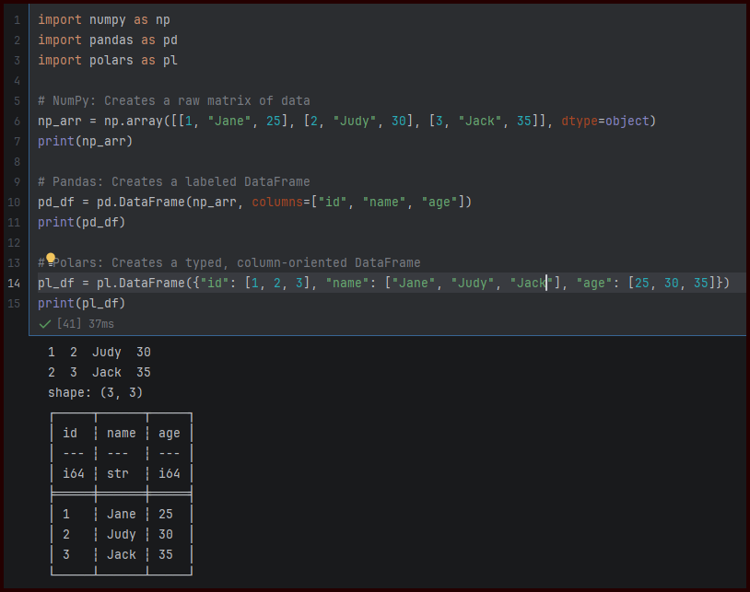
NumPy (Numerical Python): It is the core library for numerical and scientific computing in Python. It provides powerful tools for creating and manipulating arrays, matrices and multidimensional data.
Real-Life Usage:
- Data analysis in finance (portfolio optimization) .
- Image processing (pixel arrays).
- Scientific simulations (physics, chemistry).
Pandas: It’s a library built on top of NumPy. It introduces data structures like DataFrame and Series that make it easy to handle structured data efficiently for filtering, sorting, merging, cleaning and manipulation.
Real-Life Usage:
- Business data cleaning & reporting.
- Stock market time-series analysis.
- CSV/Excel data manipulation in startups.
Polars: A blazing-fast DataFrame alternative optimized for speed and parallel computation.
Real-Life Usage:
- High-performance data processing.
- Ingest and manipulate massive datasets.

b. Machine Learning & AI
Scikit-learn: The standard toolkit for classical machine learning algorithms, covering classification, regression, and clustering.
Real-Life Usage:
- Credit scoring in banks.
- Customer churn prediction.
- Spam email detection.
PyTorch: An open source developed by Facebook’s AI Research Lab. It allows developers to build dynamic computation graphs and is easy for debugging. It supports GPU (Graphic Processing Unit) acceleration, making it suitable for high-performance training of neural networks.
Real-Life Usage:
- Research prototypes (Facebook AI, OpenAI).
- NLP models (ChatGPT fine-tuning).
- Autonomous vehicle perception.
TensorFlow: It is an open-source machine learning developed by Google. It allows developers to build and train neural networks for tasks such as image recognition, natural language processing and predictive modeling.
Real-Life Usage:
- Google search ranking.
- YouTube recommendation systems.
- Image recognition in healthcare.
LangChain: A framework designed specifically for building applications powered by Large Language Models (LLMs).
Real-Life Usage:
- Used to construct AI agents and reasoning pipelines.
- Used to connect Large Language Models (OpenAI or Anthropic) to external data sources and tools.
c. Data Visualization
Matplotlib: It is a data visualization library which is a foundation tool for creating a wide variety of static, animated and interactive plots. It supports charts such as bar graphs, line charts, histograms and scatter plots.
Real-Life Usage:
- Academic research papers.
- Dashboard static charts.
- Exploratory data analysis (EDA) in notebooks.
Seaborn: Built on top of Matplotlib, it simplifies the creation of attractive, complex statistical graphs.
Real-Life Usage:
- Data science reports & presentations.
- Heatmaps for correlation analysis.
- Distribution plots in Kaggle notebooks.

Plotly: Ideal for building interactive, web-ready charts that look sharp in any browser.
Real-Life Usage:
- Used in Financial Services to track Assets
- Used in Life Sciences & Pharma for clinical trail tracking
- Used in Energy & Utilities to spot transformer anomalies
d. Web Development & APIs
FastAPI: A modern, ultra-fast asynchronous web framework for building REST APIs with automatic documentation.
Real-Life Usage:
- Used to expose automation scripts, machine learning models, and web-scraping pipelines as endpoints.
Django: A high-level, batteries-included web framework built for secure and rapid application scaling.
Real-Life Usage:
- Used to build secure, database-driven web applications from scratch.
Flask: A lightweight, minimalist micro-framework designed for smaller apps and microservices.
Real-Life Usage:
- Used to quickly spin up simple websites, mock-up prototypes, or minimal microservices that do not require the heavy overhead.
e. Web Scraping & Automation
Requests: Simple, elegant HTTP library used to send network requests and interact with external web APIs.
Real-Life Usage:
- Monitoring price for e-commerce.
- Data fetching for weather apps.
- Data collection from social media .
BeautifulSoup: Parses messy raw HTML and XML files to cleanly pull specific text and links.
Real-Life Usage:
- Used to grab data from static, simple websites (like news headlines, weather data, or real estate listings).
Scrapy: It is a web scraping and data extraction library designed to efficiently crawl websites and gather structured information. It allows developers to create spiders that automatically navigate web pages and collect data.
Real-Life Usage:
- Used to need to visit thousands of pages recursively, handle complex rate-limiting, and feed extracted data directly into a structured database or pipeline.


