Python Data Functions Explained: Map, Filter, GroupBy ,Lambda, Agg, Apply, Transform (With Examples)

Most people learn Python by writing loops working too hard.
But here is the secret nobody tells beginners , python has tiny superpowers hidden in plain sight - map, filter, lambda, and groupby, agg, apply, transform.
These are python functional tools map() for transformations, filter() for selections lambda for inline logic and groupby() with agg(), apply(), transform() for powerful aggregations.
In this blog we will unlock these super powers with simple examples.
map():map() function is python built in function which allows us to process and transform each items of iterable(list , tuple , dictionary) without using explicit for loop.
Syntax:
map(function, iterable)
Example: To find the square of numbers.
Using the tradition for loop method.

Using the map() function method.

Instead of writing loops manually to extract, transform and append items to new list, map does the entire collections through the function instantly.
Both of them gives the same result but traditional loop method is longer and manual since we need to
create empty list
loop through each number
square it
append it manually
print the result
which is verbose and require more typing .
where as map() applies lambda x:X**2 to every element in numbers and returns the transformed list which is simple and doesn't require to loop and append.
lambda() :A lambda function is small anonymous function that is defined without a name. It is used we need tiny throwaway function for short operation-something so small that writing def keyword would be not necessary.
Syntax:
lambda arguments :expression
lambda->is a keyword
arguments->function parameters
expression->A single value returning expression
Example:

In the above examples lambda function creates a simple one line function to find the square and addition of numbers without using def.
First example takes one input x and returns the square then assigns this lambda to variable square . the square function with square(2) calculates 2^2=4.
Second example lambda a,b:a+b creates a function that takes 2 inputs and returns their sum and assign it to variable add so that we can call like normal function.
add(3,7) adds 3+7 and returns 10.
filter(): A filter function is used to extract the elements from an iterable(list, tuple or set) based on true/false conditions , usually written with a lambda.
Syntax:
filter(function, iterable)
function-A function returns true/false usually lambda function
iterable-list, tuple or set
filter() returns only the elements for which function returns true.
Example:

filter(lambda x: x > 2, nums) means
Go through each element in nums list
Apply the condition x > 2
Keep only the elements where the condition is True
groupby():Groupby is used to split the dataset into groups and apply aggregations like count, mean , sum etc to each group. It is similar to groupby in SQL.
Syntax:
df.groupby('group_column')['target_column'].metric()
Example:To find the total salary by region wise

groupby('Region'): This splits the dataframe into groups based on the values in Region column so it creates 4 groups East, North, south and west
['Salary']: Selects the salary column from each group.
.sum():This applies the aggregations to each group Example:Add all salaries in East.
reset_index():This converts the Series into a clean Dataframe by turning the index (Region) back into a normal column.
Here is the another example of groupby with multiple columns.

agg(): It is used to apply multiple aggregations to one or more columns.
Example: To find the sum , mean and max of salaries for each region.

In the above example the code groups by region and calculates the sum, mean and mx of salaries for each region using agg function.
transform():The transform() function applies and operation to Dataframe and returns the object that has exact same length and shape as original input.
Example:

transform() computes the mean salary for each region and returns the value for every row and fills each each row with avg salary of that region. This adds a new column 'Region_Avg' to the dataframe.
Difference between agg() and transform()
Feature | agg() | transform() |
Output shape | one row per group | same number of rows as original dataframe |
Main purpose | To extract summaries and datasets | Add group level values |
Acceps list | yes, (e.g .agg(['sum', 'mean']) splits the metric into multiple columns). | No, passing a list of metrics will cause errors. |
Good for | Reports, dashboards | Feature engineering |
Reduces rows | Yes | No |
apply():It helps to run the custom python functions on rows, column, groups . It is more flexible than agg() or transform() function.
Syntax:
df.apply(function, axis=0 or 1)
axis=0 means apply to each column
axis=1 means apply to each row
Example:
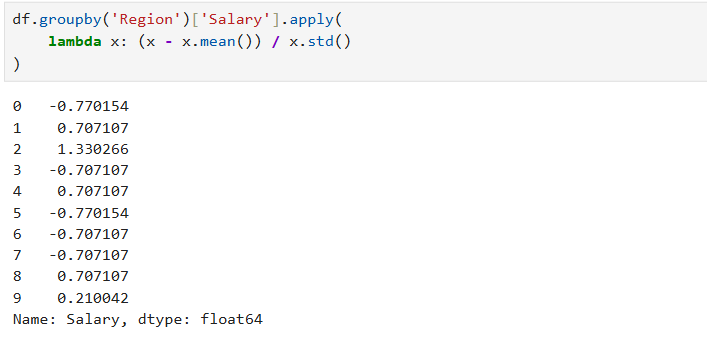
In the above example For each region:
Takes each salary value x
Subtract the mean salary of that region
Divide by the standard deviation of that region
This produces a z-score for each salary.
apply() is generally used for custom or complex logic that agg, transform and map cannot handle.
Conclusion:
Python functional tools map, filter, lambda, groupby, agg, transform, apply helps us to write the cleaner , faster and more expensive code without relying on repetitive loops.
These “tiny superpowers” are hidden in plain sight, and mastering them will definitely level up your Python and pandas skills.
Happy coding! I Hope you'll these superpowers in your next script.


