Preventing Sepsis: The Role of Early SIRS Detection in Healthcare
SIRS:
SIRS stands for Systemic Inflammatory Response Syndrome. It's a condition where the body's inflammatory response to an injury, infection, or other stressor becomes widespread and intense, potentially leading to organ damage or failure
SIRS is an exaggerated defense response where the body releases chemicals to fight off a perceived threat, but this response becomes uncontrolled and affects the entire body.

Causes:
SIRS can be triggered by various factors, including infections, trauma, surgery, burns, ischemia (lack of blood flow), and certain medical conditions.
Symptoms and Diagnosis:
The criteria for diagnosing SIRS include:
Body temperature above 38.5°C or below 35°C
Heart rate greater than 90 beats per minute
Respiratory rate greater than 20 breaths per minute or PaCO2 less than 32mmHG
White blood cell count above 12,000 or below 4,000 per microliter
Presence of two or more of these criteria indicates a potential SIRS response.
Potential Outcomes:
SIRS can be a serious condition, and if left unmanaged, it can lead to:
Organ dysfunction or failure
Sepsis, a life-threatening complication of infection
Septic shock, a severe form of sepsis where the blood pressure drops dangerously
SIRS with a suspected source of infection is termed sepsis. Confirmation of infection with positive cultures is therefore not mandatory, at least in the early stages. Sepsis with one or more end-organ failures is called severe sepsis, and hemodynamic instability despite intravascular volume repletion is called septic shock. Together they represent a physiologic continuum with progressively worsening balance between pro and anti-inflammatory responses of the body.
Relationship of SIRS and Sepsis:
Sepsis is essentially a type of SIRS where the source of the inflammatory response is a proven or suspected infection. Therefore, sepsis always involves SIRS, but SIRS can be triggered by other factors besides infection.
Sepsis progresses quickly and can cause irreversible harm if it is not identified and treated early. In many cases, it is fatal. If you suspect you have sepsis, it is crucial to get diagnosed and treated as soon as possible.
Importance of Early Intervention:
Recognizing SIRS early allows healthcare providers to initiate prompt treatment with antibiotics, fluid resuscitation, and other supportive measures to combat the infection and prevent it from progressing to sepsis. If a patient presents with signs of SIRS, such as fever and rapid heart rate, along with a suspected infection, it's crucial to alert healthcare professionals to investigate further for sepsis. Early diagnosis and treatment can significantly improve the patient's chances of survival and recovery.
Alerting healthcare professionals to SIRS is crucial to prevent Sepsis because SIRS can be an early indicator of Sepsis. Sepsis can quickly progress to septic shock or even death if not recognized and treated promptly. By alerting to SIRS, healthcare providers can initiate early intervention and treatment, potentially improving outcomes and reducing the risk of serious complications.
Identifying SIRS Early and Notifying Healthcare Providers
Let us explore on how patient biometric data from the dataset can be analyzed to identify Systemic Inflammatory Response Syndrome (SIRS). Upon classification of a patient as SIRS-positive, an alert system can notify the respective healthcare provider for timely intervention.
We will use the dataset1.csv from Kaggle and that contains Clinical Data for early prediction of Sepsis. Load the dataset into Tableau (Public/Desktop)
We will make the table which will have following columns:
1. Patient ID: The Id of the patient.
2. Hour Type: The type of the hour i.e. Transition or Trigger hour.
Trigger Hour: The trigger hour is the hour when two or more SIRS criteria are met. This marks the specific time when the patient's condition indicates the presence of SIRS.
Transition Hour: The transition hour is the hour immediately preceding the trigger hour, serving as a point of reference to identify the progression towards SIRS. It helps track the patient's vitals and determine when the SIRS criteria were initially triggered.
3. Hour: The value of the hour.
4. Email Alert: The Email notification alert action which send email to the healthcare professional, if the hour type is Trigger hour.
5. Heart Rate: Heart Rate of the patient at that particular hour.
6. Temperature: Temperature of the patient at that particular hour.
7. Respiratory Rate: Respiratory Rate of the patient at that particular hour.
8. PaCO2: Partial pressure of the carbon dioxide of the patient at that particular hour.
9. WBC: White Blood Cell count of the patient at that particular hour.
The biomarkers in the table will be shown in colors for the abnormal and normal values to feature conditional formatting.
Let us create the following calculated fields.
SIRS score can be calculated based on the criteria mentioned above.
SIRS_score =
(IF ([HR] >90) THEN 1 ELSE 0 END)
+(IF ([Temp] > 38.5 OR [Temp] < 35) THEN 1 ELSE 0 END)
+ (IF ([WBC] >12 OR [WBC]<4) THEN 1 ELSE 0 END)
+ (IF ([Resp] >20 OR [PaCO2] <32) THEN 1 ELSE 0 END)

Trigger_hour =
{FIXED [Patient ID] : MIN(IF ([SIRS_score])>=2 THEN [Hour] END)}

Transition_hour =
[Trigger_hour]-1

Hour_type =
If [Hour]=[TriggerHour] THEN 'Trigger Hour'
ELSEIF [Hour]=[TransitionHour] THEN 'Transition Hour'
END

EmailAlert =
IF [HourType]='Trigger Hour'
THEN 'Email Alert'
ELSE ' '
END

EmailSubject =
IF [SIRSNum]>=2 THEN 'Emergency Alert: SIRS Patient'
ELSE 'N/A'
END

EmailBody =
'Hi Doctor' + '%0A%0D' + '%0A%0D'+
'Patient '+ STR([Patient ID])+ ' is having SIRS at following symptoms:'+'%0A%0D'+
IF ISNULL([HR]) THEN 'Heart Rate: N/A' ELSE 'Heart Rate: ' + STR([HR]) END + '%0A%0D'+
IF ISNULL([Temp]) THEN 'Temperature: N/A' ELSE 'Temperature: ' + STR([Temp]) END + '%0A%0D'+
IF ISNULL([Resp]) THEN 'Respiratory Rate: N/A' ELSE 'Respiratory Rate: ' + STR([Resp]) END + '%0A%0D'+
IF ISNULL([PaCO2]) THEN 'PaCO2: N/A' ELSE 'PaCO2: ' + STR([PaCO2]) END +'%0A%0D'+
IF ISNULL([WBC]) THEN 'WBC: N/A' ELSE 'WBC: ' + STR([WBC]) END + '%0A%0D'+ '%0A%0D'+
'Thank you,' + '%0A%0D'

RespColor =
IF NOT ISNULL(Resp) THEN
(IF [Resp]>20 THEN 'Abnormal Resp Rate'
Else 'Normal'
END)
END

HRColor =
IF NOT ISNULL([HR]) THEN
(IF [HR]>90 THEN 'Abnormal HR'
ELSE 'Normal'
END)
END
TempColor =
If NOT ISNULL([Temp]) THEN
(IF [Temp]>38.50 OR [Temp]<36 THEN 'Abnormal'
ELSE 'Normal'
END)
END
WBCColor =
IF NOT ISNULL([WBC]) THEN
(IF [WBC]>12 OR [WBC]<4 THEN 'Abnormal WBC'
ELSE 'Normal'
END)
END
PaCo2Color =
IF NOT ISNULL([PaCO2]) THEN
(IF [PaCO2]<32 THEN 'Abnormal PaCO2'
ELSE 'Normal'
END)
END
Two placeholders for conditional formatting.
0 =
0

1 =
0
Let us now create a table for all the above calculated fields.
1. Drag Patient ID, HourType, Hour (make sure you choose dimension and discrete) in the Rows.

2. Drag the placeholders in the column.

3. Select one placeholder card in Marks pane. Choose the ‘Shape’ in the dropdown and drag the calculated field ‘EmailAlert’ to the Shapes tile. Click on the tile and select the icons as per your choice click OK.

4. Select another placeholder card in the Marks pane and drag the calculated fields ‘EmailSubject’ and ‘EmailBody’ to the Details tile.

5. Make a dual axis of the placeholders dragged in the columns by right click and select Dual Axis.

6. Again, drag the placeholders in the columns for biomarker HR. Select the correct placeholder in the Marks pane and choose ‘Square’ in the dropdown. Increase the size to the fullest in the Size tile. Drag the calculated field ‘HRColor’ in the Color tile.

7. Select another placeholder card in the Marks pane and choose ‘Text’ in the dropdown. Drag the biometric ‘HR’ in the Label tile.

8. Make the last two placeholders in the columns to Dual Axis by right click and select Dual Axis.

9. Right click on the header and click on ‘Edit Exis’. In General tab, change the title to from ‘1’ to ‘Email Alert’ and In Tick Marks tab, under Major Tick Marks, choose ‘None’. Repeat same for changing the header to ‘Heart Rate.’
10. Similarly, we will use placeholders to create the columns as Temperature, Respiratory Rate, PaCO2 and WBC. The color formatting can be changed for all biomarkers like grey for normal values, other colors for abnormal values and white for null values.

11. Format the table like formatting the table cells, the fonts, the color. Format as per your choice.

Let us set the email configuration settings for sending an email alert to healthcare professionals.
We will create an action on the <EmailAlert>.
1. Go to the Worksheet menu and click on Actions.

2. In the Action pop-up window, click Add Action. Here, in our case we need to send an email alert, therefore we choose ‘Go to URL’ option.
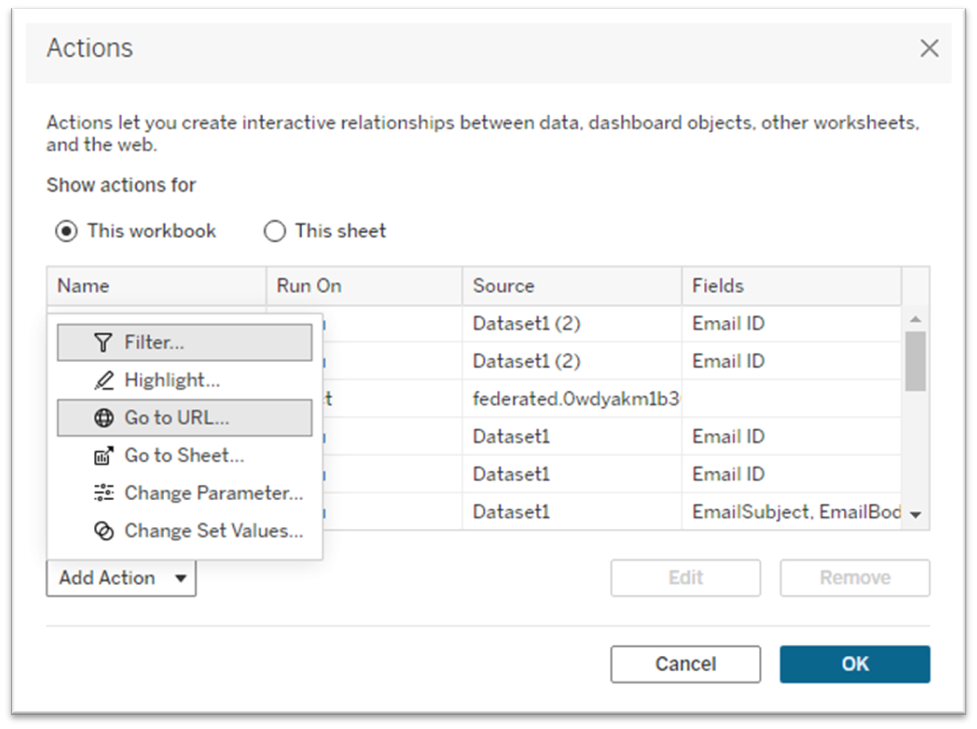
3. In the ‘ADD URL Action’ window, insert the Name using the dropdown menu and select the appropriate fields. Here, we will insert <EmailAlert>.
Choose the Source sheets where the action needs to be considered.
Choose when the action needs to be run — Hover, Select or Menu. Here we will choose ‘Select’ (the action will run only when you click the action in the visualization).
We need the action to go to a New Brower Tab, so in the URL Target, choose ‘New Browser Tab’
Under URL, post the email address of the receiver of the trigger action. Here, we need to send the email to the doctor. So, we will insert the URL:
mailto:doctor@outlook.com?subject=<EmailSubject>&body=<EmailBody>

After clicking OK, an action <EmailAlert> will be created. When we click on the icon of Email Alert in the table under column ‘Email Alert’, an email will be sent to the healthcare professionals to alert about the patient who has met the SIRS criteria with all the details of the patient’s vitals. The appropriate action is immediately executed by the medical team of that patient after receiving the email, ‘Emergency Alert: SIRS Patient’.

Conclusion:
Early identification of Systemic Inflammatory Response Syndrome (SIRS) is critical for preventing its progression to severe conditions like sepsis. By analyzing patient biometric data to detect early signs of SIRS and implementing alert systems, healthcare providers can be promptly informed, enabling timely medical intervention. The email notification can help identify patients who may be at risk for sepsis and enable quicker interventions. This proactive approach enhances clinical outcomes, reduces mortality risk, and improves overall patient recovery by ensuring that treatment is initiated at the earliest possible stage.


