PostgreSQL Recursive CTE : Querying Hierarchical Data
Introduction to Common Table Expression (CTEs)
A CTE is like a temporary result set that only available during the execution of a query. It helps break down complex queries into smaller, more manageable blocks improving both readability and maintainability.
Recursive CTE
A recursive CTE takes it a step further by adding recursion, making it ideal for handling hierarchical data, such as employee-manager relationships or nested folder structures—all within a single query. It works step-by-step, adding rows level by level, and continues until there’s no more data to process, ultimately building the complete hierarchy.
The syntax for Recursive CTE is illustrated in the below Image
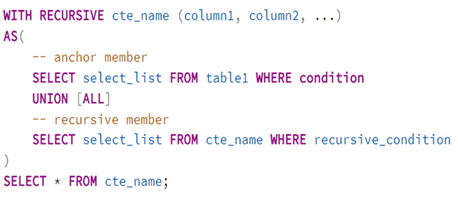
Key Components of Recursive CTEs :
The WITH RECURSIVE clause: starts the CTE definition
Anchor member - The initial (non-recursive) query that provides the starting point
Recursive member – Refers to the CTE and uses data from earlier steps to add new rows
Termination condition: ensures recursion ends to avoid infinite loops
💡 Tip: Always test the termination logic with small datasets to check the recursion behavior as expected.
UNION vs. UNION ALL: Prefer UNION ALL for better performance unless duplicates needs to be removed.
⚙️ How PostgreSQL Executes Recursive CTEs
PostgreSQL uses working table to manage recursion
Initialization:
Execute the anchor member (base query)
store results in both a working table and the final result set
Iteration:
Execute the recursive member using the current working table from previous step
Add new results to the working table (overwrites previous)
Appends new results to the final result set
Termination: Recursion stops when:
The Working table is empty(No new rows from recursive query)
A WHERE clause condition fails(e.g.,reports_to = employee_id or level <= 5 )
Understanding the Working Table
The working table is a temporary internal structure used to manage recursion
Internally execute recursive queries, not part of query results
Stores the latest recursive results only.
Used as the input for the next recursive step
Separate from the final result Set, which contains all the accumulated results
Use Cases for Recursive CTEs
Recursive CTEs are ideal for working with hierarchical and iterative data:
Hierarchical Data
Organizational Charts (Employee-manager relationships)
Product categories and sub-categories.
Sequences and Calculations
Generating number series (eg. 1- 100)
Computing factorial or Fibonacci numbers.
File systems
Navigating directory structures with nested folders
Comment threads
Threaded discussions (e.g., forums)
💡 Tip: Recursive CTEs can be combined with other CTEs to handle multi-level hierarchies across different domains—like combining product categories with location-based inventory
Real Example: Visualizing Employee Hierarchies in PostgreSQL
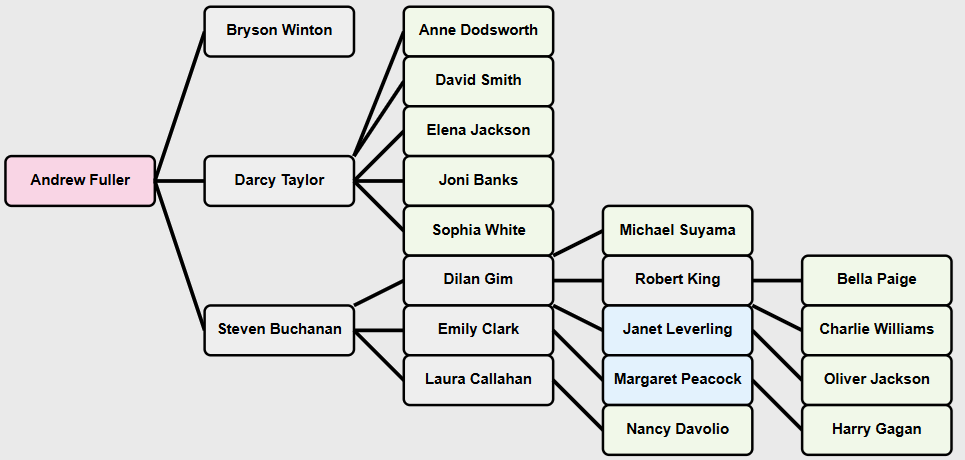
Lets walk through step-by-step implementation of employee-manager hierarchy using a recursive CTE in PostgreSQL.
The image below represents the organizational hierarchy to be implemented using a recursive CTE
Recursive CTE Query:
WITH RECURSIVE org_hierarchy AS ( -- Anchor: Start with the top-level manager (Andrew Fuller) SELECT e.employee_id, e.employee_name,e.title, e.reports_to, cast('' as varchar) as manager_name, 0 AS level, e.employee_name AS path FROM employees e WHERE e.reports_to is null UNION ALL -- Recursive: Join employees with their managers SELECT e.employee_id, e.employee_name,e.title,e.reports_to, m.employee_name AS manager_name, oh.level + 1, oh.path || ' > ' || e.employee_name FROM employees e JOIN org_hierarchy oh ON e.reports_to = oh.employee_id JOIN employees m ON e.reports_to = m.employee_id -- Join to get manager name ) SELECT employee_id,employee_name,title,reports_to,manager_name,level, path as org_chart FROM org_hierarchy ORDER BY path; |
Step by Step Explanation
1. Anchor Query - Initialization
The CTE starts by executing the anchor query/member which identifies the top level manager defined by report_to is null.
-- Anchor: Start with the top-level manager (Andrew Fuller) SELECT e.employee_id, e.employee_name, e.title, e.reports_to, CAST(NULL AS VARCHAR) AS manager_name, -- Cast to match VARCHAR type 0 AS level, e.employee_name AS path FROM employees e WHERE e.reports_to IS NULL |
This below row is added to both:
The working table serves as starting point for recursion
The final result set eventually returned to user

💡 Tip: You can start with any level in the hierarchy as the anchor—like a mid-level manager—to fetch all their subordinates using a recursive CTE.
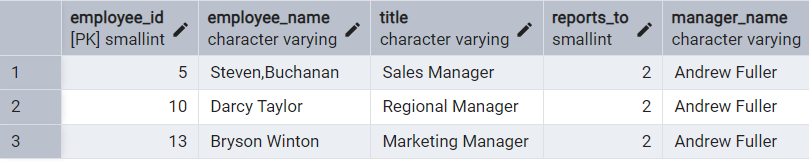
Step 2: First Recursive Iteration
PostgreSQL uses the working table to find employees who report to the anchor (e.g., Andrew Fuller).
SQL Code for Recursive Iteration
SELECT e.employee_id, e.employee_name, e.title,e.reports_to, m.employee_name AS manager_name, -- Get the manager's name oh.level + 1, oh.path || ' > ' || e.employee_name FROM employees e JOIN org_hierarchy oh ON e.reports_to = oh.employee_id JOIN employees m ON e.reports_to = m.employee_id -- Join to get manager name |
Explanation:
Recursive Join:
The recursive part of the query joins the employees table with the working table which already contains Andrew Fuller (the anchor row). This join finds employees who report directly to Andrew Fuller (i.e., e.reports_to = oh.employee_id).
Second Join:
Another with the employees table (m) retrieves the name of the manager (m.employee_name). In this case, Andrew Fuller's name will be included as the manager_name for employees who report to him.
Level and Path:
oh.level + 1: Increases the level by 1 for employees in the next step of the hierarchy
oh.path || ' > ' || e.employee_name: This combines the current path with the employee's name, creating a clear and easy-to-read display of the reporting structure .
Output:
Working Table: Adds rows for all employees reporting directly to Andrew Fuller into the working table.
Final Result Set: The same rows are added to the final result set, representing the second level of the hierarchy.
Output of Step2:
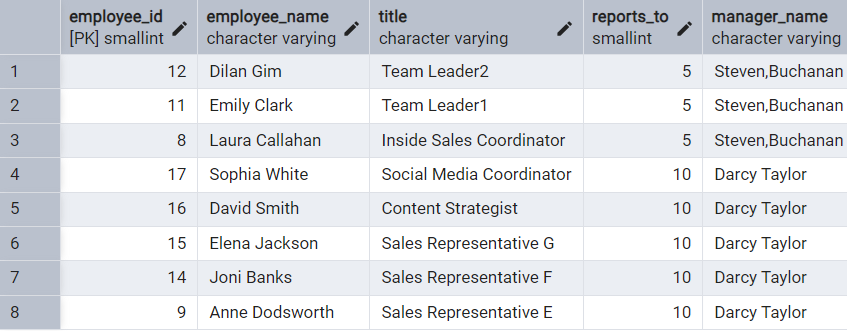
Step 3: Second Recursive Iteration
At this step, PostgreSQL finds employees who report to those found in the previous step (Steven, Darcy, or Bryson).
Repeats the process until no further rows match
Builds full path and level for each employee
Output of step3:
Subsequent Iterations:
PostgreSQL automatically runs the recursive query repeatedly. Each time, it uses the working table to find employees reporting to those added in the last iteration.
The process stops when no new employees are found (i.e., the recursion terminates).
With each step, the query goes one level deeper in the organization, showing who reports to whom at every level.
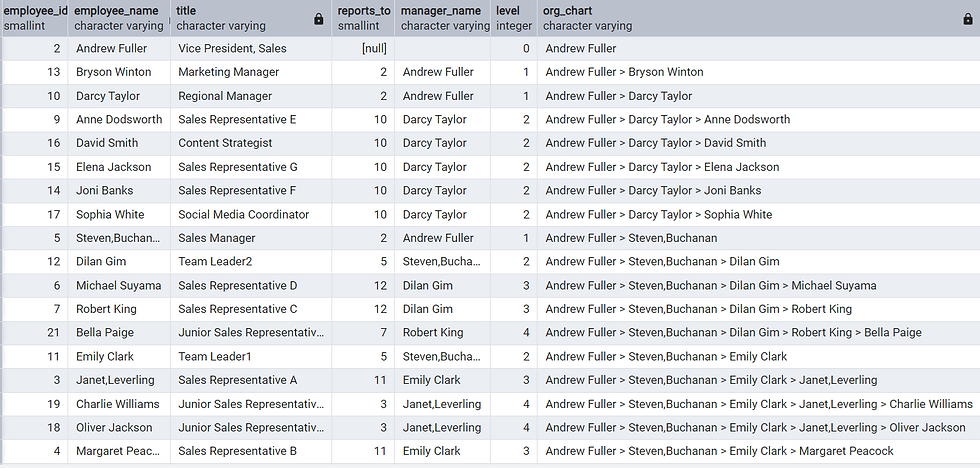
Final Output
After all the steps are done, the final result set contains:
Every employee in the organization.
Each person’s manager, hierarchy level, and reporting path(eg. VP > Sales Manager>Sales Rep..).
The final result set provides a clear view of the organization’s structure, showing how each employee fits within the hierarchy, who they report to, and their full reporting path.
Performance Considerations
When to Use Recursive CTEs
Pros:
Ideal for small to moderately sized hierarchies
Built-in SQL support for tree traversal
Cons:
Can be slow for very deep hierarchies
Performance depends heavily on indexing and query design
💡 Tip: Use EXPLAIN or EXPLAIN ANALYZE to analyze recursive query plans. This helps to spot slow parts of the plan and fine-tune performance by optimizing joins, adding indexes, or adjusting recursion depth.
Optimization Tips:
To improve the performance of recursive CTEs
Use UNION ALL instead of UNION
Use UNION ALL for faster execution unless duplicates must be removed
Include Explicit Termination Conditions
Prevent infinite recursion and control depth
Use a condition like WHERE level < 10 to limit how deep the recursion goes
Index Key Columns
Ensure columns used in joins (e.g. employee_id, reports_to) are indexed for faster recursion
Use Materialized View for Results
If the output of recursive CTE is reused frequently, store the results in a materialized view. This avoids recalculating the hierarchy multiple times and improves performance.
Note: While recursive CTEs are powerful, materializing their final results in a view reduces repeated computations and improves performance for frequent reuse. However, materialized views may increase memory usage depending on the size of the data.
Best Practices
Always include a termination condition.
Use UNION ALL unless duplicates must be removed.
Conclusion
Recursive CTEs are a powerful solution for handling hierarchical data, such as organizational charts, category hierarchies, and nested structures. By implementing proper termination logic, indexing, and query optimization, they provide a reliable and reusable approach for managing complex relationships. Their versatility brings both clarity and efficiency, making them essential for modern data challenges.
💡 Tip: While recursive CTEs are powerful, consider storing their results in materialized views for large hierarchical datasets that are frequently accessed, especially in reporting systems.


