Playwright with API:POSTMAN

In modern web development, APIs play a significant role. The API economy refers to the use of Application Programming Interfaces (APIs) to facilitate the creation of new products, services, and business models.
APIs allow different software applications and systems to interact with each other, enabling data sharing, integration, and communication between various services and devices.
APIs have become fundamental building blocks of modern software development, allowing businesses to develop new products and services more quickly and efficiently.By leveraging the capabilities of existing software and platforms.
It also provides new opportunities for businesses to generate revenue and reach new markets. For example, many companies offer APIs that allow third-party developers to build applications that integrate with their services, creating new business opportunities for both the API provider and the developers.
When doing automation testing, you must automate use cases on UI, API, or both. Let's take an example where you need to log in using the token, or you want to quickly create a dataset using API and then run the UI test. You need an automation testing framework to run UI tests and trigger API endpoints. Further, it helps in end to end testing, creating prerequisite data, configuring microservices, and setting up the environment.
CRUD in API
CRUD stands for Create, Read, Update, and Delete, which are the four basic operations that can be performed on data in a database or system. When building an API, it is common to implement CRUD functionality to allow customers to perform these operations on the resources the API exposes.
How CRUD can be implemented in an API:
Create (POST)
This operation is used to create a new resource. The client sends a POST request to the API endpoint with the data for the new resource in the request body.
Read (GET)
This operation retrieves an existing resource or a list of resources. The client sends a GET request to the API endpoint, optionally with query parameters to filter, sort, or paginate the results.
Update (PUT or PATCH)
This operation is used to modify an existing resource. The client sends a PUT or PATCH request to the API endpoint with the updated data for the resource in the request body. PUT replaces the entire resource with the new data, while PATCH only updates the specified fields.
Delete (DELETE)
This operation is used to remove an existing resource. The client sends a DELETE request to the API endpoint with the unique identifier of the resource to be deleted.
Set up Playwright for API Testing
Get started with Playwright - API:
POST API Request using static API Request body
POST API Request using static JSON body
Now we will start a POST API Request using a static API Request body
First, we will work following the steps :
Installed playwright
How to get Postman collections?
Playwright API testing on GitHub: Add a GitHub Actions workflow to easily run tests on CI
Create a POST API Request
Validate status code
Validate JSON API Response
Validate Nested JSON Object
Step-1
Get started by installing Playwright using npm, yarn or pnpm
Create an empty folder called " Playwright API testing".
Open the command prompt: npm init playwright@latest
It takes some time to install plugins and libraries.
Here we have these options:
typescript/ JavaScript: choose JavaScript options in the playwright automation script.

Go to VScode and open the folder: open the Playwright API testing folder
Step-2
We are using the Postman collection for the BOOK API.
We will create a new repository for playwright API testing
Step-4
Create a POST API request:
IN the postman, we will check the BOOKAPI collections for the POST request. (Manual testing)
We will add the baseURL in the playwright. config.js file.
baseURL: 'https://restful-booker.herokuapp.com'

Now we will create tests under the post_api_request.spec.js file,
Inside the post_api_request01.spec.js file, we will follow the steps:
Load the playwright module
Write a test
Create a Post API request
Validate status code
Validate JSON API response
Validate nested JSON API response
Create a POST API request

We will execute and check our tests, in ready or not.

API response body prints on the console.
Step-5
Validate status code:
We can validate with the postAPIResponse variable.
In Postman:
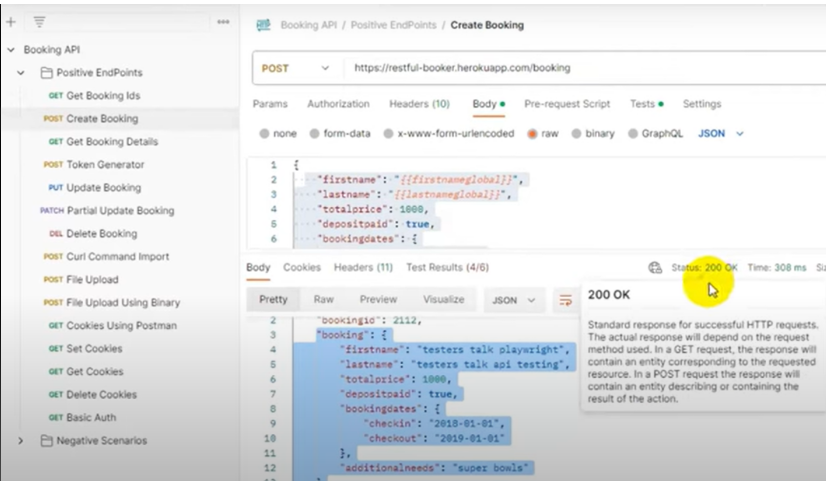
Once the request is completed, we will receive the response. We assert by using expect condition for the ok message and status code 200.
IN VScode:

STEP-6
Validate JSON API response:
In POSTMAN JSON DATA:
We are just validating the first name and last name JSON response data.

Step-7
Validate nested JSON API response:
In the Postman collection, we have nested JSON data.
We will use nested JSON data.

Execution
Run the following command:
npx playwright test tests/post_api_request01.spec.js
When we execute the request, it prints the response body as we have used console.log, then it asserts and marks the test as passed.
HTML Report
To get the HTML report, you can run the command:
npx playwright show-report

POST API Request using static JSON body
In this section, how a POST call can be made by passing the static JSON file data in the body.
Create a folder with the name test-data and then add a JSON file with the name post_request_body.json. In the booking-details file, mention all the booking details you must pass while making a POST call.
Implementation:

Implementation
To create a new booking by passing the data from JSON in POST request to the /booking endpoint, we need to provide the request body by using a JSON file. The rest of the implementation of the code would be the same as mentioned in the previous approach.
We will create tests under the post_api_request02.spec.js file,

Once the request is completed, we will receive the response. We assert by using expect condition for the ok message and status code 200.
Also, we assert the response body to check the key and value.

Execution
Run the following command:
npx playwright test tests/post_api_request01.spec.js
When we execute the request, it prints the response body as we have used console.log, then it asserts and marks the test as passed.

HTML Report
To get the HTML report, you can run the command:
npx playwright show-report:

We will complete our CRUD methods in the next blogs.
Thank You.


