Overview of Thread Methods and Thread Synchronization

Hi all!!! I have already written a blog on the basic concepts of threads. Now, let's explore these concepts in depth. Please refer to my previous blog, https://www.numpyninjaacademy.com/post/unveiling-the-basics-of-thread-a-beginner-s-guide, where you can get an Introduction to Threads, the Components of a Thread, the Life Cycle of a Thread, and the Implementation of a Single thread. In this blog, let us look into the details of the multi-thread implementation, Differences between Multi-tasking and Multi-threading, and their synchronization.

Many confuse between multi-threads and multitasking. A process is a program with multiple threads, whereas a thread is an individual part of a running program. Multi-tasking is when the CPU executes many tasks or processes at a time. The operating system manages CPU time by scheduling multiple tasks to run simultaneously.
There by ensures efficiency and productivity. Multi-threading is when a process has multiple threads that run simultaneously. These threads share the same address space and resources.
Multi-Tasking | Multi Threading |
Execution of multiple processes by the operating system at the same time. | Many threads are created from a process in a system. |
Every program has its own address space and resources. | Multiple threads may share a common address space and resources. |
Heavyweight process | Lightweight process |
Context switching is at a high cost, where there is a high overhead involved | Context switching is at a low cost |
Slower Performance | Executes fastly |
Increased productivity and efficiency | Threads require careful management, especially when it comes to synchronization |
Methods Of Thread Class:
Whenever we create a thread in Java, we extend the thread class to gain access to all the methods available in that class through an instance of our new class. The thread class serves as a base class, and we create a child class that inherits from it using the concept of inheritance. The main methods available in the thread class are as follows:
Methods of the Thread Class | Description |
start() | The execution of the thread will start from this method. Unless we call this method, the thread does not start |
run() | This method is implicitly called by the start method. |
sleep(milliseconds) | The sleep method temporarily halts the thread for the specified milliseconds. It is a static method, meaning no object needs to be instantiated. This method should always be enclosed within a try-catch block, as it can throw exceptions. |
join() | This method waits for a thread to finish its process. It is used in multi-threading. This method is static and should be written in a try-catch block |
getId() | This method is used to get the ID of the current thread. |
getName() | This method is used to get the name of the current thread. The thread name always starts from thread 0. |
setName(string) | This method is used to set the name of the current thread. |
getPriority() | The thread's priority can vary from 1 to 10. Minimum priority is 1, Normal priority, which is the default priority, is 5, and maximum priority is 10. This method is used to get the priority of a specific thread. |
setPriority(integer) | This method is used to set the priority of the thread. The integer value varies from 1 to 10. |
isAlive() | This method tells the status of the thread, whether the thread is alive or not. This method returns a boolean value, true or false. |
Let us see the implementation of the above-mentioned methods:
class Th extends Thread
{
public void run()
{
for(int i=0;i<5;i++)
{
try
{
Thread.sleep(1000);
}
catch(Exception e)
{
}
System.out.println(i);
}
}
}

class TMethods
{
public static void main(string args[])
{
Th t1 = new Th();
System.out.println("ID="+t1.getId());
System.out.println("Name of the thread is="+t1.getName());
t1.setName("Miruthu");
System.out.println("Name of the thread after changing is="+t1.getName());
System.out.println("Priority of the thread is="+t1.getPriority());
t1.setPriority(4);
System.out.println("Priority of the thread after changing  is="+t1.getPriority());
System.out.println(t1.isAlive());
t1.start();
}
}
OUTPUT:
ID=8
Name of the thread is = Thread 0
Name of the thread after changing is = Miruthu
Priority of the thread is = 5
Priority of the thread after changing is = 4
true
0
1
2
3
4
When we implement multiple threads, we use the join method, which halts one thread while the other is executing. We shall see the difference in the output when using the join() method. Let's explore the implementation of multiple threads using the join method and without using the join method.
Without the join method:
class Th extends Thread
{
public void run()
{
for(int i=0;i<5;i++)
{
try
{
Thread.sleep(1000);
}
catch(Exception e)
{
}
System.out.println(i);
}
}
}

class TMethods
{
public static void main(string args[])
{
Th t1 = new Th();
Th t2 = new Th();
t1.start();
t2.start();
}
}
OUTPUT:
0
0
1
1
2
2
3
3
4
4
Here, both threads are running. First thread 1, then thread 2. Again, thread 1 then thread 2.
With the join method:
class Th extends Thread
{
public void run()
{
for(int i=0;i<5;i++)
{
try
{
Thread.sleep(1000);
}
catch(Exception e)
{
}
System.out.println(i);
}
}
}

class TMethods
{
public static void main(string args[])
{
Th t1 = new Th();
Th t2 = new Th();
t1.start();
try
{
t1.join();
}
catch(Exception e)
{
}
t2.start();
}
}
OUTPUT:
0
1
2
3
4
0
1
2
3
4
Here, thread t1 runs while t2 is halted temporarily. And then t2 runs. This executes in an order.
Thread Synchronization:
Earlier, we saw the thread class's methods, the implementation of single threads, and multi-threads with the help of the join method. Now, let us see how threads are scheduled with the help of thread synchronization. When we use multiple threads, we cannot predict which one will run. If we use synchronization, only one thread will run at a time, and that current thread is in a lock procedure; other threads will not interrupt. Remaining threads will wait until this current thread is completed.
For example, we have three threads t1,t2, and t3. They can run in any order, like
t1. t2. t3.
t2. t1. t3.
Multithreaded Implementation Executing Without Synchronization
import java.io.*;
class Example
{
void display()
   {
Thread g= Thread.currentThread();

for(int i=0;i<=5;i++)
   {
       try
            {
System.out.println(g.getName()+" "+i);
            }
    catch(Exception e)
            {
           }
       }
   }
}
class T extends Thread
{
Example e;
T(Example e)
{
this.e;
}
public void run()
{
e.display();
}
}
class TSynch
{
public static void main(String args[])
  {
Example ex = new Example();
T t1 = new T(ex);
T t2 = new T(ex);
T t3 = new T(ex);
t1.start();
t2.start();
t3.start();
  }
}
Output
Any order can be seen. There is no specific manner in which the thread is going to be executed. When we use synchronization, t1 is locked, and other threads cannot interrupt until t1 completes executing. We have achieved this in the join function, and the join method is also similar to this.
The drawback of the join method is that if we want to synchronize 100 or more threads, we have to apply the join to all threads. To avoid this, we use synchronization, which can be done in three ways.
Using Synchronized Keyword
Add the synchronized keyword as a prefix to the method where the statements are written to be executed. But we cannot add the keyword to the run method because we will have the derived class from the base class Thread. We are overriding the run function from the thread class. The rule for overriding is that the name, parameter, and scope must not be changed. If it is changed, then it is not method overriding then it is a different method. All these must be the same for base and derived classes. Only the statement inside the run function will be modified. So we will implement it in a separate method, and this method will be called by the run function.
Implementation:
import java.io.*;
class Example
{
synchronized void display()
   {
Thread g= Thread.currentThread();

for(int i=0;i<=5;i++)
   {
       try
            {
System.out.println(g.getName()+" "+i);
            }
    catch(Exception e)
            {
           }
       }
   }
}
class T extends Thread
{
Example e;
T(Example e)
{
this.e;
}
public void run()
{
e.display();
}
}
class TSynch
{
public static void main(String args[])
  {
Example ex = new Example();
T t1 = new T(ex);
T t2 = new T(ex);
T t3 = new T(ex);
t1.start();
t2.start();
t3.start();
  }
}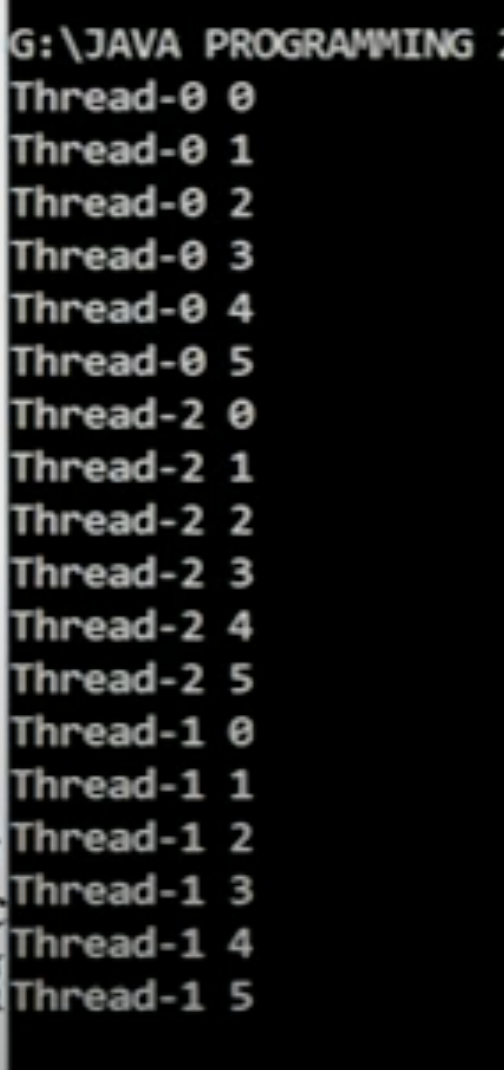
Output
2. Using Synchronized Block
If we restrict synchronization for a few lines, then we use this method.
synchronization(this)
{
-----
-----
}
Implementation:
import java.io.*;
class Example
{
void display()
   {
Thread g= Thread.currentThread();
synchronized(this)
{
for(int i=0;i<=5;i++)
   {
       try
            {
System.out.println(g.getName()+" "+i);
            }
    catch(Exception e)
            {
           }
       }
     }
   }
}
class T extends Thread
{
Example e;
T(Example e)
{
this.e;
}
public void run()
{
e.display();
}
}
class TSynch
{
public static void main(String args[])
  {
Example ex = new Example();
T t1 = new T(ex);
T t2 = new T(ex);
T t3 = new T(ex);
t1.start();
t2.start();
t3.start();
  }
}
Output:
3. Synchronized Static Block
These keywords are used in the method where the thread instruction is executed. Since it is a static method object is not created to access. It can be directly accessed by class name.method name.
Synchronized static return type methodname ()
{
-------
-------
}
Implementation:
import java.io.*;
class Example
{
synchronized static void display()
   {
Thread g= Thread.currentThread();

for(int i=0;i<=5;i++)
   {
       try
            {
System.out.println(g.getName()+" "+i);
            }
    catch(Exception e)
            {
           }
       }
   }
}
class T extends Thread
{

public void run()
{
Example.display();
}
}
class TSynch
{
public static void main(String args[])
  {

T t1 = new T();
T t2 = new T();
T t3 = new T();
t1.start();
t2.start();
t3.start();
  }
}
Output:

Learning is a lifetime process. Let us all enjoy the learning process.
Hope you all understood the concepts of threads and their implementation.Thank you for reading my blog..


