Mock Servers in Postman: Build Before the Backend Exists
Modern development often stalls for a familiar reason: the frontend team is ready to build, but the backend API isn't finished yet. Or the API exists but it's unstable. Or you need to test an error state that's nearly impossible to trigger in the real system.
This is where mock servers come in and Postman's implementation is one of the cleanest ways to create them. A mock server is essentially a mirror API that returns predefined responses. You define what the endpoints should return, Postman hosts it on a real URL, and your code calls it like it's the real thing.
This post walks through what mock servers are, why you'd use them, and how to set one up in Postman from scratch.
What Is a Mock Server?
A mock server is a simulated API endpoint that returns canned responses based on the requests it receives. It doesn't connect to a real database or execute business logic, it just matches the incoming request to a saved example and sends back the corresponding response.
In Postman, mock servers are built directly from your collections. You create example responses for each request in your collection, then Postman generates a hosted mock server that serves those examples. The result is a fully functional URL that behaves like your API without needing the actual backend running.
Why we need to use Mock Servers?
1.Unblock Frontend Development
Frontend teams can start building against the API contract immediately, even if the backend isn't finished.
2.Test Edge Cases
Simulate 401/403/404/500 errors, timeouts, empty states, and rate limits without trying to “break” the real system
3.Contract-First Design
Define what the API should look like before implementation, ensuring frontend and backend teams are aligned.
4.Demos and Prototypes
Show working prototypes to stakeholders without needing a full backend infrastructure in place.
When You Should Use a Mock Server:
Mock servers are ideal when you're in the early stages of development, when you're working in parallel with backend teams, or when you need to test specific scenarios without affecting production data. They're also perfect for onboarding new developers where they can experiment with API calls without worrying about breaking anything.
However, mocks aren't a replacement for integration testing against the real API. They return static responses, so they won't catch issues like database connection failures, performance bottlenecks, or unexpected side effects in your business logic. Use mocks to move fast early on, then switch to real endpoints as they become available.
How Postman Mock Servers Work:
The architecture is straightforward. When you create a mock server in Postman, it reads the example responses you've saved in your collection. Each example is linked to a specific request like GET or POST. Postman then generates a unique URL for your mock server.
Mock Server Request Flow
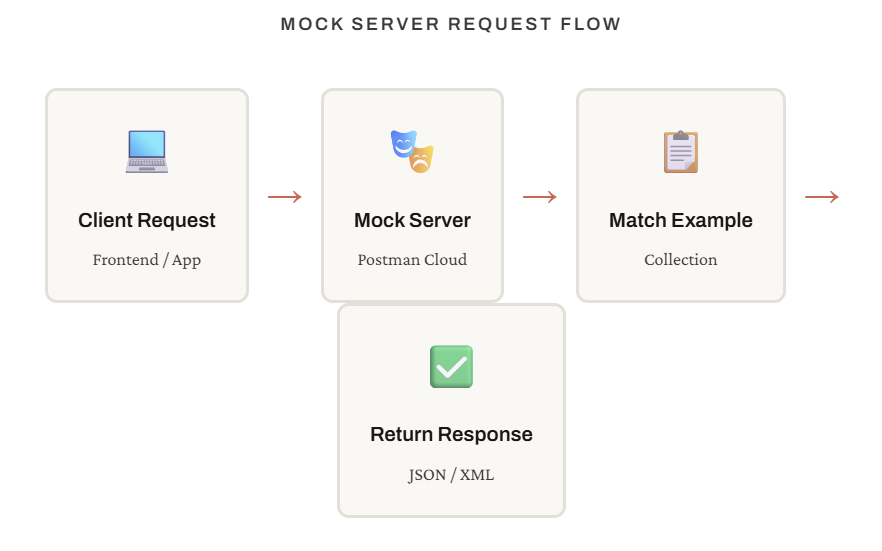
When a request comes in, Postman matches it against your collection's requests based on the HTTP method and path. If it finds a match, it returns the associated example response. If you've saved multiple examples for a single request, you can configure which one to return based on request headers or query parameters.
Creating Your First Mock Server in Postman:
Let's walk through the process step by step. We'll create a mock server for a simple user management API with three endpoints: list users, get a specific user, and create a new user.
1.Create a Collection
In Postman, create a new collection. This will hold all your requests and examples.
2.Add Requests to the Collection
Add any number of requests like GET, POST,PUT,DELETE. The base URL will be generated from mock server.
3.Add Example Responses
For each request, click "Save Response" and then "Save as Example". Define what the API should return .For example, a JSON array of users for GET.
4.Create the Mock Server
In the collection menu, select "Mock Collection". Give your mock server a name, choose an environment if needed, and decide whether to make it private or public. Postman will generate a unique URL.
5.Test the Mock Server
Copy the generated mock URL and use it as the base URL in your requests. Send a request — you should get back the example response you defined.
6.Integrate with Your Application
Replace your frontend's API base URL with the mock server URL. Your app will now receive the mock responses. Once the real API is ready, swap back to the production URL — no code changes needed beyond the config.
Advanced Mock Server Features:
Matching by Request Headers
You can create different examples for the same endpoint and have the mock server choose which one to return based on request headers. For instance, you might return different data based on any mock-scenario header, allowing you to test multiple paths without creating separate mock servers.
Delay Simulation
To simulate realistic network latency, you can configure delays in your mock server responses. This is useful for testing loading states and ensuring your frontend handle's slow responses gracefully.
Private vs. Public Mocks
Postman lets you choose whether your mock server is public (anyone with the URL can access it) or private (requires a Postman API key). For internal development, private mocks are usually the right choice. For public APIs or open-source projects, public mocks can serve as live documentation.
Limitations to Keep in Mind:
Mock servers are stateless. If you POST to create a resource, then GET that resource, the mock won't have "saved" it unless you explicitly created a separate example. This means complex workflows that depend on state (like multi-step checkouts or CRUD sequences) require you to think through and manually create examples for each step.
Postman's free tier has rate limits on mock server calls. For most development use cases this is fine, but if you're running automated tests that hammer the mock hundreds of times per minute, you might hit limits. Paid tiers increase these caps.
Finally, mocks don't validate your request payloads beyond basic pattern matching. If your real API expects a specific JSON schema and you send malformed data to the mock, it might still return a success response. Always validate your integration against the real API once it's available.
Conclusion:
Mock servers in Postman are one of those tools that, once you start using them, become indispensable. They turn API development from a sequential, blocking process into a parallel, collaborative one. Frontend and backend teams can work simultaneously. QA can start writing tests before the API is done. Stakeholders can see working demos weeks ahead of schedule.
The setup takes minutes. The payoff lasts the entire project. If you're tired of waiting for APIs to be ready, or if you've ever struggled to test an error state in production, mock servers are the answer.
Happy Learning!


