Mastering SQL JOINs: The Complete Beginner‑Friendly Guide

SQL stores data in a structured, relational format, meaning information is organized into tables made of rows and columns. Instead of keeping all information in one large table, we split data into multiple related tables. This avoids duplication, improves data quality, and makes queries more efficient.
Let’s imagine a retail store system where we store information about customers, employees, products, stores, inventory, and orders.
Example Tables
Customer → CustomerID, Name, Phone, Address
Employee → EmployeeID, Name, StoreID, EmpAddress
Product → ProductID, ProductName, Price
Store → StoreID, StoreAddress
Inventory → StoreID, ProductID, Quantity
Orders → OrderID, CustomerID, EmployeeID, StoreID, OrderDate
OrderDetails → OrderID, ProductID, Quantity
Each table stores one type of information, but real‑world questions often require combining data from multiple tables. This is where JOINs become essential.
Entity‑Relationship Overview
Your tables form a relational structure where:
A Store has many Employees
A Customer places many Orders
Each Order contains multiple Products
Inventory links Stores and Products
This structure is typically represented using an ER Diagram.


SQL Script for Table Creation

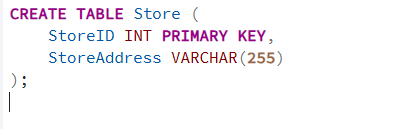


Insert Values into tables


What is join
A JOIN in SQL is a way to combine rows from two or more tables based on a related column between them. It allows you to pull connected information together so you can answer real‑world questions that no single table can answer on its own.
Why Do We Need JOINs?
Suppose we want to find all employees who work at a particular store location.
Employee information → stored in Employee
Store address → stored in Store
Common column → StoreID
To answer this question, we must join the two tables using the shared column.
JOINs allow us to combine related data across tables and answer meaningful business questions.
Why JOINs matter
They connect related tables
They help retrieve meaningful combined information
They avoid data duplication by using relationships instead of repeating data
They support real business questions that span multiple tables
Lets explore different types of joins

Inner Joins:
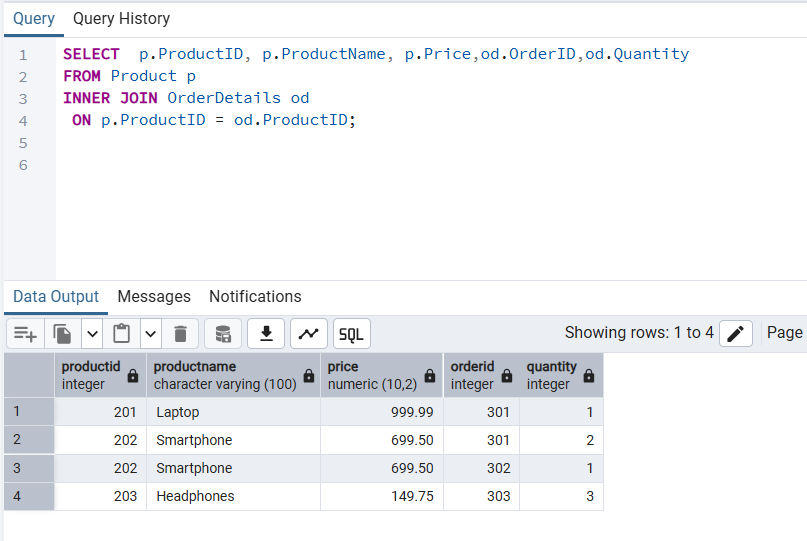
An INNER JOIN returns only the rows where both tables contain matching values based on the join condition. Any rows that do not have a match in either table are excluded from the result.
Example Use Case
Suppose we want to generate a report of products that have actually been sold, along with their order details. This type of report is essential for:
sales analysis
revenue tracking
inventory turnover reporting
Since sold products appear in the OrderDetails table, an INNER JOIN between Product and OrderDetails gives us exactly what we need.
2.Left Join
A LEFT JOIN returns all rows from the left table, along with the matching rows from the right table. If no match exists in the right table, the result shows NULL values for the right‑side columns.
This makes LEFT JOIN ideal when you want to keep everything from the left table, even if related data is missing on the right.
Example Use Case
Use a LEFT JOIN when you want to answer questions like:
Which products exist in the catalog?
Which of those products have been sold?
Which products have not been sold yet? (important for inventory review, restocking, or promotional planning)
In this scenario, the Product table is the left table, and OrderDetails is the right table. A LEFT JOIN ensures that every product appears, even if it has never been ordered.

Right Join
A RIGHT JOIN returns all rows from the right table, along with the matching rows from the left table. If no match exists in the left table, the result shows NULL values for the left‑side columns.
This makes RIGHT JOIN useful when you want to keep everything from the right table, even if related data is missing on the left.
Example Use Case
Use a RIGHT JOIN when you want to answer questions like:
What products exist in the catalog?
Which of those products have been sold?
Which products have not been sold yet? (important for inventory review or promotional planning)
In this scenario, Product is the right table, and OrderDetails is the left table. A RIGHT JOIN ensures that every product appears, even if it has never been ordered.

Full Outer Join
A FULL OUTER JOIN returns all rows from both tables, whether or not a match exists. When a row has no matching counterpart in the other table, the missing side is filled with NULL values.
This makes FULL OUTER JOIN ideal for creating complete, gap‑free reports that include every record from both tables.
Example Use Case
Use a FULL OUTER JOIN when you want to answer questions like:
Which products exist in the catalog, whether or not they’ve ever been sold?
Which order records exist, even if they reference a product that is missing or deleted?
Are there any data inconsistencies between Product and OrderDetails?
A FULL OUTER JOIN ensures that nothing is left out—you see all products, all order details, and any mismatches between them.

Left Join (Excluding Inner Join)
A LEFT JOIN returns all rows from the left table (Product) and the matching rows from the right table (OrderDetails). Rows that do not have a match in the right table return NULL values.
To isolate only the unmatched rows—that is, to exclude the INNER JOIN portion—we add a filter:
sql
WHERE od.ProductID IS NULL
This removes all products that do appear in orders, leaving only products that have never been sold.
Example Use Case
Use this pattern when you want to identify:
Products that have never been sold
Items to target for inventory cleanup
Products suitable for marketing or promotional campaigns
Catalog gaps or data inconsistencies
This technique is often called an anti‑join, because it returns rows that do not have a match in the other table.

RIGHT JOIN (Excluding INNER JOIN)
A RIGHT JOIN returns all rows from the right table (Product) and the matching rows from the left table (OrderDetails). Rows that do not have a match in the left table appear with NULL values.
To isolate only the unmatched rows—that is, to exclude the INNER JOIN portion—we apply a filter:
WHERE od.ProductID IS NULL
This removes all products that do appear in orders, leaving only products that have never been referenced in any order.
Example Use Case
Use this pattern when you want to identify:
products added but never sold
data inconsistencies or missing order links
catalog items that exist but were never used in transactions
A RIGHT JOIN with exclusion is especially helpful for auditing, quality checks, and catalog validation.

FULL OUTER JOIN (Excluding INNER JOIN)
A FULL OUTER JOIN returns all rows from both tables, including matched and unmatched records. To isolate only the non‑matching rows—that is, to exclude the INNER JOIN portion—we apply a filter:
WHERE p.ProductID IS NULL OR od.ProductID IS NULL
This removes all rows where the Product and OrderDetails tables match, leaving only the records that do not have a corresponding entry in the other table.
Example Use Case
Use this pattern when you want to identify:
products that have never been sold
order records that reference missing or deleted products
orphaned or inconsistent data across tables
A FULL OUTER JOIN with exclusion is especially helpful for data integrity checks, audits, and catalog validation.

Cross Join
A CROSS JOIN returns the Cartesian product of two tables—meaning every row from the first table is combined with every row from the second table. Because it does not require a matching condition, it can produce a very large number of rows.
This join is useful when you need all possible combinations of two datasets.
Example Use Case
Use a CROSS JOIN when you want to generate:
all combinations of products and store locations
inventory distribution scenarios
pricing or promotional simulations
test datasets for modeling or forecasting
In this example, pairing every product with every store helps explore how items might be stocked or priced across different locations.

Key Takeaways
JOINs connect related tables so you can answer real‑world questions that no single table can answer.
INNER JOIN returns only matching rows from both tables.
LEFT JOIN keeps all rows from the left table and fills unmatched right‑side values with NULL.
RIGHT JOIN keeps all rows from the right table and fills unmatched left‑side values with NULL.
FULL OUTER JOIN returns all rows from both tables, matching where possible and using NULL where not.
Anti‑joins (LEFT/RIGHT JOIN with NULL filters) help identify missing, unused, or inconsistent records.
CROSS JOIN generates all possible combinations of two tables—useful for simulations and planning.
Choosing the right JOIN depends on whether you want matches only, unmatched rows, or everything from both sides.
Mastering JOINs builds the foundation for more advanced SQL topics like CTEs, subqueries, and analytical queries.


