Master Advanced SQL: Real-World Queries, Reusable Techniques, and Next-Level Data Insights
Advanced SQL aggregation is essential for handling complex data analysis, improving query efficiency, and deriving meaningful insights from large datasets. Once there is a base query, it is easier to reuse and extend. How can you do that naturally and meaningfully within your existing dataset.
Instead of repeating the filtering logic use a CTE,VIEW functions to simplifying complex queries and make your code reusable and readable.
Understanding Of CTE Function-
A CTE (Common Table Expression) in SQL is a temporary result set that you can reference within a SELECT, INSERT, UPDATE, or DELETE statement. It makes complex queries easier to read and manage, especially when working with recursive queries or sub-queries. Acts like a table but don’t store data.
Breaks queries into logical, named sections
Can reference the CTE multiple times in the same query
Can process hierarchical/tree structures easily
Avoids deeply nested SELECT statements
SQL QUERY:
In E-commerce, SaaS, or logistics, understanding year-over-year trends by customer is essential for forecasting, account health monitoring, and retention strategy. Identify which of your customers is growing or disappearing over time?
A pure SQL approach is referred to solving this and then showed how to extend it using SQL VIEW function for reuse and scale.
Step 1- Create orders Table
CREATE TABLE orders (
order_id SERIAL PRIMARY KEY,
customer_id INT NOT NULL,
order_date DATE NOT NULL,
quantity INT NOT NULL,
price_per_unit DECIMAL(10, 2) NOT NULL
);
Step 2- Sample Data Inserts
-- Assume CURRENT_DATE is 2025-05-21-- Customers in last year (2024)
INSERT INTO orders (customer_id, order_date, quantity, price_per_unit)
VALUES
(1, '2024-01-15', 5, 20.00),
(1, '2024-03-10', 2, 22.00),
(2, '2024-06-05', 10, 15.50),
(3, '2024-09-12', 4, 30.00);
-- Customers in current year (2025)
INSERT INTO orders (customer_id, order_date, quantity, price_per_unit)
VALUES
(1, '2025-02-05', 8, 20.00),
(2, '2025-04-20', 6, 15.50),
(4, '2025-01-18', 3, 25.00) -- New customer only in 2025
(3, '2025-05-10', 2, 30.00);
Step 3:-Filter Orders for Relevant Years Using CTE
WITH filtered_orders AS (
SELECT customer_id,
EXTRACT(YEAR FROM order_date) AS order_year,
SUM(quantity) AS total_quantity,
SUM(quantity * price_per_unit) AS total_revenue
FROM orders
WHERE EXTRACT(YEAR FROM order_date) IN (
EXTRACT(YEAR FROM CURRENT_DATE),
EXTRACT(YEAR FROM CURRENT_DATE) - 1
)
GROUP BY customer_id, EXTRACT (YEAR FROM order_date)
)
🧩 Concept: CTE (Common Table Expression)
A CTE allows you to create a temporary result set that you can reference throughout your query. It makes complex logic modular, clean, and easy to debug.
📆 Concept: EXTRACT()
The EXTRACT () function pulls out parts of a date/time value. Here, we're using it to get the YEAR from the order_date.
Step 4: Pivot Yearly Data for Comparison
pivoted AS (
SELECT
customer_id,
MAX(CASE WHEN order_year = EXTRACT(YEAR FROM CURRENT_DATE) - 1 THEN total_quantity
ELSE 0 END) AS last_year_qty,
MAX(CASE WHEN order_year = EXTRACT(YEAR FROM CURRENT_DATE) THEN total_quantity ELSE 0 END) AS this_year_qty,
MAX(CASE WHEN order_year = EXTRACT(YEAR FROM CURRENT_DATE) - 1 THEN total_revenue ELSE 0 END) AS last_year_revenue,
MAX(CASE WHEN order_year = EXTRACT(YEAR FROM CURRENT_DATE) THEN total_revenue ELSE 0 END) AS this_year_revenue
FROM filtered_orders
GROUP BY customer_id
)
🧩 Concept: CASE WHEN
This is a conditional logic structure inside SQL. We use it here to pivot year-based rows into columns for side-by-side comparison.
🧩 Concept: MAX() + CASE WHEN = Pivoting
By applying MAX() over each CASE condition, we pivot our dataset without a dedicated pivot function. It’s a clever SQL trick for turning row-based data into columnar summaries.
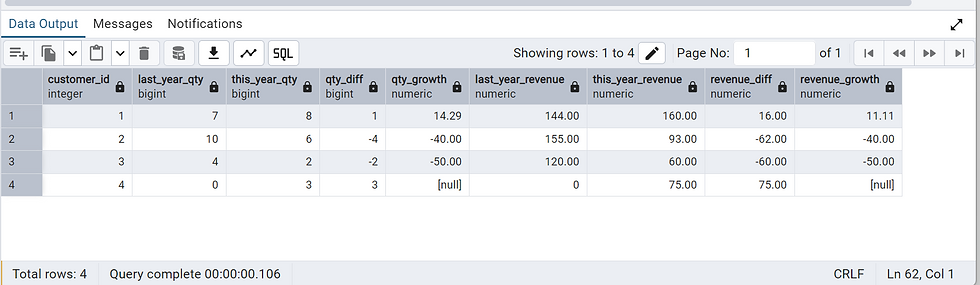
Step 5: Calculate Differences and Growth Rates
SELECT
customer_id,
last_year_qty,
this_year_qty,
this_year_qty - last_year_qty AS qty_diff,
ROUND ((this_year_qty - last_year_qty) * 100.0 / NULLIF(last_year_qty, 0), 2) AS qty_growth,
last_year_revenue,
this_year_revenue,
this_year_revenue - last_year_revenue AS revenue_diff,
ROUND((this_year_revenue - last_year_revenue) * 100.0 / NULLIF(last_year_revenue, 0), 2) AS revenue_growth
FROM pivoted
ORDER BY revenue_growth DESC NULLS LAST;
🧩 Concept: NULLIF ()
The NULLIF(x, y) returns NULL if x = y, otherwise it returns x. We use this to avoid divide-by-zero errors when calculating percentages.
🧩 Concept: ROUND()
Used to round the growth percentages to 2 decimal places for better readability.
🧩 Concept: ORDER BY ... NULLS LAST
Ensure customers with no growth data (e.g., new or inactive ones) appear at the bottom.
🔁 Level-Up: Make It Reusable with SQL VIEW
Instead of repeating filter logic everywhere, wrap the aggregation inside a SQL VIEW.
CREATE VIEW customer_order_summary AS
SELECT
customer_id,
EXTRACT(YEAR FROM order_date) AS order_year,
SUM(quantity) AS total_quantity,
SUM(quantity * price_per_unit) AS total_revenue
FROM orders
GROUP BY customer_id, EXTRACT(YEAR FROM order_date);

🧩 Concept of VIEW :-
A VIEW is a virtual table based on the result of a SQL SELECT statement. It doesn't store actual data itself, but shows data stored in other tables.
Write complex joins/filters once and reuse them easily.
Break down complex logic into manageable parts.
Restrict access to certain columns/rows in a table.
Hide underlying table structures or changes.
Reuse Query -
USE VIEW: - Find Customers with Increased Revenue
SELECT *
FROM (
SELECT
customer_id,
SUM(CASE WHEN order_year = 2024 THEN total_revenue ELSE 0 END) AS last_year_revenue,
SUM(CASE WHEN order_year = 2025 THEN total_revenue ELSE 0 END) AS this_year_revenue
FROM customer_order_summary
WHERE order_year IN (2024, 2025)
GROUP BY customer_id
) AS revenue_comparison
WHERE this_year_revenue > last_year_revenue;

📎 Summary of SQL Concepts Used
SQL Concept | Purpose |
CTE (WITH) | Modularizes complex logic |
EXTRACT() | Pulls out the year from dates |
CASE WHEN | Conditional logic to pivot data |
MAX() + CASE | Pivoting rows into columns |
NULLIF() | Avoids divide-by-zero |
ROUND() | Formats numerical outputs |
ORDER BY NULLS LAST | Organizes results clearly |
VIEW | Promotes reusability and clean architecture |


