Implicit Wait vs Explicit Wait vs Fluent Wait in Selenium

Introduction
One of the most common problems beginners face while learning Selenium is test failure due to timing issues. A test may fail not because the code is wrong but because Selenium tries to find an element before it is fully loaded on the page. This is where waits come into the picture.
This blog explains these most commonly used waits provided by selenium with examples and use cases.
Why Do We Need Waits in Selenium?
Web applications do not load everything instantly. Some elements:
Load slowly due to network speed
Render after animations
Depend on backend responses
If Selenium tries to interact with such elements too early it throws errors like:
NoSuchElementException
ElementNotInteractableException
TimeoutException
We need waits in Selenium to synchronize the test automation script's execution speed with the actual behavior and loading times of the web application. Without proper waits, the script will attempt to interact with elements that are not yet present, visible or interactive, which may lead to common errors and "flaky" (intermittent) tests.
Without waits:
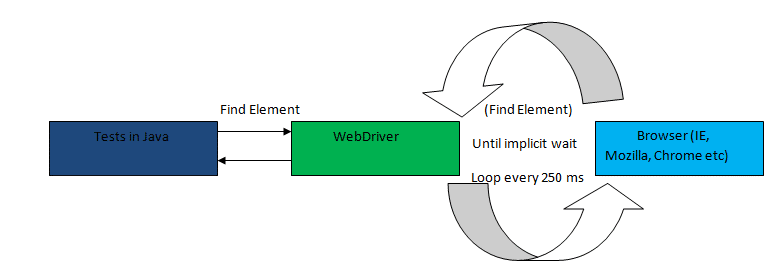
Selenium looks for the element immediately
If not found, it throws Exceptions
With waits:
Selenium waits for the element before interacting
Tests become stable
Why Waits Are Essential
Prevent Race Conditions: Waits eliminate the timing gap (race condition) between the script running a command and the web element being ready to accept that command.
Increase Test Stability & Reliability: By ensuring interactions only happen when elements are ready, waits make test scripts more robust and less prone to failures due to minor variations in network speed or server response times.
Handle Dynamic Content: Waits are crucial for handling elements that are dynamically added to a page, change visibility or rely on background processes (like AJAX calls) before they can be used.
Avoid Common Exceptions: They help prevent errors such as NoSuchElementException, ElementNotVisibleException or ElementNotInteractableException.
Optimize Execution Time: Unlike static Thread.sleep() commands which always pause for a fixed duration, Selenium waits stop waiting as soon as the required condition is met saving execution time.
Types of Waits in Selenium
Selenium provides three main waiting mechanisms:
Implicit Wait – Global waiting rule
Explicit Wait – Condition‑based waiting
Fluent Wait – Customized explicit wait
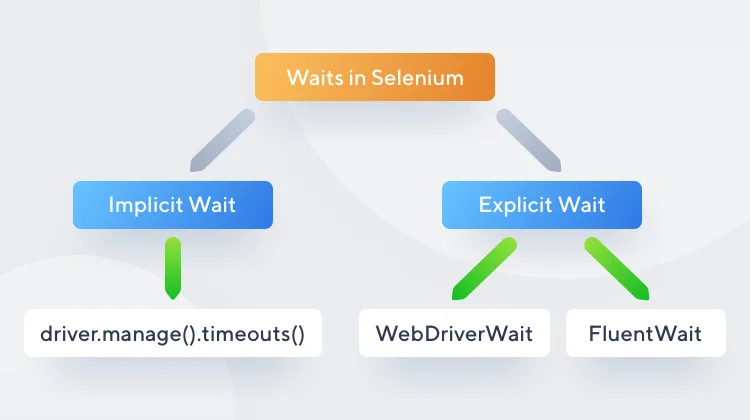
Let’s explore each of these wait types in more detail below.
Implicit Wait
Implicit wait tells Selenium to wait for a certain amount of time before throwing an exception if an element is not found.
driver.manage().timeouts().implicitlyWait(Duration.ofSeconds(10));This tells Selenium:
Selenium will wait up to 10 seconds
If the element appears earlier, Selenium continues immediately
If not found after 10 seconds, an exception is thrown
It is applied once and works globally for all elements. Implicit wait is fine for learning but not ideal for large frameworks.
Key Points About Implicit Wait
Easy to use
Applies to all elements automatically
Not flexible
Can slow down debugging
Not recommended for complex applications
Explicit Wait
Explicit wait allows Selenium to wait until a specific condition is met for a specific element.
Instead of blindly waiting, Selenium checks for conditions like:
Element is visible
Element is clickable
Element is present in DOM
WebDriverWait wait = new WebDriverWait(driver, Duration.ofSeconds(10));
wait.until(ExpectedConditions.visibilityOfElementLocated(By.id("loginButton")));
This tells Selenium:
Wait up to 10 seconds
Continue only when the element becomes visible
Explicit wait should be the default choice when working with dynamic elements
Key Points About Explicit Wait:
Condition‑based
More reliable than implicit wait
Used in real‑world automation
Slightly more code
Fluent Wait
Fluent Wait is an advanced type of explicit wait in Selenium that provides granular control over the waiting process for a specific condition. It defines both the maximum amount of time to wait and the frequency (polling interval) with which to check for the condition to be met.
It allows:
Custom timeout duration
Custom polling frequency
Ignoring specific exceptions
This means Selenium checks for a condition at regular intervals instead of continuously.
Wait<WebDriver> wait = new FluentWait<>(driver)        .withTimeout(Duration.ofSeconds(20))        .pollingEvery(Duration.ofSeconds(2))        .ignoring(NoSuchElementException.class);

wait.until(ExpectedConditions.elementToBeClickable(By.id("submitBtn")));
This Tells Selenium:
Wait for a maximum of 20 seconds
Check for the condition every 2 seconds
Ignore NoSuchElementException while waiting
Continue only when the element becomes clickable
Fail if the condition is not met within the timeout
Key Points About Fluent Wait:
Highly flexible
Useful for slow or unpredictable elements
Ideal for advanced frameworks
Not beginner‑friendly
More complex syntax
Which wait is preferred?
Prefer Explicit Wait for dynamic elements.
Use Fluent Wait when custom polling or exception handling is required.
Avoid mixing Implicit and Explicit Waits, as this can lead to unpredictable delays.
Do not use Thread.sleep() for synchronization it introduces unnecessary delays and makes tests inefficient.
Common Mistakes
Setting very high implicit wait values, which slow down tests.
Using Thread.sleep() instead of proper waits.
Mixing implicit and explicit waits in the same script.
Ignoring dynamic content issues and relying solely on implicit waits.
Why Thread.sleep() is a Bad Practice?
JavaThread.sleep(5000);Use of Thread.sleep() is considered as bad practice because,
Waits even if the element loads early
Slows down test execution
Makes tests flaky and inefficient
Note:- Waits are smarter because they wait only as long as needed.
Example: Login Button with Explicit Wait
WebDriver driver = new ChromeDriver();
driver.get("https://www.facebook.com/login");

// Explicit Wait for login button
WebDriverWait wait = new WebDriverWait(driver, Duration.ofSeconds(10));
WebElement loginBtn = wait.until(ExpectedConditions.elementToBeClickable(By.id("loginBtn")));
loginBtn.click();
Conclusion
Understanding waits is a key milestone for any Selenium beginner. Waits help automation scripts handle real‑world web behavior and make tests stable.
Implicit Wait: Simple, global, not condition-based.
Explicit Wait: Recommended for most scenarios, condition-based.
Fluent Wait: Advanced, customizable, suitable for complex cases.
Learning waits properly will save hours of debugging and is essential for writing professional Selenium automation.


