How to Use Assertions to Improve Your Selenium Tests in TestNG framework

Assertions are important when we are testing an application. Assertions are the validations that are executed in the middle or end of the test cases to evaluate that the actual result is as expected. These checkpoints confirm that the application under test (AUT) is behaving as we expect it to. Assertions help make your tests more reliable, accurate, and meaningful.
In this blog, we’ll walk through what assertions are, why they're important, and how to use them effectively in Selenium tests.
What is an Assertion?
The primary purpose of an assertion is to verify that the application is working correctly at the inserted checkpoints and, hence, overall.
When an assertion is executed, it evaluates a condition (usually a comparison between the actual and expected value). If the condition is true, the test continues to run. If the condition is false, the assertion throws an error, marking the test as failed.
Think of it like asking:
· “Is the login message displaying correctly?”
· “Is the title of the page what I expected?”
· “Is this button enabled?”
If the answer is “no,” the assertion fails — and so does the test.
Why Use Assertions in Selenium Tests?
1. Validate Results Automatically No need to manually check output.
2. Fail Fast Tests stop immediately when something critical breaks.
3. Improve Debugging Clear assertion messages make failures easier to diagnose.
4. Increase Confidence You know your tests are actually validating the expected behavior.
Types of Assertions in Selenium
In Selenium, two types of assertions are categorized based on their behavior after a condition is passed or failed. The two assertions:
Hard Assertion
Soft Assertion
What is a Hard Assertion in TestNG?
Hard Asserts are those asserts that stop the test execution when an assert statement fails, and the subsequent assert statements are therefore not validated. It plays a vital role in projects where we have an element without whose validation, asserting other elements is useless. One good example in such cases is the login functionality. If I want to see my past orders, for example, then what is the point of checking this test case when the login validation already failed? Hard asserts are the default type of asserts in TestNG,
TestNG uses the org.testng.Assert class for hard assertions.
How to use Hard assertions in TestNG?
ard assertions are accessed through the Assert class in TestNG. When a hard assertion fails, the test execution is immediately stopped , and the remaining steps are skipped.we cannot control or continue execution after a failure when using hard assertions.
Now, Let us discuss different types of assertion methods and how to implement in selenium test !
assertEquals:
This is used to compare expected and actual values in the selenium webdriver. The assertion passes with no exception whenever the expected and actual values are same. But, if the actual and expected values are not same then assert fails with an exception and the test is marked as failed.
Syntax: Assert.assertEquals(actual, expected);
Example:

Explanation:
If PageTitle is equal to "Google" , the test will pass.
If PageTitle is not equals to "Google" , the test fails and shows an error.
assertNotEquals :
This is just the opposite of assertEquals. The assertion passes with no exception whenever the expected and actual values are not same. But, if the actual and expected values are same then assert fails with an exception and the test is marked as failed.
Syntax: Assert.assertNotEquals(actual, expected, message);
Example:

Explanation:
This assertion expects PageTitle should not be "Google".
If PageTitle is equals to "Google", test will fail and shows the error message "page title is not matched" .
assertTrue:
This type of assertion is used when you are checking if condition is true. That is when we are dealing with boolean values this assertion is used. Whenever test case passes it returns true and if condition is false then it skips the current method and jumps to next.
Syntax: Assert.assertTrue(condition, messages);
Example:

Explanation:
This assertion check the condition actualText value contains "Automation" . if condition is true test will pass.
If condition is false, the test fails and shows "The text does not contain 'Automaton' " message.
assertFalse:
This type of assertion is used when you are checking if condition is false. whenever condition is not satisfied then test case will pass if condition is satisfied test case will fail.
Syntax : Assert.assertFalse(condition, message);
Example:

Explanation:
This assertion check the condition actualText contains "Manual" . if condition not satisfied test will pass.
if condition satisfied test will fail and throws error message "Text should not contain the word 'Manual' ".
assertNull:
This assertion checks if the object is null or not. when an object is null test case will fail and it throws error message . when an object is not null then when case will pass.
Syntax : Assert.assertNull(object, message);
Example:
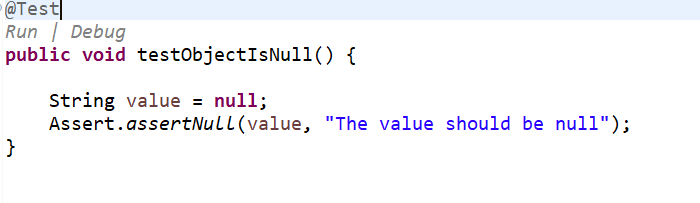
Explanation:
In This assertion value is "Null" so test will pass
If value is not null, the test will fail and display " The value should be null " message.
assertNotNull:
This assertion checks if object is null or not. It aborts the test if object is not null that is if object is having any value and gives an exception.
Syntax : Assert.assertNotNull(object , message);
Example:

Explanation:
In this assertion message contains value so test will pass.
If message value is null, the test fails and displays "The message should not be null " message.
What is a soft Assertion in TestNG?
Soft asserts are just the opposite of hard asserts. In soft asserts, the subsequent assertions keep on running even though one assert validation fails, i.e., the test execution does not stop. Soft assert does not include by default in TestNG. For this, you need to include the package org.testng.asserts.Softassert.
How to use Soft Assertion in TestNG?
To use soft assertions in Selenium, first we need to create an instance of the SoftAssert class. Once the object is created, we can use all the available assertion methods provided by the class.
If an assertion fails, the test will continue executing the subsequent steps without interruption. However, to report any failed assertions, it's essential to call the assertAll() method at the end of the test. This method collects and throws all assertion failures encountered during execution.
Example:

Explanation:
In the above example we have two assertion statements.
If any of these assertions fail, the test execution will continue without interruption. The exceptions related to the failed assertions will only be thrown after the execution is complete.
However, if the softAssert.assertAll(); statement is not included, no exception will be thrown—even if some assertions have failed. This makes it essential to call assertAll() to ensure that any assertion failures are reported properly.
Tips for Using Assertions Effectively
• Use clear messages in assertions to make failures easier to understand
• Don’t overuse them — focus on critical validation points.
• Combine assertions with waits to handle dynamic content.
Conclusion
Assertions are the backbone of test validation in Selenium. They help to catch bugs early and avoid falls test passes and helps to debug where and why test is failing . By using assertions wisely, you’ll write more reliable, readable, and valuable tests.


