How to learn SQL as a beginner and execute query using SQL execution order
Updated: Jan 28, 2025

Part A
Learning SQL or Structured Query Language
The Power of SQL in Data Management
In today's data-driven world, data is everything. Every task, decision, and innovation often revolves around analyzing data. To harness the full potential of data, we need tools that allow us to retrieve and manipulate it effectively. This is where SQL (Structured Query Language) comes into play.
What is SQL?
SQL is not a database system; rather, it is a query language designed to manage and manipulate data in relational database management systems (RDBMS). While the databases store the data, SQL provides the commands needed to interact with it.
Database Management Systems (DBMS)
To perform SQL queries, you need a database management system installed on your system. Some popular DBMS options include:
Oracle
MySQL
MongoDB
PostgreSQL
SQL Server
DB2
Simplifying SQL
At first glance, working with databases—retrieving, cleaning, and analyzing data—can seem overwhelming. However, the beauty of SQL lies in its simplicity. The language is fundamentally composed of just 17 core commands. Mastering these commands allows you to handle most SQL queries effectively. These commands are the building blocks of interacting with databases, making data manipulation straightforward and accessible.
1) SELECT 📌
2) FROM 📍🗺️
3) WHERE 🕵️🔎
4) GROUP BY 👥
5) ORDER BY 🔄📦
6) LIKE 👍🏼
7) COUNT 🔢✌🏼
8) MAX/MIN ⬆️⬇️
9) AVG ↕️
10) SUM 🤑
11) LIMIT 💼
12) JOIN 🤝
13) DISTINCT 🦄
14) HAVING 🎁
15) WITH 📋
16) PARTITION BY 🧱
17) CONCAT 🐈
SELECT
To retrieve data from a SQL database, we need to write SELECT statements, which are often colloquially referred to as queries.
A select query helps you retrieve only the data that you want, and also helps you combine data from several data sources.
FROM
The FROM command is a crucial part of SQL queries, used to specify the table from which data should be selected or deleted. It defines the source of the data for the query.
Usage in SELECT Statements
In a SELECT statement, the FROM command specifies the table from which to retrieve the data.
Usage in DELETE Statements
In a DELETE statement, the FROM command specifies the table from which records should be deleted.
Key Points:
The FROM command is essential for defining the data source.
It is used in both SELECT and DELETE statements.
Combined with other SQL commands like WHERE, JOIN, and GROUP BY, the FROM command helps in building complex queries.
JOIN
SQL joins are the foundation of database management systems, enabling the combination of data from multiple tables based on relationships between columns. Joins allow efficient data retrieval, which is essential for generating meaningful observations and solving complex business queries.
Types of Joins:
INNER JOIN: Returns rows where the ON condition is true for both tables.
LEFT JOIN (or LEFT OUTER JOIN): Returns all rows from the left table, and the matching rows from the right table. If there's no match, NULL values are shown for the right table's columns.
RIGHT JOIN (or RIGHT OUTER JOIN): Returns all rows from the right table, and the matching rows from the left table. If there's no match, NULL values are shown for the left table's columns.
FULL JOIN (or FULL OUTER JOIN): Returns rows when there is a match in either table. If there's no match, NULL values are shown for the columns of the table without a match.
ON
The ON operator in SQL is used in JOIN clauses to define the condition for combining two tables based on related columns. Here's a simple explanation of how it works:
Syntax
SELECT columns
FROM table1
JOIN table2
ON table1.column = table2.column;
The ON clause sets the condition that links rows from the joined tables.
The ON clause is essential in defining how tables are related in these joins, making it a key part of SQL queries that involve multiple tables.
GROUP BY
The GROUP BY operator in SQL is used to arrange identical data into groups. This operator is often used in conjunction with aggregate functions (like COUNT, SUM, MAX, MIN, AVG) to perform operations on each group of data.
HAVING
The HAVING operator in SQL is used to filter the results of a GROUP BY operation based on a specified condition. Unlike the WHERE clause, which filters rows before grouping, HAVING filters groups after the aggregation.
The HAVING clause was added to SQL because the WHERE keyword cannot be used with aggregate functions.
ORDER BY
The ORDER BY clause in SQL is used to sort the result set of a query in a specific order based on one or more columns. This clause is commonly used to arrange data in ascending or descending order, allowing you to control the presentation of data for better analysis and readability.
AGGREGATE
An aggregate function is a function that performs a calculation on a set of values, and returns a single value.
Aggregate functions are often used with the GROUP BY clause of the SELECT statement. The GROUP BY clause splits the result-set into groups of values and the aggregate function can be used to return a single value for each group.
The most commonly used SQL aggregate functions are:
MIN() - returns the smallest value within the selected column
MAX() - returns the largest value within the selected column
COUNT() - returns the number of rows in a set
SUM() - returns the total sum of a numerical column
AVG() - returns the average value of a numerical column
Aggregate functions ignore null values (except for COUNT()).
LIMIT
The LIMIT clause in SQL lets you control how many rows you get back from a query. It’s super helpful when you only need a few results, like the top entries, or when you want to break the results into smaller, more manageable chunks for things like pagination.
DISTINCT
The SQL DISTINCT keyword is used in queries to retrieve unique values from a database. It helps in eliminating duplicate records from the result set. It ensures that only unique entries are fetched. Whether you’re analyzing datasets or performing data cleaning, the DISTINCT keyword is Important for ensuring data integrity and precision.
WITH
WITH provides a way to write auxiliary statements for use in a larger query. These statements, which are often referred to as Common Table Expressions or CTEs, can be thought of as defining temporary tables that exist just for one query. Each auxiliary statement in a WITH clause can be a SELECT, INSERT, UPDATE, DELETE, or MERGE; and the WITH clause itself is attached to a primary statement that can also be a SELECT, INSERT, UPDATE, DELETE, or MERGE.

The WITH clause defines two auxiliary statements named regional_sales and top_regions, where the output of regional_sales is used in top_regions and the output of top_regions is used in the primary SELECT query. This example could have been written without WITH, but we'd have needed two levels of nested sub-SELECTs. It's a bit easier to follow this way.
PARTITION BY
The PARTITION BY clause in SQL is used in window functions to divide the result set into partitions to which a function is applied independently. Unlike table partitioning (which physically splits the data into partitions), PARTITION BY is used within a query to logically segment the data for analysis or calculation purposes.
Key Features of PARTITION BY:
Purpose:
Used in conjunction with window functions like ROW_NUMBER(), RANK(), DENSE_RANK(), SUM(), AVG(), etc.
It divides the result set into partitions and performs calculations on each partition independently.
CONCAT
In SQL, the CONCAT function is used to combine two or more strings into a single string. It is widely used in various SQL databases like MySQL, PostgreSQL, SQL Server, and others. The syntax can vary slightly depending on the database system.
In PostgreSQL, you can also use the || operator for concatenation
Part B
Executing a query using SQL order of execution
SQL Query Order of Execution
When writing SQL queries, understanding the order in which SQL processes different clauses is crucial. Unlike the order in which we write the query, SQL executes it in a specific logical sequence.
SELECT DISTINCT column, AGG_FUNC(column_or_expression), …
FROM mytable
JOIN another_table
ON mytable.column = another_table.column
WHERE constraint_expression
GROUP BY column
HAVING constraint_expression
ORDER BY column ASC/DESC
LIMIT count OFFSET COUNT;
1. FROM and JOINs
First, the database looks at the FROM clause to figure out which tables we’re querying. If we're using JOINs, it combines the tables into a single working set, including any subqueries. Let's think of this step as gathering all the data we need to work with.
2. WHERE
Next, the WHERE clause kicks in. This filters out rows that don’t meet your specified conditions. Only the rows that pass this filter will move forward. At this point, we can only reference columns from the original tables, not anything calculated or aliased later in the query.
3. GROUP BY
After filtering, the GROUP BY clause groups the remaining rows based on the unique values in the specified column. This step is usually paired with aggregate functions like SUM or COUNT, as it condenses multiple rows into summary rows.
4. HAVING
If we have grouped our data, the HAVING clause lets us filter those groups. It’s similar to WHERE, but it works on the grouped data instead of individual rows. This step helps us to keep only the groups that meet certain conditions.
5. SELECT
Now, the SELECT clause runs. This is where we pick the specific columns and calculate any expressions we want in your final result.
6. DISTINCT
If we use DISTINCT, this step removes any duplicate rows from our result set, ensuring each row is unique.
7. ORDER BY
The ORDER BY clause then sorts our data. We can order the results by any column, either ascending or descending. By this stage, we can reference any aliases or calculated columns from the SELECT clause.
8. LIMIT / OFFSET
Finally, the LIMIT and OFFSET clauses control how many rows we get back and where to start. This is where we trim down our result set to just the number of rows you want, making it useful for things like pagination.
Example
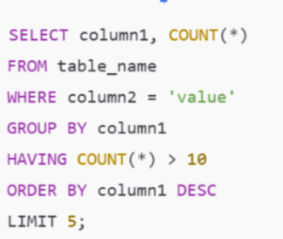
Execution Order:
FROM: Start with table_name.
WHERE: Filter rows where column2 = 'value'.
GROUP BY: Group the remaining rows by column1.
HAVING: Filter groups where the count is more than 10.
SELECT: Choose column1 and the count for the result.
ORDER BY: Sort by column1 in descending order.
LIMIT: Show only the top 5 rows.
This logical flow helps SQL efficiently process the query and return the results you need.
In short, the query works through the data step-by-step: collecting, filtering, grouping, and sorting, before giving you the final set of results.


