How to handle common Selenium Exceptions?
An exception is an error or unexpected event that occurs while a program is running, which disrupts the normal flow of execution. Handling exceptions in Selenium is crucial for building robust and stable test automation framework. If an exception is not handled appropriately, the rest of your tests may also fail. The inability to differentiate between an application problem and a Selenium problem due to the Exception in Selenium complicates the interpretation of automation results.
By implementing effective exception handling mechanisms, you can prevent test failures, improve test reliability, and gain valuable insights into potential issues in your application.
This blog will cover common Selenium exceptions, exploring their causes, and providing practical solutions to mitigate their impact.
NoSuchElementException
This exception occurs when Selenium WebDriver is unable to locate an element on the webpage. This exception is typically thrown when:
The element locator is incorrect or has changed.
The element takes time to load and the test script attempts to interact with the element, before it appears on the page or is present in the DOM.
The page is dynamic and the elements are being updated in real-time
Some of the most useful strategies to avoid this exception include:
Double-check the Locator: Make sure the locator (e.g., By.id(), By.xpath(), By.cssSelector()) is accurate and it uniquely identifies the element you want to interact with.
Use Explicit Waits:Use WebDriver's explicit waits (WebDriverWait) to wait until a specific element condition is met, ensuring the element is present before interacting with it.

Dynamic Locator Strategies: If the element locator is dynamic, consider using more flexible locators like XPath or CSS selectors to match patterns, or use attributes that are more stable over time.
StaleElementReferenceException
An element goes stale when it was previously located, but can not be currently accessed. Elements do not get relocated automatically; the driver creates a reference ID for the element and has a particular place it expects to find it in the DOM. If it can not find the element in the current DOM, any action using that element will result in this exception. This generally happens when:
The DOM has been updated or changed after the element was located.
The page has been refreshed, causing previously referenced elements to become "stale."
Here are some strategies you can use to prevent StaleElementReference exceptions.
Re-locate the Element:When the exception occurs, attempt to re-locate the element to get a fresh reference.

Reload the page before interacting with the element that triggers the StaleElementReferenceException
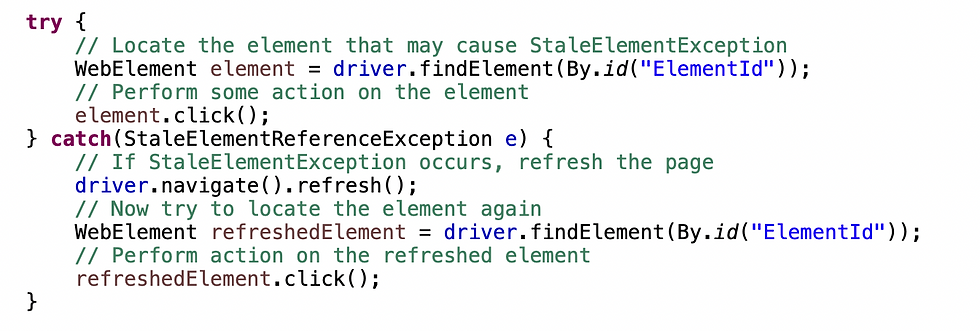
Retry mechanism to wrap the problematic interaction within a loop and a try-catch block, re-locating the element if the exception occurs.

TimeoutException
The TimeoutException occurs when a command or wait fails to complete within a specified time. This usually happens when:
An explicit wait condition is not met within the allotted time.
The page takes longer than expected to load.
Network or server issues are slowing down page response times.
Here are some workarounds to prevent TimeOutException:
Increase the wait time for WebDriverWait or page load time to accommodate slower loading pages.

Combine different types of waits (implicit, explicit, or fluent waits) to handle different scenarios effectively.

ElementNotInteractableException
This Exception is thrown when an element is present in the DOM but is not interactable. This can happen when
The element is hidden (e.g., hidden input fields or elements with display: none CSS).
The element is covered by another element, such as a popup.
The element has not yet loaded completely.
Here are some possible solutions to prevent ElementNotInteractable exceptions.
If the element is present but not visible, use JavaScript to scroll it into view before interacting with it.

Use an explicit wait to ensure the element is visible before interacting with it.

Ensure there are no other elements (e.g., popups) overlapping the target element. Consider using JavaScript to click the element if it remains covered.

ElementClickInterceptedException
This exception occurs when Selenium tries to click an element, but the click would instead be received by a different element. Before Selenium will click an element, it checks if the element is visible, unobscured by any other elements, and enabled - if the element is obscured, it will raise this exception.
Here are some possible solutions to avoid this ElementClickIntercepted Exception.
Wait for the element to be clickable or for the overlapping element to disappear.

If a popup is causing the issue, explicitly wait for it to become invisible or disappear before clicking the target element.

Use JavaScript to scroll the target element into the viewport before performing the click.

Use actions class to move to the element before performing the click.

Best Practices for Exception Handling
Graceful Error Handling
Implement try-catch blocks in your test code to handle exceptions gracefully without causing abrupt test failures.
Retry Logic
For flaky tests, implement retry logic to attempt actions more than once in case of failure. This helps deal with intermittent issues such as network latency or timing issues.
Explicit Waits
Many exceptions happen due to timing issues. So try to use explicit waits in combination with ExpectedConditions to handle dynamic web elements. Avoid hardcoded sleeps in the code which makes your framework unreliable and slow.
Page Object Model (POM)
Implementing a Page Object Model can reduce the impact of changes in the DOM and make exception handling more centralized and efficient. By encapsulating element locators and interactions, it's easier to handle changes and exceptions in one place.
Logging and Reporting
Add logging to track what happens during test execution, especially in the event of an exception. Libraries like Log4j can be integrated with Selenium to provide detailed logs, which are extremely helpful for diagnosing issues.
Adding screenshots to reports
During test case failure, make sure to attach screenshots to the generated reports which can help to understand the state of UI and the possible cause of exceptions.
Conclusion
Exceptions in Selenium and handling them is a critical component of every Selenium framework, as it ensures that the tests run smoothly even when unexpected errors occur. Ignoring exceptions can lead to disruptions in the normal execution of test script, making robust exception handling essential for maintaining the reliability of automated tests. Effective exception handling not only enhances script stability but also aids in delivering meaningful insights into test failures, ultimately contributing to higher-quality automation testing.


