How to achieve parallel testing in Cucumber BDD: Common pitfalls and Thread safe solutions
Updated: Jan 10
Parallel testing is the most powerful technique used in large scale projects to reduce the test execution time, optimize resource utilization and get faster feedback on the quality of the software.
What is parallel testing in cucumber?
Parallel testing in cucumber refers to the ability to execute the Cucumber scenarios in parallel, allowing multiple scenarios to run simultaneously which can speed up overall execution time.
In this blog, I will guide you through the steps for the implementation of parallel testing in cucumber framework using TestNG and Maven surefire plugins.
Step 1 : Create Maven Project
Start by creating new Maven project in your IDE and add all required Maven dependencies in Pom.xml file

Step 2: Feature files and step definitions
Create all necessary feature files for your project that contain test scenarios. Also create corresponding step definition files that defines how the scenarios should be executed.
Step 3: Create cucumber runner class
Runner class should extend AbstractTestNGCucumberTests and it should override scenarios() method to add @DataProvider(parallel = true) annotation.

This annotation instructs testNG to run your cucumber scenarios in parallel threads.
The scenarios method serves as a dataprovider method for TestNG which is responsible for fetching and providing the scenarios defined in your Cucumber feature files.
Step 4: Surefire Plugin configuration
Add the following configuration to the build section of your project’s POM file.

suiteXmlFile configuration in pom.xml is used within Maven surefire plugin to specify which TestNG suite file should be executed during test phase of Maven build lifecycle.
Dataproviderthreadcount tag is used to control the number of threads run in parallel for TestNG dataprovider. The default dataproviderthreadcount is 10 if you don’t configure it. In Cucumber BDD, this dataproviderthreadcount can be configured depending on the number of scenarios you want to run simultaneously.
Note: Be sure to verify the available memory on the device running your tests, and carefully set the dataproviderthreadcount to an appropriate value based on your system’s memory capacity. Always start from minimal value and increase it to know the optimal value for your system(sometimes setting greater than 10 might cause the system to hang). Often you might get selenium exceptions like SessionNotCreatedException due to large number of threads being configured which could not be handled by the system.
Step 5: testng.xml configuration
This testng.xml file is used to configure the test execution suite, define which runner classes to include in execution and set the parameters for parallel execution. You can set the parallel attribute either at the suite level or test level and you can configure TestNG to run either classes in parallel or methods in parallel.
Here is the sample configuration of testng.xml file with parallel execution of classes and thread count as 2.

In the above configuration, there are multiple runners used in the test suite. So to achieve parallel execution across all runner files, I have used “parallel = classes” attribute in the suite level. It can also be set at the test level.
Here thread-count limits the number of classes which can run in parallel. Based on the above configurations in pom.xml and testng.xml, 2 primary threads can run concurrently for the classes and each of those primary thread can execute 15 scenarios(from the feature files listed in corresponding runner) in parallel.
Hence a maximum of 2 ** 15 = 30 scenarios can be executed simultaneously with this configuration.
Why TestNG is used for parallel execution?
Cucumber itself doesn't natively support parallel execution at the scenario level in the same robust and flexible way that TestNG does. TestNG was designed with robust support for parallel execution built-in, which includes the ability to run tests, classes, methods, or suites in separate threads via configuration in a testng.xml file. TestNG acts as the execution management framework, providing the multi-threading capabilities that allow multiple Cucumber scenarios or feature files to run simultaneously, significantly reducing overall test execution time.
Common Issues with Parallel execution:
It is possible that if you don’t have thread safe web driver instance during setup, multiple threads will attempt to access and change the same browser instance simultaneously, leading to a variety of unpredictable issues.
The consequence of not ensuring a thread-safe WebDriver include:
Session Conflicts: Different test scenarios might try to interact with the same browser window, causing actions (like clicks, text entry, or navigation) to be directed to the wrong test's browser instance or tab. Most likely you will be getting NoSuchElementException for session conflicts.
Incorrect Test Results: Test results will be unreliable as scenarios will not run in isolation, potentially leading to false positives or negatives, making the automation suite untrustworthy.
Browser Crashes: The application under test or the browser instance itself may crash or become unresponsive due to conflicting commands or unexpected application states.
Implementation of thread-local WebDriver
Create a class to handle the initialization and management of ThreadLocal WebDriver. This ensures that each thread has its own WebDriver instance.

Use Cucumber’s @Before and @After hooks to initialize and quit the driver for each scenario.

Test Execution
To execute your test automation framework as a TestNG suite, follow these steps:
Right-click on the pom.xml and you will find the menu as below. Click on “Run as Maven test”
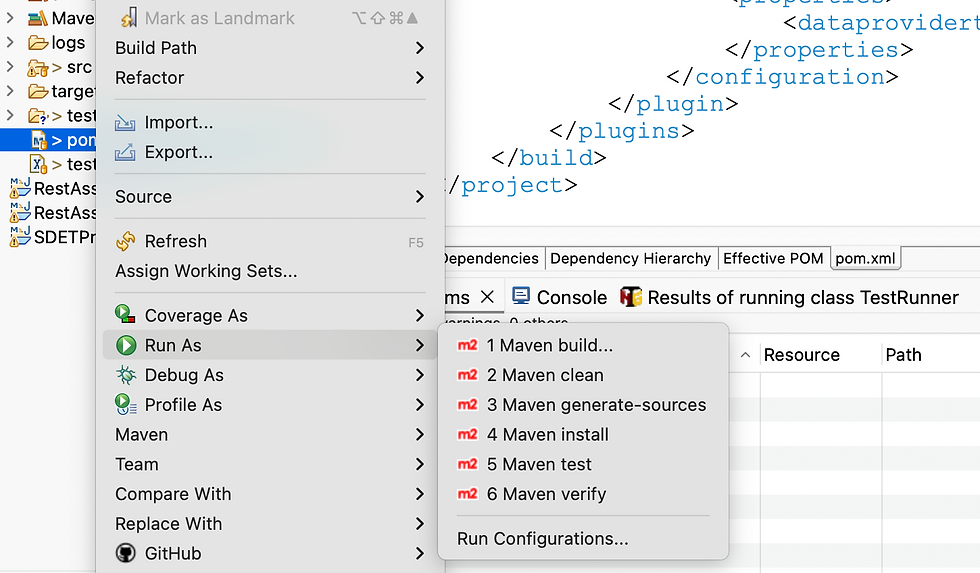

I have set dataproviderthreadcount as 5 in pom.xml and thread-count as 2 in testng.xml. Hence there are 10(5 * 2) chrome windows getting opened simultaneously thereby achieving parallel execution.
Conclusion
In this blog, we have explored parallel testing with cucumber BDD along with implementation examples. With these steps, you can successfully implement parallel testing in your Cucumber project, leading to more efficient and faster test execution, ultimately contributing to the quality of your software. I hope this guide has provided valuable insights into parallel testing optimizing your testing workflow. Happy learning!


