Hands-On SQL Practice Using Retail Sales Data—Part 1

Intro:
This blog is a part of my SQL practice, where I am applying SQL to a retail sales dataset that I found on GitHub to sharpen my SQL skills by writing queries and analyzing patterns to gain confidence in applying SQL to real analysis scenarios. Here I am looking to solidify my SQL skills and problem-solving skills.
Step 1: Creating the Table Structure

I created a table in PostgreSQL matching the structure of the retail sales dataset instead of importing the file directly, allowing me to think about how dates, numeric values, and text fields should be stored in the database before loading the data.
Step 2: Loading the Data into PostgreSQL

Now that the table was created, it was time to load the raw CSV file into the database. Using pgAdmin, I imported the dataset into the retail_sales table using the Import/Export feature, specifying that the file format was CSV, encoding was UTF-8, and the column order matched the table structure.
After the import completed successfully, I ran a simple SELECT * query to verify that all records had loaded correctly, and now the raw retail sales data was fully available in PostgreSQL and ready for further cleaning and analysis.
Step 3: Verifying the Imported Data

Verify the imported data: Once I imported the CSV file, I performed some basic SQL queries to verify the data was loaded correctly. I used a COUNT(*) query to confirm the number of records, which should be 2,000 rows, and previewed the first 10 records with a SELECT * … LIMIT 10 query to make sure columns were aligned, data types were correct, and there were no glaring errors in the imported values.
Step 4: Checking for Null Values
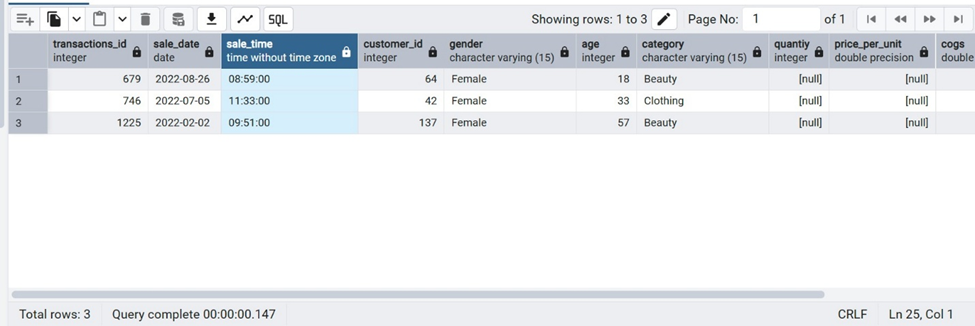
After loading and verifying the data, I then ran a SQL query to look for NULL values in all columns and to return only the rows that had at least one missing value across all columns (missing values can affect calculations like total sales and revenue analysis).
Looking at the results, I saw that there were a few transactions that had NULL values in columns such as quantity, price_per_unit, and cogs, which I identified early because they would affect calculations like total sales and revenue analysis. At this point, I did not alter the data because I wanted to understand where and how often the missing values existed before I determined how to address them.
Step 5: Removing Records with Missing Values

After finding the rows with missing values, I deleted those records from the dataset, as they had NULL values in key columns such as quantity, price_per_unit, and cogs, which are needed for sales and revenue calculations, so leaving them would skew the analysis.
I deleted the incomplete rows using a DELETE statement, and then verified that the operation was successful, thus improving the data quality and ensuring that the remaining records were complete and reliable for analysis.
What’s Next
In this practice exercise, I worked with actual retail sales data and performed tasks such as creating tables, handling missing values, and aggregating data, all of which solidified my understanding of how foundational SQL skills can be applied to ensure accurate analysis.
In Part 2, I will move from data preparation to business analysis, writing SQL queries to answer questions about sales performance, customer behavior, and trends.


