Data‑Driven Testing in Selenium Using CSV

Introduction
While learning Selenium it is common to write tests with fixed values such as usernames and passwords. This works for practice but real applications need the same test to run with multiple input values.
Data‑Driven Testing helps solve this by allowing a Selenium test to run multiple times using test data stored in an external file. One of the simplest ways to do this is by using a CSV file.
What Is Data‑Driven Testing?
Data-driven testing (DDT) is a software testing methodology where test scripts are executed multiple times using different sets of input data which are stored in external data sources rather than being hard-coded into the test logic.
Why Use Data-Driven Testing?
Increased Test Coverage: Testers can easily test a wider range of scenarios, including positive, negative, boundary and edge cases, by simply adding more data to the external source.
Reusability: The same test script can be reused across multiple test scenarios and even for different projects, reducing the need to write redundant code.
Simplified Maintenance: If test data needs to be updated (e.g. a new valid login credential), only the external data file needs modification not the test script itself. This makes tests more adaptable to changing requirements.
Efficiency and Accuracy: Automation reduces human error associated with manual data entry for repetitive tasks, leading to more reliable test results and faster test execution.
Better Collaboration: The separation of data and logic allows technical and non-technical team members to work on the data and the scripts concurrently.
Why Use CSV Files?
CSV (Comma-Separated Values) files are a popular and practical choice for data-driven testing for several reasons:
Simplicity and Accessibility: CSV files are plain text, human-readable and can be created and edited using simple text editors or common spreadsheet software (like Microsoft Excel or Google Sheets) without requiring special tools or infrastructure.
Ease of Management: They are straightforward to create, modify (simply add a new line for a new test case) and manage under version control alongside test scripts.
No Infrastructure Dependencies: Unlike databases, CSV files don't require complex configurations, access credentials or a running server, making them easy to use in various testing environments, including CI/CD pipelines.
Quick Scenarios: They are ideal for quick testing scenarios and can be easily used by team members without technical expertise, fostering broader collaboration in the QA process.
Project Setup
Recommended Tech Stack
Java 11+
Selenium 4.x (WebDriver)
TestNG 7.x (DataProviders)
OpenCSV (CSV parsing)
Gradle or Maven (build/deps)
POM (Page Object Model) for clean separation
Sample CSV File
Create a file named login_data.csv under src/test/resources/testdata.
username,password
standard_user,secretsauce
invaliduser,wrongpassword
Project Structure
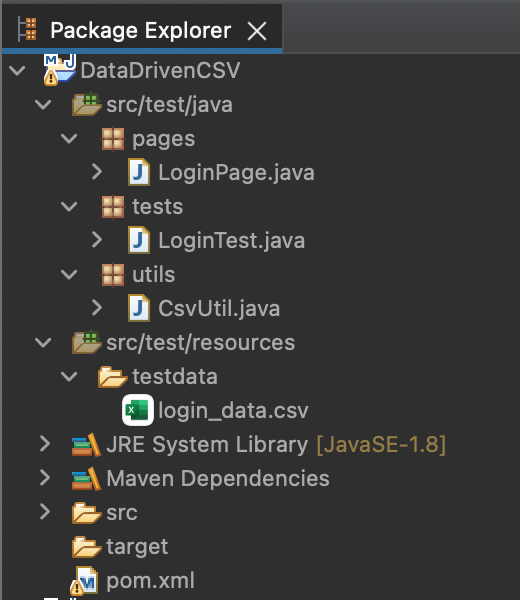
Add dependencies (Gradle)
dependencies {
    testImplementation 'org.seleniumhq.selenium:selenium-java:4.16.1'
    testImplementation 'org.testng:testng:7.8.0'
    testImplementation 'com.opencsv:opencsv:5.9'
}
CSV Utility Class (CsvUtil.java)
This class reads data from the CSV file.
import com.opencsv.CSVReader;
import java.io.FileReader;
import java.util.ArrayList;
import java.util.List;

public class CsvUtil {

    public static Object[][] readCsv(String path) {
        List<Object[]> data = new ArrayList<>();

        try (CSVReader reader = new CSVReader(new FileReader(path))) {
            String[] row;
            boolean header = true;

            while ((row = reader.readNext()) != null) {
                if (header) {
                    header = false;
                    continue;
                }
                data.add(new Object[]{row[0], row[1]});
            }
        } catch (Exception e) {
            e.printStackTrace();
        }

        return data.toArray(new Object[0][]);
    }
}
Page Object Class (LoginPage.java)
All page‑related logic is written in one class.
import org.openqa.selenium.By;
import org.openqa.selenium.WebDriver;

public class LoginPage {

    private WebDriver driver;

    private By username = By.id("user-name");
    private By password = By.id("password");
    private By loginBtn = By.id("login-button");

    public LoginPage(WebDriver driver) {
        this.driver = driver;
    }

    public void login(String user, String pass) {
        driver.findElement(username).sendKeys(user);
        driver.findElement(password).sendKeys(pass);
        driver.findElement(loginBtn).click();
    }
}
Selenium Test Using CSV + POM (LoginTest.java)
import org.openqa.selenium.WebDriver;
import org.openqa.selenium.chrome.ChromeDriver;
import org.testng.annotations.DataProvider;
import org.testng.annotations.Test;

public class LoginTest {

    @DataProvider(name = "loginData")
    public Object[][] getData() {
                   "src/test/resources/testdata/login_data.csv"
        );
    }

    @Test(dataProvider = "loginData")
    public void loginTest(String username, String password) {

        WebDriver driver = new ChromeDriver();
        driver.get("https://www.saucedemo.com/");

        LoginPage loginPage = new LoginPage(driver);
        loginPage.login(username, password);

        System.out.println("Test executed for user: " + username);
        driver.quit();
    }
}
How This Works
Selenium reads test data from the CSV file
Each row is passed to the test using DataProvider
The test runs once for each data row
Page Object handles UI actions
One test covers multiple scenarios
Benefits of Using CSV with POM
No hardcoded data: Instead of writing usernames and passwords directly in the test code, we keep them in a CSV file. This means if the data changes, we don’t need to edit the code just update the file. It saves time and reduces mistakes.
Cleaner test code: The test looks neat because it only focuses on the steps (like login) and not on the actual data. All the messy details (like reading data) are handled separately. This makes the code easy to read and understand.
Easy to maintain: If the application changes or new test cases are added, we don’t need to rewrite everything. Update the CSV file or the page object class and the tests will still work. Maintenance becomes simple.
Reusable test logic: The same test method can run for many different data sets. For example, one login test can check valid users, invalid users and locked users all using the same code. This saves effort and avoids duplication.
Follows industry best practices: Using POM and external data files is how real automation frameworks are built in companies. Learning this early helps students write professional quality tests and prepares them for jobs.
Conclusion
Data‑Driven Testing using CSV is an easy and effective way to write reusable Selenium tests. When combined with Page Object Model, it helps create clean, readable and maintainable automation code.
This approach is ideal for beginners and provides a strong foundation for professional automation frameworks.


