Data Driven Testing in Cucumber - From Fundamentals to Advanced Techniques
Data Driven Testing (DDT), also known as parameterized testing, is a software testing approach where same test cases are executed with different sets of data. These test data are not hard-coded instead they are stored in external data sources like excel sheets, CSV files, JSON files, etc., and then fed into the test cases. The approach of re-using test scripts provides low maintenance and improve test coverage. Important aspect of parameterized testing is to separate the test data from the test scripts to reduce duplication, maintainability.
How Data Driven Testing Works?
Key Components in DDT are:
Test script: Contains reusable logic (written once) and placeholders for input data
Test data: External file like spreadsheets, CSV files, XML, JSON, databases, or APIs or system containing multiple sets of test data
Data provider: Mechanism to load and inject data into the test during execution
Test execution: Test framework or utility read the data sets and executes the test logic accordingly
Benefits of Data Driven Testing:
Reduces duplication of test scripts - Test code is written once and reused for multiple scenarios
Helps test multiple scenarios using a single test logic
Improves test coverage - More combinations of input values can be tested
Maintenance of test scripts - Changes in data don’t require changes in the test code
Easier to add more test data sets without changing the logic to improve scalability
Cucumber:
Cucumber is an open source tool that supports Behavior Driven Development (BDD). It allows writing test case in human readable format called Gherkin syntax, where the simplicity lies in its human-readable syntax. By using plain language to define test scenarios, Gherkin eliminates ambiguity, Involving stakeholders becomes easier regardless of their programming knowledge and clear communication is enabled. It is compatible with popular software platforms like Selenium, Ruby, and others.
Data Driven Testing in Cucumber:
Cucumber aligns perfectly with the idea of Data Driven Testing which are about reusability, maintainability, scalability and flexibility. There are different ways to implement DDT in cucumber like,
Scenario Outline with Examples Table
DataTable with Scenario
External Data files - Excel
Parameterization via @DataTableType
SCENARIO OUTLINE WITH EXAMPLES:
Scenario Outline is the basic way to do Data Driven Testing directly within the .feature file. Data are passed using the keywords Scenario Outline and Examples. This is suitable when the Test data size is small and static. It is an easy and quick approach for few test cases.


Test Data is passed under "username" and "password" as an arguments along with its datatype. Test case execution is based on the number of data given as an input. Here, to simplify the process, Page Object Model (POM) and Step Definitions are specified in the same class file. Usually, POM and Step Definitions are implemented in different packages based on the requirement.
DATA TABLE WITH SCENARIO:
DataTable or Inline table is used when there are multiple rows of data to be executed using a single scenario. Tabular form data is passed directly in the .feature file. Data are passed using the keywords Scenario and included with Given, When, Then Scenarios . This is suitable when the Test data size is multiple and static.


Data is passed in the feature file under Scenario instead of Scenario Outline. DataTable is converted to a list of maps to handle multiple data. Test case with multiple row of data is executed in the single scenario. Here, to simplify the process, Page Object Model (POM) and Step Definitions are specified in the same class file. Usually, POM and Step Definitions are implemented in different packages based on the requirement.
EXTERNAL DATA FILES - EXCEL:
Cucumber does not directly support external data files like Excel, JSON, CSV, etc., but can be implemented by adding dependencies and plugins in POM.xml. Excel data can be implemented by adding Apache POI dependency. Keywords like Scenario Outline and Examples are used. Instead of specifying data directly in the feature file, excel sheet name and row number is passed as arguments. Best used when the data set is large, dynamic and reusable.

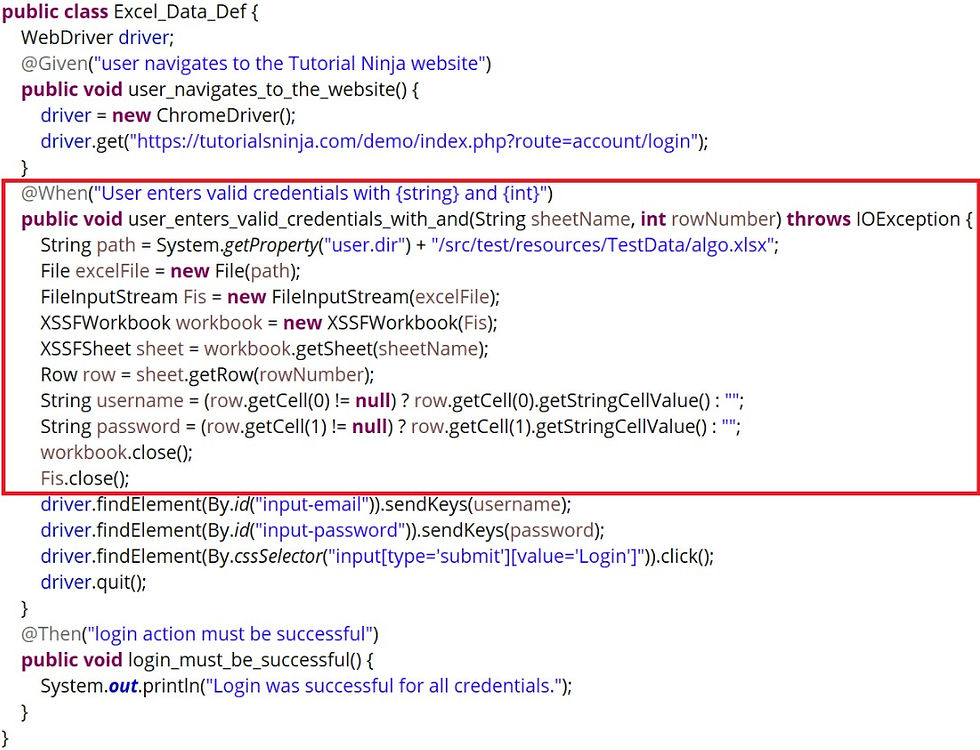

Index in excel sheet starts from 0, the row number which is specified in the feature file should be given accordingly (excluding header).
Keywords:
Path of the file should be given in "String path = System.getProperty("user.dir") + "/src/test/resources/TestData/algo.xlsx";"
FileInputStream - to open and close excel file
XSSFWorkbook - used to load the entire Excel workbook and for .xlsx file
XSSFSheet - to extract the sheet name mentioned in the feature file
Row - to get the data which is passed from the feature file
getCell() - used to get the data form the row
PARAMETERIZATION via @DATATABLETYPE:
@DataTableType is an annotation in cucumber which can be used to transform a DataTable into a Java Object automatically rather than manually parsing data. It is directly mentioned in the feature file. It provides a structured way of working with data instead of directly using Map<String, String> or List<String>. Advantages of using @DataTableType are readability, reusability, simplifying complex data structures.


Constructor to hold credentials

@DataTableType is an annotation used for the method to store username and password. This method is used as List<Login_cred> instead of List<String, String>. This can handle complex data sets.
Data-driven testing in Cucumber is a powerful way to run the same scenario multiple times with different sets of inputs. There are different Data driven testing techniques and it can be used depending on the data size. It helps in separating test logic from test data, making your tests more flexible, reusable, and readable.


