One JSON File, Zero Repetition: Data-Driven API Testing in Postman with a Pre-Request Script

A Little Background
During our LMS API hackathon, every team had to build and test an end-to-end API collection covering user, program, batch, class, login controller, and finally data cleanup. The testing part meant covering positive scenarios, negative scenarios, wrong endpoints, invalid data, missing fields, and more.
Most teams, including ours at the beginning, took the straightforward approach: one Postman request for every scenario. Wrong endpoint? Create a new request. Missing field? Another request. Valid data? Yet another request.
By the time I had gone through just the User controller, I already had requests everywhere. Duplicate URLs, same structure repeated over and over, and every time something changed in the API, I was updating the same thing in multiple places. I searched for a better way.
Then my teammate showed me a simpler approach that was new to me. One JSON file. One pre-request script at the collection level. Every scenario in that collection runs from it automatically.
That one idea saved us a lot of pain for the rest of the hackathon. This blog breaks down exactly how it works, what you need to get right, and the mistakes we made along the way that are worth knowing before you try this yourself.
What Our Collection Looked Like
Our collection had 8 folders running in a strict sequence:

Each folder depended on the one before it. The authentication token generated during login was used by all subsequent requests. The programId created in folder 02 was needed to create a batch in folder 03. The user created later in the flow needed the programId and batchId generated in the previous steps. The batchId was then needed to create a class in folder 05. Get the data wrong at any step and everything after it breaks.
The Idea: One JSON File for the Entire Collection
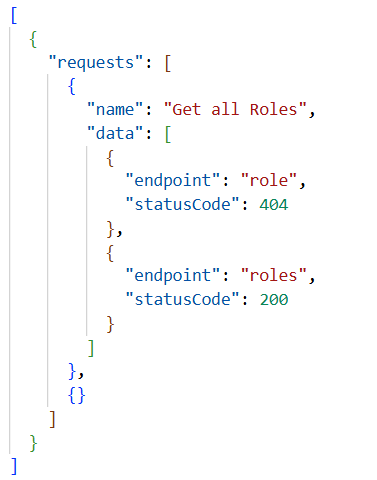
Instead of one request per scenario, we used a single JSON data file loaded through Collection Runner. The structure has a ‘requests’ array at the top level. Each entry in that array has a ‘name’ that matches the Postman request name exactly, and a ‘data’ array with all the test scenarios for that request.
Here’s a JSON data file example:
Three things you have to get right with this data file:
1. The name field must match the Postman request name exactly.
Capitals, spaces, special characters, everything. If there’s even a small difference the script silently skips that request and no data gets injected. No error, no warning. This is the easiest mistake to make and the most annoying to debug.
2. Both endpoint and statusCode live inside the data rows, not hardcoded in the Postman request.
This is what makes the whole approach powerful. From one single Postman request you can test a wrong endpoint that returns 404 and the correct endpoint that returns 200, just by having two rows in your data file. The request itself never changes.
3. The file must end with an empty ‘{}’ as the last entry.
Without it the last request in your collection may not run correctly. It’s a small thing but it will cost you time if you don’t know about it.
The Collection Level Pre-Request Script
This one goes at the collection level, not inside any individual request. That’s the whole point. Write it once and it handles every request in the collection automatically.
if (typeof pm.variables.get('requestdata') !== 'object') {
    pm.variables.set('requestdata', pm.iterationData.toObject());
}
const requestdata = pm.variables.get('requestdata');

// Check if 'requestdata' exists and is an object
if(typeof requestdata !== 'object' || Object.keys(requestdata).length ===0) {
    console.log("No external file found")
    return;
}

// Find the current request from the request data
const currentrequest = requestdata.requests.filter(({name}) => name === pm.info.requestName) [0];
if(!currentrequest){
    console.log(`Request ${pm.info.requestName} has no data defined.`);
     return;
}
else{
       // Check if 'data' exists and is an array
    if (!Array.isArray(currentrequest.data) || currentrequest.data.length === 0) {
        console.log("No data in the current request.");
        return;
    }

    // Extract and set the first data item
    const variables = currentrequest.data.shift();

// Iterate through the variables and set them in Postman
    Object.entries(variables).forEach(([key, value]) => {
            pm.variables.set(key, value);
            if(key==="statusCode"){
                pm.environment.set("expectedStatuscode", value );
            }
            if(key==="logMsg"){
                console.log(value);
            }
        });

         // Re-set the 'requestdata' variable
    pm.variables.set('requestdata',requestdata);

       // If there's more data left, set the next request to the current one
    if(currentrequest.data.length > 0){
        pm.execution.setNextRequest(pm.info.requestName)
    }
}
Here is what’s actually happening step by step:
The JSON file loads through Collection Runner and gets cached in pm.variables, so it persists across all requests in the same run. It then matches to whichever request is currently running using pm.info.requestName.
.shift() is the key part. It removes and returns the first item from the data array each time the request runs; first run picks row one, second run picks row two. No index management needed.
Every field in that row becomes a Postman variable automatically. Only statusCode goes to the environment as "expectedStatuscode" for the test script to use, and logMsg prints to the console so you can track which scenario is currently running.
If more rows remain after the shift, setNextRequest loops the same request back. Once all rows are done, execution moves to the next request naturally.
The Collection Level Post-Response Script
var expectedStatusCode = pm.environment.get("expectedStatuscode");

var statusCodePassed = pm.test("Status code", function () {
    pm.expect(pm.response.code).to.eql(expectedStatusCode);
});

if (statusCodePassed &&
    (pm.response.code === 200 || pm.response.code === 201)) {

    pm.test("Status line is OK", function () {
        pm.expect(pm.response.status).to.be.oneOf(["OK", "Created"]);
    });

    pm.test("Content-Type is valid", function () {
        const ct = pm.response.headers.get("Content-Type");
        pm.expect(
            ct.includes("application/json") || ct.includes("text/plain")
        ).to.be.true;
    });

    pm.test("Response time is ok", function () {
        pm.expect(pm.response.responseTime).to.be.below(2000);
    });
}
Every request gets the status code check. The remaining validations run only when that test passes.
What We Got Wrong and Learned from the Code Walkthrough
After the hackathon our organizers did a code walkthrough with all teams. This is where we found out our test script had a real gap.
Here’s what our original script looked like:
pm.test("Status code", function () {
    pm.expect(pm.response.code).to.eql(expectedStatusCode);
});

if ((pm.response.code === 200) || (pm.response.code === 201)) {
    // extra checks ran here
}
During the walkthrough, our organizers pointed out a scenario where this breaks. Imagine your JSON data file has statusCode: 400 for a particular row, meaning you expect the API to reject that request. But the API has a bug and returns 200 and actually creates the record.
This is what happens with our original script:
The status code test fails because expected was 400 but actual was 200
But then the ‘if’ block runs anyway because the actual response code is 200
So status line OK passes, content type passes, response time passes
Our test results look partially green even though there was a real API bug sitting right there
We actually hit this exact situation during the hackathon and didn’t catch it until the walkthrough. The record was getting created in the database when it shouldn’t have been, and our test results weren’t failing the way they should.
The fix was simpler than we expected.
var statusCodePassed = pm.test("Status code", function () {
    pm.expect(pm.response.code).to.eql(expectedStatusCode);
});

if (statusCodePassed &&
    (pm.response.code === 200 || pm.response.code === 201)) {
    // now these only run when expected matches actual
}
Now if the API returns 200 when you expected 400, the status code test fails and the ‘if’ block never runs. The bug shows up clearly with no green tests around it to soften the blow.
Writing tests is one thing. Making sure they fail loudly and clearly when something is actually wrong is a different skill. That’s what we took away from the walkthrough.
The Auth Precedence Issue
One more thing we learned the hard way. Postman follows a simple authorization precedence rule:
Request -> Folder -> Collection
We accidentally inherited the admin token into our unauthorized folder because of this behavior. As a result, requests that were supposed to test unauthorized access were actually being sent with a valid admin token.
Setting the folder authorization to “No Auth” fixed the problem and made the tests behave as expected. It was a simple issue, but understanding the precedence rule helped us avoid similar mistakes later.
Is This Approach Used Anywhere?
It worked well for us and may be worth exploring if you're facing a similar challenge. Rather than creating separate Postman requests for every positive and negative scenario, we used a single request per endpoint and drove the test scenarios through a centralized JSON data file.
The approach combines Postman's pm.iterationData, pm.variables, and setNextRequest features to separate test data from request logic. While we didn't come across many examples that implemented these features in exactly this way during the hackathon, the pattern helped us keep the collection compact, reduce duplication, and make updates much easier.
Most teams in our hackathon created separate requests for each scenario. By contrast, our collection used one request per endpoint, with multiple scenarios supplied through the JSON file. As the number of test cases grew, this approach proved much easier to maintain.
To Wrap Up
We started with a simple goal: reduce duplicate requests. What we ended up building was a more maintainable testing framework that separated test data from request logic and allowed multiple scenarios to run through a single request definition.
The Postman script was just the means. But the real lesson was simpler: maintainability matters, even in short projects. Spending a little time reducing duplication upfront saved us a lot of effort later whenever new scenarios had to be added.


