Understanding JOINS in SQL
For someone who has always been a beginner in SQL, JOINS was a topic that I avoided. I always thought that it was a complex topic to understand. Every time I had to run SQL queries that involved JOIN, I reused a colleagues' query and modified the column names and table names according to the requirement until I finally understood the concept recently.
It is a simple task to extract data and insights from a single table. However, in a real-world scenario, data is broken down into structured information that is stored across multiple tables to reduce duplication, improve data integrity and maintain the database to normalization data.
Before I jump into JOINS in SQL, we must first understand the concept of Primary Key and Foreign Key.
A primary key is a column in a table that uniquely identifies the rows of that table. Some important characteristics of a primary key are -
It must contain UNIQUE values
It cannot have NULL values.
A table can have only one primary key and in the table, this primary key can consist of single or multiple columns (fields) and both together can be called a multi-column (Composite) primary key or simply composite primary key.
A foreign key is a column(s) in a table that refers to the primary key in another table. The table that contains the foreign key is called the child table and the table with the primary key is called the referenced or parent table. Some important characteristics of foreign keys are -
A foreign key in a table must reference the primary key of another table.
It can contain NULL values
It can also contain duplicate values
We cannot delete a parent record if a child record still references it unless a cascade rule is defined.
A table can have multiple foreign keys
I have used a simple illustration of a Customer Database to explain the concept of primary key, foreign keys and the relationship between the tables in the diagram below. This concept is the key to understanding JOINS in SQL because it is through primary key and foreign keys we’ll understand how tables in a database are related and thereby, extract the information we need. In the sections, I'll use the same database as shown below to explain different types of JOINS in SQL.

Definition of JOIN:
JOIN is used to extract information by combining rows from two or more tables based on their relationship via primary key and foreign keys.
There are different types of JOINS we can use in SQL to gather insights as mentioned below -
INNER JOIN:
This type of join returns records that have matching values in the tables.
Syntax:
SELECT column_name1, column_name2, column_name(s)
FROM tableA
INNER JOIN tableB
ON tableA.column_name = tableB.column_name;
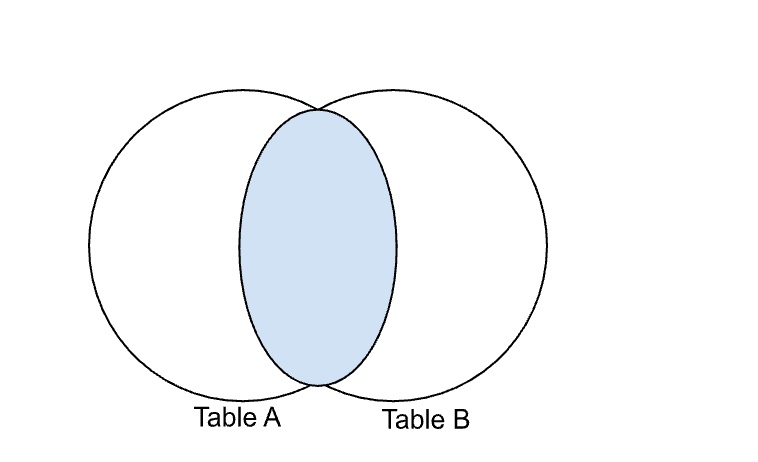
Example from the customer database:
SELECT customer_id, name, order_id
FROM orders
INNER JOIN customer
ON customer.customer_id = orders.customer_id;
In the above query, the customer and order tables are joined using customer_id column which will return only the matching records from both tables. The customer_id is the primary key in the customer table and is being referenced as the foreign key in the orders table.
RIGHT JOIN:
This type of join returns all records from the right table and matching records from the left table. If there are no matches then the result will return no records from the left table.
Syntax:
SELECT column_name1, column_name2, column_name(s)
FROM tableA
RIGHT JOIN tableB
ON tableA.column_name = tableB.column_name;

Let's take an example from the above mentioned customer database:
SELECT product_id, product_name, delivery_date
FROM product
RIGHT JOIN orders
ON product.product_id = orders.product_id;
In the above query, the product and orders tables are joined using the product_id column which then, returns all records from the orders table plus the matching records from the product table. When using applying a RIGHT JOIN, every order will be included in the result, even if a matching product record doesn' t exist.
A simple trick I keep in mind: The products table is Table A (left table) which is mentioned before the keyword RIGHT JOIN and orders is Table B (right table) as per the Venn diagram.
LEFT JOIN:
Similar to RIGHT JOIN, LEFT JOIN returns all records from the left table and matching records from the right table. If there is no match then the result will return no records from the right table.
Syntax:
SELECT column_name1, column_name2, column_name(s)
FROM tableA
LEFT JOIN tableB
ON tableA.column_name = tableB.column_name;

Example from the above customer database:
SELECT product_id, product_name, delivery_date
FROM product
LEFT JOIN orders
ON product.product_id = orders.product_id;
The example query is the exact opposite of the example mentioned in RIGHT JOIN. The product and orders tables are joined using the product_id column and returns all records from the product table including the matching records from the orders table. In a LEFT JOIN, every product will be included in the result, even if a matching order record does not exist.
In this case, as per the Venn diagram, products is the left table (Table A) and orders is the right table (Table B).
FULL OUTER JOIN:
This type of join returns all records when there is a match in left or right table records. FULL OUTER JOIN is also called FULL JOIN. This join basically combines the results of both LEFT OUTER JOIN and RIGHT OUTER JOIN into a single result.
Syntax:
SELECT column_name1, column_name2, column_name(s)
FROM tableA
FULL OUTER JOIN tableB
ON tableA.column_name = tableB.column_name
WHERE condition;

Example from the above customer database:
SELECT customer_id, name, delivery_date
FROM orders
FULL OUTER JOIN customer
ON orders.customer_id = customer.customer_id;
The above query does a FULL OUTER JOIN between the orders and customer tables using the customer_id column wherein all records from both tables which includes matching and non-matching rows is the output. When a matching customer_id exists in both tables, the corresponding customer and order data are combined into a single row. If a record does not exist in one table but exists in the other, the missing values are displayed as NULL.
SELF JOIN:
A SELF JOIN lets us join a table to itself. This helps with query hierarchical data or compare rows within the same table. A self join uses either inner join or left join clause because the query that uses the self join references the same table. To achieve this, a table alias is used to assign different names to the same table within the query.
Syntax:
SELECT column_name1, column_name2, column_name(s)
FROM tableA a1, tableA a2
WHERE condition;

CROSS JOIN
A CROSS JOIN is used to generate a combination of each row of the first table with each row of the second table. This type of join is also called a Cartesian Join.
Syntax:
SELECT column_name1, column_name2, column_name(s)
FROM tableA
CROSS JOIN tableB;

While I found it easy to use INNER JOIN, there will be instances where we would need to use RIGHT or LEFT JOIN. A simple trick to remembering this is through the Venn diagram mentioned above. For example, in a RIGHT JOIN, the table that is mentioned before the keyword RIGHT JOIN is Table A (left table) and the table mentioned after the keyword is Table B (right table) and vice versa when using LEFT JOIN.
Understanding this small trick and the concept of how tables are related via primary and foreign keys has allowed me to combine data from multiple tables and transform information into meaningful insights, especially during hackathons. Once the concept of JOINs and its different types are understood, we then have the flexibility to control how a data is related and the kind of results we want to portray.


