Building Data Pipelines with Python: ETL and Libraries in Action

I started learning data handling and Python, and one of the most useful concepts I came across was ETL and web scraping/API techniques. These topics helped me understand how data moves from raw sources into structured formats that we can analyze.
ETL stands for Extract, Transform, and Load. It is a process used to collect data, clean it, and store it in a usable form.
In the Extract step, data is pulled from different sources. These sources can be databases, CSV files, websites, or APIs. For example, if I want sales data from a website or an API, Python helps me fetch it automatically instead of copying it manually.
In the Transform step, the data is cleaned and organized. Real-world data is rarely perfect. It may contain missing values, extra spaces, or incorrect formats. Python libraries like Pandas help in cleaning data. I can remove blank values, convert text into numbers, and standardize formats so the data becomes useful for analysis.
In the Load step, the cleaned and transformed data is stored in a database or analytics table. This is where SQL is used to query and analyze the structured data. In Python, we typically use libraries like SQLAlchemy or sqlite3 to connect to the database and load the data into tables. SQLAlchemy is commonly used for connecting to databases like PostgreSQL or MySQL, while sqlite3 is used for lightweight local databases. This process is similar to working with staging and analytics tables in SQL-based projects, where data is prepared first and then stored for reporting and analysis.

Web scraping is another technique that helps in data extraction. Sometimes data is available on websites but not in databases or APIs. Web scraping allows Python to collect that data automatically. Instead of manually copying information, Python reads the webpage and extracts required details.
Libraries like BeautifulSoup and Requests are used for web scraping. Requests fetches the webpage content, and BeautifulSoup helps in parsing HTML so we can extract specific information. For example, if I want product prices or market trends from a website, web scraping can collect that data.
However, not all websites allow scraping. Some websites restrict automated access. That is why APIs are often a better option.
APIs (Application Programming Interfaces) provide structured data in formats like JSON. Instead of scraping HTML pages, we can request data directly from the API. This makes data extraction easier and more reliable. For example, weather websites provide APIs that give real-time weather data in a structured format.
ETL, web scraping, and APIs work together in data pipelines.
Learning these concepts improved my understanding of data engineering and automation. Python made it easier to handle large datasets, clean information, and store structured data. SQL complemented this by allowing me to analyze and query data efficiently.
Taking ETL Further: Real Use Cases, Code, and Best Practices
After understanding the basics of ETL (Extract, Transform, Load), I realized that it is not just a theory concept. It is used everywhere in real industries.
Real-World Use Cases of ETL
In e-commerce, ETL processes collect customer orders, clean the data, and analyze buying patterns. This helps companies manage inventory and recommend products.
In finance, ETL is used to collect transaction data, detect fraud, and generate daily financial reports.
In healthcare, ETL helps combine patient records from different systems, clean missing values, and prepare structured data for analysis and reporting.
ETL is the backbone of data-driven decision-making.
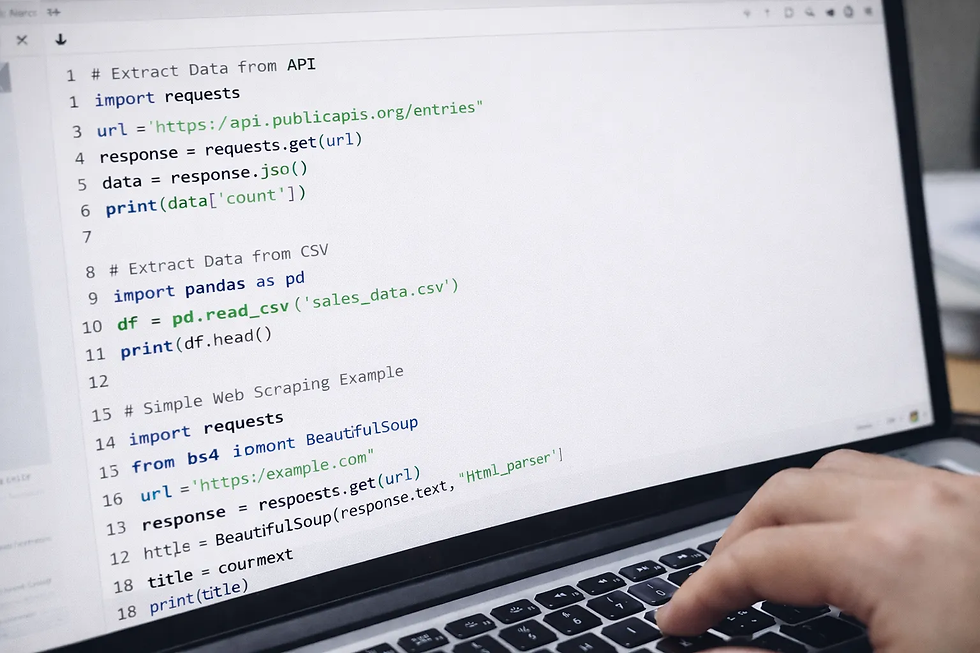
Extract Data from an API
APIs provide structured data (usually JSON). Here is a simple example:
import requests
This Extract Data from API:
Sends a request to the API
Gets the response
Converts it into JSON
Prints part of the data
This is the Extract step.
Extract Data from a CSV File
This loads data from a CSV file into a Pandas Data Frame.
Simple Web Scraping Example
This code:
Fetches a webpage
Parses the HTML
Extracts the page title
That is basic web scraping.



