Unlock New Possibilities: Java, Spring AI, and Cloud Intelligence
What is MCP (Model Context Protocol)?
• A standard protocol for communication between AI models and external tools.
• Provides a common language for AI apps and services.
• Think of MCP as a "universal translator" that helps AI models (like ChatGPT) intelligently interact with various external tools and data sources.
• Or Think of MCP like a USB-C port for AI applications. Just as USB-C provides a standardized way to connect electronic devices, MCP provides a standardized way to connect AI applications to external systems.
• MCP servers provides methods which we call as Tools.
MCP Client and Server Architecture:
As we know API works on Client Server Architecture; Similarly, MCP also need client and server instances depending on use cases.
MCP Host: The AI application that coordinates and manages one or multiple MCP clients
MCP Client: A component that maintains a connection to an MCP server and obtains context from an MCP server for the MCP host to use
MCP Server:
· MCP servers are programs that expose specific capabilities to AI applications through standardized protocol interfaces.
· There are some ready-to-use MCP servers available which we can directly plugin to our AI applications / MCP Hosts with some minimal configuration
e.g FileSystem, Git, GitHub,etc…
· But for customized use cases we can build MCP server in some languages such as Python, Java, Node, C#
MCP Transports:
· Stdio --- communication over standard in and standard out. The server reads JSON-RPC messages from its standard input (stdin) and sends messages to its standard output (stdout). Mainly used in AI Agents such Claude Desktop
· Streamable HTTP --- The server operates as an independent process that can handle multiple client connections.
Note: This replaces Old HTTP + SSE tranport
Java MCP Client – Server Applications:
· Build MCP Client server applications with the help of below resources:
· To Test MCP Client-Server Architecture build applications from above resources and test in Postman or any test tool in the similar way as API Testing.
· Build Custom MCP server Tool as below in the service layer and registered in the main class:
Service class implementation:
Main Class Tool Registration:
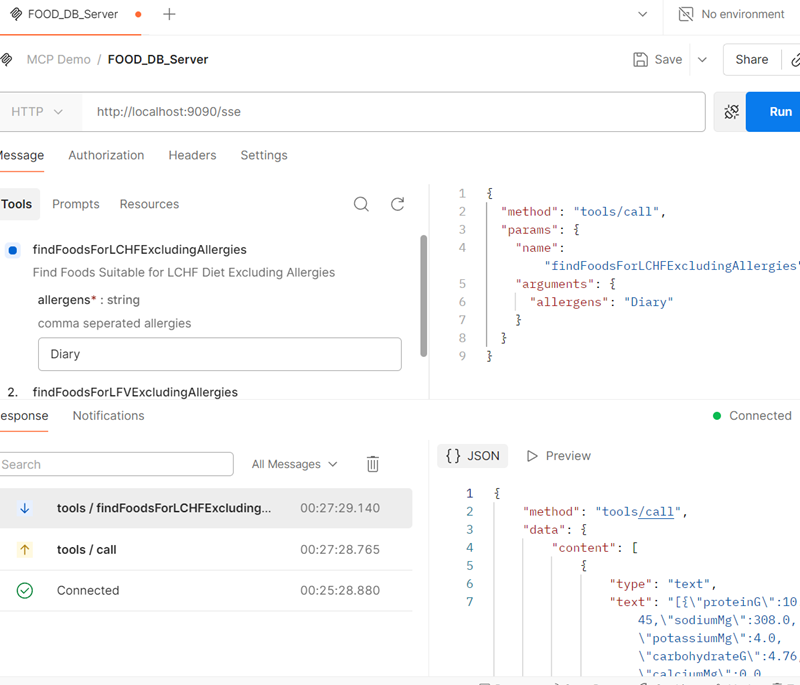
· Testing with Postman:
o Click on New Project and select MCP

o Select HTTP Mode from the drop down and provide the URL as shown. By Default MCP server connects to SSE transport

o Click Connect and then it will show the listed tools from the server

o Select any tool and provide the required parameter and click Run; it will provide the result in JSON format.