Beyond the Dashboard: Why Mastering API Testing with Postman Was My Best Career Move as a Data Analyst


As a Data Analyst, my comfort zone used to be very defined: give me a CSV, access to a SQL database, or a pre-built data warehouse, and I would work my magic. I’d clean, transform, model, and visualize until the stakeholders were happy.
But then, the inevitable would happen. A dashboard that was green on Friday would be bright red on Monday morning. Why? "Something changed upstream." A developer tweaked an API endpoint, a schema shifted unannounced, or a service started spitting out null values where integers used to be.
I realized I was always playing defense. I was reactive, fixing data issues only after they polluted my beautiful pipelines.
I decided I needed to go upstream. I needed to understand how the data was being generated in the first place. That decision led me down a rabbit hole of mastering API testing with Postman, and honestly, it’s been one of the most transformative technical journeys of my career.
Here is my experience going from just consuming APIs to actively testing them, and why I believe every modern Data Analyst needs this skill.
Phase 1 : The Awakening – Getting Hands-on with Postman
My journey started with a simple realization: APIs (Application Programming Interfaces) are the gateways for almost all modern data. If I didn't understand the gateway, I didn't really understand the data.
I downloaded Postman. At first glance, it was overwhelming—collections, environments, headers, auth tokens.
I started small. I found a public weather API and sent my first GET request. Seeing that raw JSON response come back felt like looking under the hood of a car for the first time.
Analyzing and Visualizing Raw Data: As a DA, my instinct kicked in. I wasn't just checking if the request worked; I was analyzing the structure. Was the date format ISO 8601? Were latitude and longitude floats or strings?
I also discovered Postman’s visualizer tab. Instead of staring at raw JSON, I could write a tiny bit of HTML/CSS right there in Postman to turn that JSON response into a basic table or chart immediately. It was my first taste of bending the API response to my will before it even hit a BI tool.

Phase 2 : Moving Beyond Clicking – Writing Code
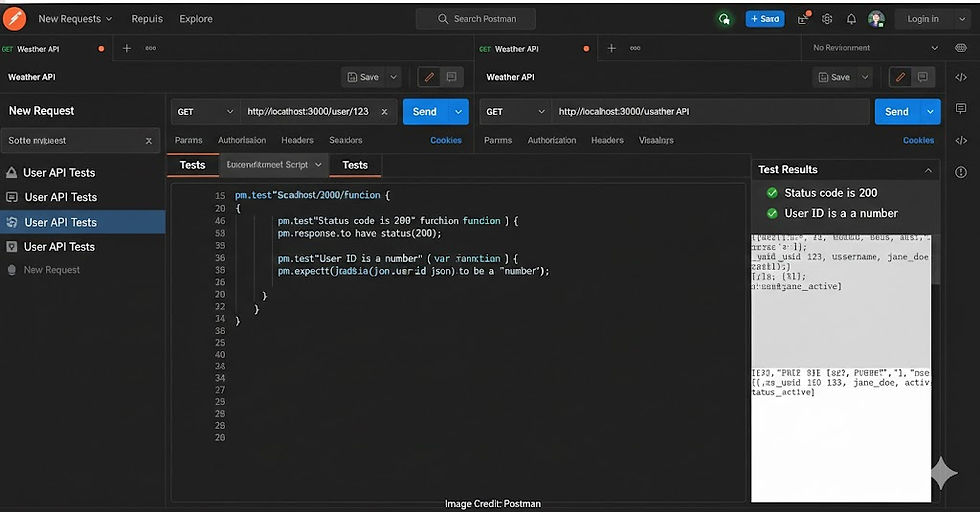
Clicking "Send" manually is fine for exploration, but it’s not scalable testing. I knew I needed automation. This meant diving into the "Tests" tab in Postman, which uses JavaScript.
I am not a software engineer. My coding experience was mostly Python and SQL. But the JavaScript needed here was approachable. I started writing basic tests to validate what the developers were promising:
Did the API return a 200 OK status?
Did the response take less than 500ms? (Performance matters for data ingestion pipelines!)
Then, I got fancier with schema validation. I wrote scripts to ensure that if an endpoint promised a user_id as an integer, it actually delivered an integer every single time.
JavaScript Code :
// A simple snippet of the kind of code I started writing
pm.test("Status code is 200", function () {
    pm.response.to.have.status(200);
});

pm.test("User ID is a number", function () {
    var jsonData = pm.response.json();
    pm.expect(jsonData.user_id).to.be.a('number');
});
Writing these tests felt like building a protective shield around my future data analysis.
Phase 3 : The Big Picture – End-to-End (E2E) Testing
Data doesn’t exist in a vacuum. A user signs up (POST), then retrieves their profile (GET), then updates their settings (PUT).
I learned to use Postman Collections to group these requests together. I used variables to chain them—capturing the ID created in the first request to use in the second. This allowed me to perform End-to-End testing, simulating real user flows.
For a DA, this is crucial because it helps you understand data lineage. You see exactly how data changes state as it moves through the system.

Phase 4: Leveling Up – Git, HTML Reports, and CI/CD
This is where things got really exciting and shifted my perspective from "Analyst" to "Data Professional."
1. Treating Tests as Assets (Git Repository)
I realized my Postman collections and tests were valuable code. They shouldn't just live on my local machine. I learned how to export my collections and commit them to a Git repository (like GitHub). This meant version control, collaboration with developers, and a backup of my hard work.

2. Creating HTML Reports (Newman)
My stakeholders don't want to look at Postman consoles. I learned to use Newman, Postman’s command-line tool. With Newman, I could run my entire test suite via the command line and generate beautiful, readable HTML reports showing what passed and what failed. Suddenly, I had proof of data quality I could email to a product manager.

3. The Holy Grail: CI/CD Integration
This was the final piece of the puzzle. I learned how to integrate my Newman tests into a CI/CD pipeline (like GitHub Actions or GitLab CI).
Now, every time a developer commits new code to the application, my API tests run automatically in the background. If they break the data contract—say, by changing a field name my dashboard relies on—the build fails, and they know immediately.
I was no longer finding out about broken data on Monday morning. The bad code was being stopped before it ever merged.

The Verdict: Why This is Vital for a Data Analyst
You might be thinking, "This sounds like QA work or Data Engineering." You aren't entirely wrong, but the lines are blurring. Here is the impact this journey has had on my profile and why I believe it's essential for DAs today.
1. The Shift from Reactive to Proactive Data Quality :
Instead of cleaning up messes in SQL, I am now involved in defining the API contracts. I can ensure data quality at the source. This has saved me countless hours of debugging broken dashboards down the line.
2. Supercharged Collaboration :
I now speak the same language as the software engineers. When I request a change to data, I don't send a vague email; I send a failing Postman test case showing exactly what's wrong. This earns immense respect and gets things fixed faster.
3. Impact on My Profile (The "Full-Stack" Analyst) :
Adding API Testing, Postman, Git, and CI/CD familiarity to my resume changed the conversation during interviews.
It shows technical depth beyond just SQL and Tableau/PowerBI.
It proves I understand the entire software development lifecycle (SDLC), not just the analytics tail-end.
It positions me for higher-level roles like Analytics Engineer or Data Engineer.
Final Thoughts :
If you are a Data Analyst tired of your dashboards breaking due to upstream changes, stop waiting for permission. Download Postman. Send that first request. Start writing bad JavaScript until it becomes good JavaScript.
Mastering the source of your data is the best investment you can make in your analytics career.