Beyond the Basics: Mastering Advanced SQL Analytics and Query Optimization.

Query Optimization Techniques
Query optimization is the process of finding the most efficient way to execute database query. It analyzes instructions and evaluates multiple execution plans to find the fastest data retrieval while consuming the least amount of memory, CPU and disk I/O.
Query Optimization is on of the most important skill for Data analyst. Even a well written query can slow when a dataset grows, joins become complex, or indexes are missing . Understanding how to optimize queries helps us to increase performance, reduce execution time and build scalable applications.
Lets walk through most effective Query optimization techniques with examples
Use Proper Indexing: Index is the data structure provides quick access to data , optimizing the speed of queries. Indexes helps us to find the rows faster.
Example:
CREATE INDEX index_customer_id on customer(customer_id);This improves the performance of queries like
SELECT * FROM customer where customer_id=1;2.Avoid SELECT *:Fetching All columns increases I/O and wastes memory network bandwidth. Instead name only the columns you need.
SELECT * FROM customer;                                 -- Bad practice
SELECT customer_id,first_name,last_name FROM customer;  --Good practice
Use INNER JOIN instead of LEFT JOIN when possible: Inner join is faster, cleaner and better for performance.
Example :
To find the List of actors who acted in film using INNER JOIN
SELECT a.first_name||a.last_name as Actors_name ,f.title
FROM actor a
JOIN film_actor fa on a.actor_id=fa.actor_id
JOIN film f on fa.film_id=f.film_id;
To find the List of actors who acted in film using LEFT JOIN
SELECT a.first_name||a.last_name as Actors_name ,f.title
FROM actor a
LEFT JOIN film_actor fa on a.actor_id=fa.actor_id
LEFT JOIN film f on fa.film_id=f.film_id;
Using EXISTS instead of IN for Large Subqueries: When EXISTS is used database stops scanning as soon as it find the first match instead of scanning all records.
Example: List of films which are rented.
SELECT f.film_id, f.title
FROM film f
WHERE EXISTS (
	SELECT 1
	FROM inventory i
	JOIN rental r ON r.inventory_id = i.inventory_id
	WHERE f.film_id = i.film_id
)
ORDER BY f.film_id ASC;
Use LIMIT or TOP for larger tables: LIMIT/TOP restrict the number of rows returned, preventing the database from unnecessarily scanning millions of records, which improves performance and speed.
SELECT film_id,title from film LIMIT 20;Avoid Wildcard searches at the Start: Wildcards at the beginning restricts the database to use index on that column.
Example: To find the name of movies which contains "Arizona".
SELECT title from film where title like '%Arizona';    --slow
SELECT title from film where title like 'Arizona%';    --Fast
when wildcards is used at the beginning of the pattern the index cannot be used and database scans for all the records but when the search starts with fixed prefix index can be used making the query much faster.
Analyze Execution plans: It is the reliable way to understand how database actually executed the query. It helps to identify full table scans, missing indexes and expensive joins.
EXPLAIN SELECT s.staff_id,s.first_name,s.last_name,a.district, a.city_id, a.postal_code
FROM staff s
JOIN address a
ON a.address_id=s.address_id;

Execution plan shows the hash join between address and staff with sequential scan on both the tables. No indexes are used because full scans are faster for small datasets.
Mastering on these helps us to write queries that are not only correct but also fast , scalable and production ready.
Advance SQL Analytics
Now that we understand how to optimize queries, We can move into advance SQL analytics . This is where SQL becomes more powerful.
With Features like CROSS JOIN LATERAL, FILTER(), CUMMULATIVE DISTRIBUTION, CROSS TABS we can reshape the data, create flexible reports and perform complex calculations which helps us to solve real business problem in smarter and faster way.
FILTER(): It is used with aggregate functions to apply a condition to single aggregate function making it cleaner, faster and easier to read than using CASE WHEN.
Example: To count the films by rating (PG, R,G)
Using CASE WHEN
SELECT
	COUNT(CASE WHEN rating ='PG' THEN 1 END) AS pg_films,
	COUNT(CASE WHEN rating ='G' THEN 1 END) AS g_films,
	COUNT(CASE WHEN rating ='R' THEN 1 END) AS r_films
FROM film;
Using FILTER()
SELECT
	COUNT(*) FILTER (WHERE rating = 'PG') AS pg_films,
	COUNT(*) FILTER (WHERE rating = 'G') AS g_films,
	COUNT(*) FILTER (WHERE rating = 'R') AS r_films
FROM film;
Both gives same Output as

Comparatively FILTER() makes conditional aggregations cleaner , more readable and easier to maintain where as CASE WHEN becomes messy and harder to manage when multiple conditions are involved.
2.CUMMULATIVE DISTRIBUTION:CUME DIST helps us to know the percentile position of each row which helps us to understand how values are spread across dataset.
It tells us what percentage of rows have a values less than or equal to current row.
This is extremely useful in Analytics, statistics, risk scoring, percentile analysis and ranking.
Example:
SELECT
	film_id,
	rental_duration,
	ROUND((CUME_DIST() OVER (ORDER BY rental_duration) * 100)::numeric,2)
	AS cume_dist_percent
FROM film
ORDER BY rental_duration;
Output:

For film_id 1000 with rental_duration = 3, the CUME_DIST value of 20.38% means that 20.38% of all films in the dataset have a rental duration less than or equal to 3 days.
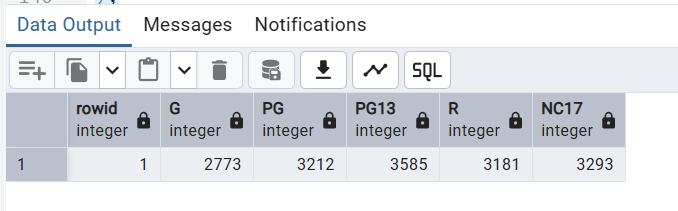
CROSS TABS: this is a data transformation technique which pivots rows to columns .
CREATE EXTENSION tablefunc;SELECT
f.rating,
COUNT(*) AS total_rentals
FROM rental r
JOIN inventory i ON r.inventory_id = i.inventory_id
JOIN film f ON i.film_id = f.film_id
GROUP BY f.rating
ORDER BY f.rating;
SELECT *
FROM crosstab(
	$$
	SELECT
	1 AS rowid,
	f.rating,
	COUNT(*) AS total_rentals
	FROM rental r
	JOIN inventory i ON r.inventory_id = i.inventory_id
	JOIN film f ON i.film_id = f.film_id
	GROUP BY f.rating
	ORDER BY f.rating
	$$,
	$$ SELECT unnest(ARRAY['G','PG','PG-13','R','NC-17']) $$

) AS ct(
	rowid int,
	"G" int,
	"PG" int,
	"PG13" int,
	"R" int,
	"NC17" int

);
4.CROSS JOIN LATERAL:CROSS JOIN LATERAL is a type of SQL join that allows the subqueries in the FROM clause to reference the columns from the left table in the query.
It takes a row from the left table
Return the sub query on the right using that row values.
Return whatever rows subquery produces
Move to the next row and repeat. It behaves like row-by-row loop.
Example: To find the list of films with their actors
SELECT

  	f.film_id,

	f.title,

    a.actor_name

FROM film f

CROSS JOIN LATERAL (

    SELECT

        CONCAT(a.first_name, ' ', a.last_name) AS actor_name

    FROM film_actor fa

    JOIN actor a ON fa.actor_id = a.actor_id

    WHERE fa.film_id = f.film_id       -- depends on outer row

    ORDER BY a.actor_id

    LIMIT 1

) AS a;
Output:

In the Above example the query picks one film at a time. The sub query looks at current film_id and find all actors of that film , orders them and return only one actor(because of LIMIT 1).
film row 1 ───> run subquery ───> return 1 actor ───> output row 1
film row 2 ───> run subquery ───> return 1 actor ───> output row 2
film row 3 ───> run subquery ───> return 1 actor ───> output row 3
Once the Foundation is strong , SQL becomes more powerful. Advance features such as FILTER(), CUME_DIST,CROSS TABS, CROSS JOIN LATERAL allows us to reshape data and perform complex analytics.
Mastering both optimization techniques and advance analytical functions helps us to solve real business problems faster, smarter and deliver scalable insights.


