Automating Your Builds: Integrating Your Project with Jenkins

What is Jenkins:
The Jenkins project was originally named Hudson and was renamed in 2011,A Jenkins is a an open-source automation server enables and automates various process (such as building ,testing and development).
A Jenkins pipeline is a series of code-defined steps that automate the Continous integration and continous delivery CI/CD process.
This Java-based application provides packages designed for Windows, Linux, macOS, and Unix-like operating systems, providing out-of-the-box readiness. One of its most distinctive features, the plugin architecture, offers developers countless customization options so they may tailor Jenkins to specific project needs.
Jenkins offers several different types of projects, including:
Pipeline.
Multibranch Pipeline.
Organization folders.
Freestyle.
Multi-configuration (matrix)
Maven.
External job.
What is CI/CD:
Continuous integration (CI) refers to the practice of automatically and frequently integrating code . Continuous delivery and/or deployment (CD) is a process that refers to the integration, testing, and delivery of code changes.
Jenkins Project
A Jenkins project or task is an automated process created by a Jenkins user. The plain Jenkins distribution offers a variety of build tasks that can support continuous integration workflows.
What are the advantages of Jenkins?
Highly extensible with a huge variety of existing plugins.
scripting and declarative language which supports advanced.
Robust and reliable.
Supports hybrid and multi-cloud environments.
Offers an extensive knowledge base, documentation, and community resources.
What are Jenkins Stages:
Build: Developer commits the code.
Test: verifying the software has bugs or not and meets the requirements.
Deploy: Releasing the tested software to a production.
Installing JDK:
Before we need to download JDK version to install Jenkins, to build Jenkins plugins you need to install a Java Development Kit (JDK). In Google copy paste the link : https://www.oracle.com/java/technologies/downloads/ For macOS or windows select the option and download and set the path to Environment variable.
What is JDK?
JDK contains all the tools that are required to compile, debug, and run a program developed using the Java platform.
First step Click on the operating system macOS or Windows

Second a popup window will appear Click on windows and click on Next.

Third a pop-up window will appear click on Next and it start processing Click on Finish .

Fourth When finished, a pop-up window will appear, with Summary highlighted (and The installation was completed successfully).

Installing Jenkins:
Download the Link :https://www.jenkins.io/download/#downloading-jenkins and select the operating system

Installation

Give Account as a name and password and click on next
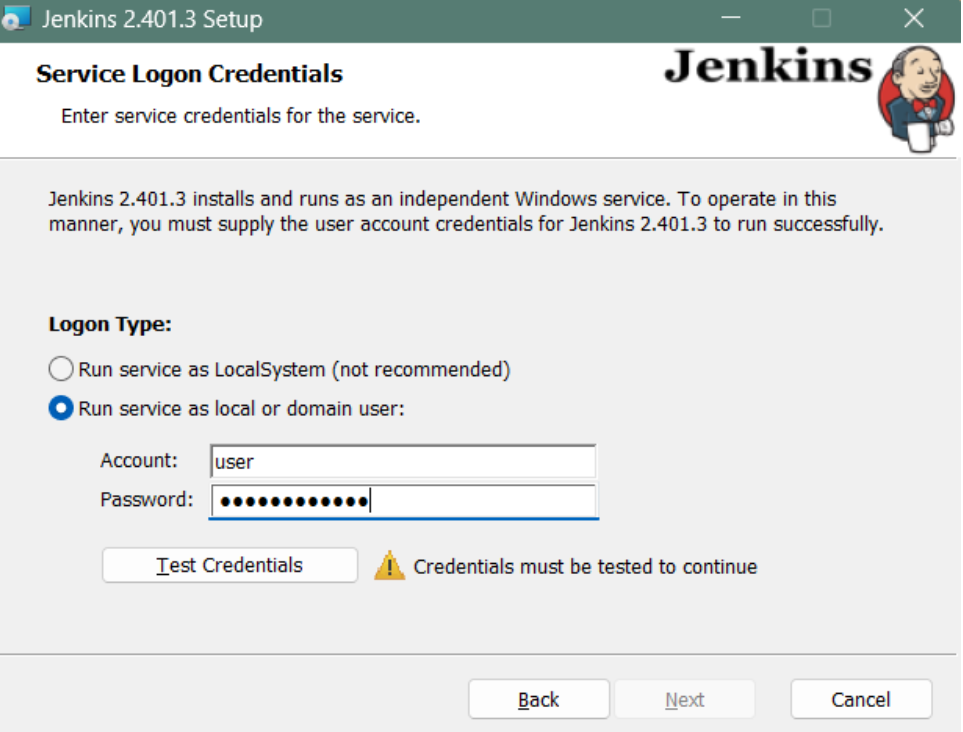
Click Test Port

Choose the Directory and clock Next

Click on Finish

We finish setting up the Jenkins and go to google site and give local host URL : http://localhost:8080/login? when you enter username and password it will open the Dashbord page and add plugins needed for the project to build, To add plugins go to manage Jenkins
when we enter the URL the page will appear and Enter username and password and click on login.

It will redirect Jenkins Dashboard here we need to add plugins to build the project
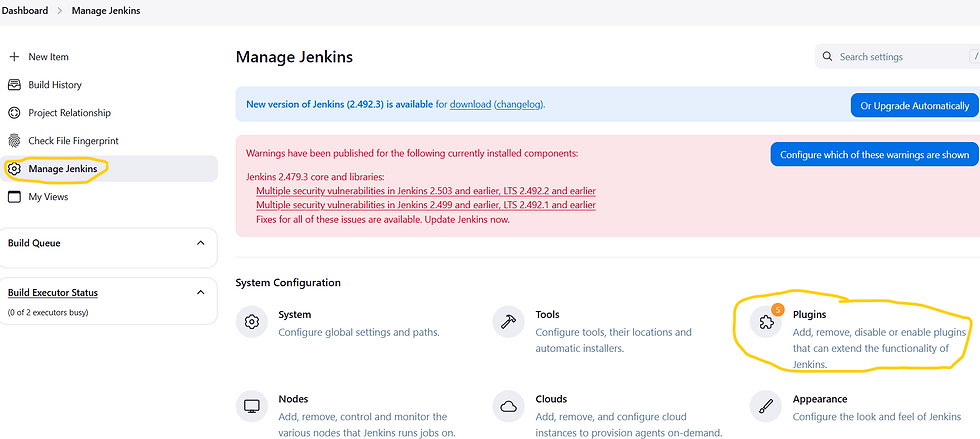
In manage Jenkins we can see right side plugins These plugins work together to create a powerful and automated CI/CD pipeline for your Java project hosted on GitHub:
Git Plugin: Fetches your code from GitHub.
Maven Integration Plugin: Uses Maven to build your project, manage dependencies, and execute tests (potentially using TestNG).
TestNG Plugin: Interprets and displays the results of your TestNG tests in Jenkins.
Allure Jenkins Plugin: Generates rich and informative test reports based on the output from your testing framework (including TestNG and potentially Cucumber).
Cucumber HTML Plugin: Specifically visualizes the results of your Cucumber BDD tests in a user-friendly HTML format.
By using these plugins, you can automate the entire process from code retrieval to building, testing, and generating comprehensive reports, all within your Jenkins environment.

In Available plugins we can add Allure Reports, Cucumber Reports , maven integration and git plugin What is Github?
GitHub is a web-based interface that uses Git, the open source version control software that lets multiple people make separate changes to web pages at the same time

when Developer create a maven project and write the automated code and push the code git hub repository from there we push the code to Jenkins to build, test and deploy.

maven project with Cucumber BDD framework Benefits of Integrating Jenkins with GitHub:
Clearly state the advantages of connecting Jenkins to your GitHub repositories:
Automation: Automatically build, test, and potentially deploy code whenever changes are made in GitHub.
Continuous Integration: Enable a CI workflow where code changes are frequently integrated and validated.

Git Repository Building from GitHub with a Freestyle Project:
Navigate to the Jenkins Dashboard: Go to your Jenkins home screen.
Click "New Item": Just like before, you'll create a new job.
Enter a Name: Give your new project a descriptive name (e.g., "build-java-freestyle").
Select "Freestyle project": Choose the "Freestyle project" type and click "OK."

It will appear a new page displaying "New Item " and enter the name and Select the Free Style project

Source code management add the github URl of Repository

In post build add cucumber report and allure report to get reports


Click save and click on build it will build project .

After Building we will see in console output whether the Build is pass or fail .

Click on workspace of project to view Allure report and Cucumber report.

We can see Two reports Click on Allure report

Click on Cucumber report.
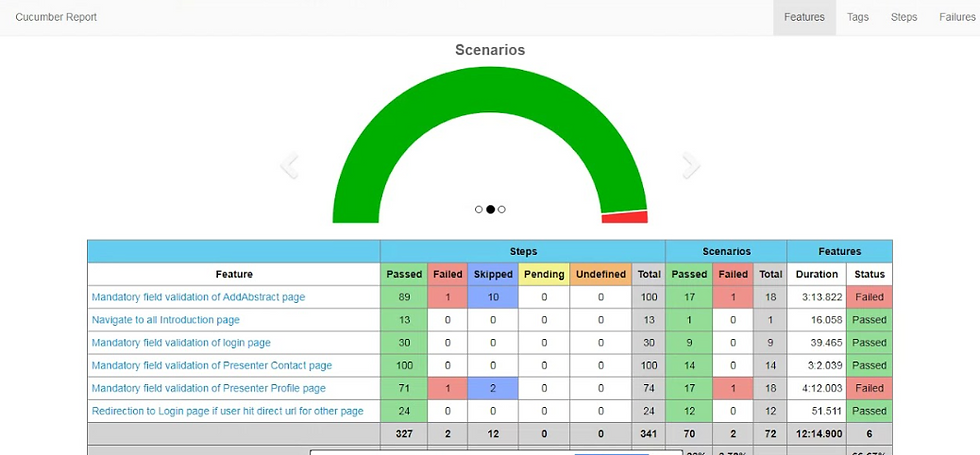
Conclusion:
Jenkins is like a powerful toolbox—it might feel overwhelming at first, but once you learn the basics, you’ll unlock endless automation possibilities!


