ACID transactions and JOINS

What a transaction is?
A transaction is an indivisible unit of work. It can consist of one or more SQL statements, but to be considered successful, either all of those SQL statements must complete successfully, leaving the database in a new stable state, or none must complete, leaving the database as it was before the transaction began.
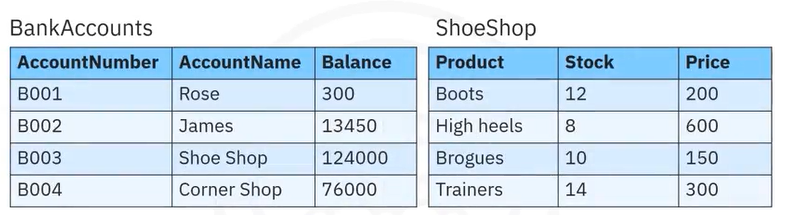
For example, if you make a purchase using your bank card, many things must happen. The product must be added to your cart. Your payment must be processed. Your account must be debited the correct amount and the store's account credited.
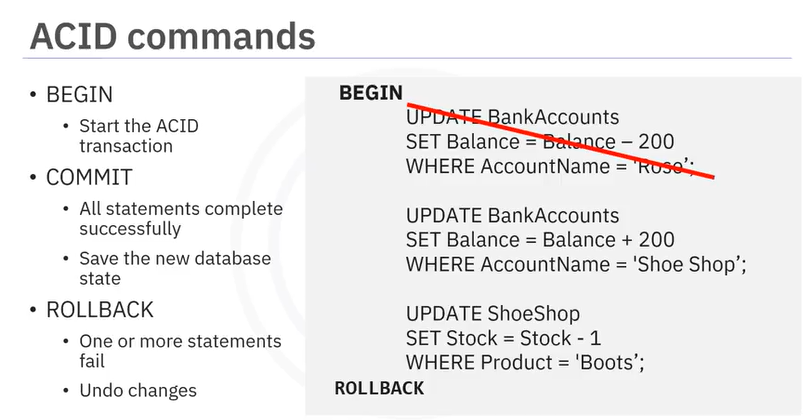
The inventory for that product must be reduced by the number purchased. Let's look at the example in more detail. If Rose buys boots for $200, then you can use an UPDATE statement to decrease her account balance. And another UPDATE statement to add $200 to the Shoe Shop balance. And a final update statement to decrease the stock level of boots at the Shoe Shop by 1. If any of these UPDATE statements fail, the whole transaction should fail, to keep the data in a consistent state. The types of transactions in the example are called ACID transactions.


ACID stands for :Atomic, Consistent ,Isolated ,Durable .

To start an ACID transaction, use the command BEGIN. In db2 on Cloud, this command is implicit. Any commands you issue after that are part of the transaction, until you issue either COMMIT, or ROLLBACK. If all the commands complete successfully, issue a commit command to save everything in the database to a consistent, stable state.
If any of the commands fail; perhaps Rose’s account doesn’t have enough money to make the payment, you can issue a rollback command to undo all the changes and leave the database in its previously consistent stable state.

SQL statements can be called from languages like Java, C, R, and Python. This requires the use of database-specific access APIs such as Java Database Connectivity (JDBC) for Java or a specific database connector like ibm_db for Python. Most languages use the EXEC SQL commands to initiate a SQL command, including COMMIT and ROLLBACK, as you can see in this example. Remember that BEGIN is implicit, you do not need to call it out explicitly. Incorporating SQL commands into your application code gives you the opportunity to create error-checking routines that in turn control whether the transaction is committed or rolled back.
An ACID transaction is one where all the SQL statements must complete successfully or none at all. This ensures the database is always in a consistent state. ACID stands for Atomic, Consistent, Isolated, Durable. SQL commands BEGIN, COMMIT, and ROLLBACK are used to manage ACID transactions.

Conclusion:
Syntax | Description | Example |
COMMIT; | A COMMIT command is used to persist the changes in the database. The default terminator for a COMMIT command is semicolon (;). | CREATE TABLE employee(ID INT, Name VARCHAR(20), City VARCHAR(20), Salary INT, Age INT); START TRANSACTION; INSERT INTO employee( ID, Name, City, Salary, Age) VALUES( 1, ‘Priyanka pal’, ‘Nasik’, 36000, 21), (2, ‘Riya chowdary’, ‘Bangalor’, 82000, 29); SELECT *FROM employee;COMMIT; |
ROLLBACK; | A ROLLBACK command is used to rollback the transactions which are not saved in the database. The default terminator for a ROLLBACK command is semicolon (;). |
INSERT INTO employee VALUES (3, ‘Swetha Tiwari’, ‘Kanpur’, 38000, 38); SELECT *FROM employee;ROLLBACK;SELECT *FROM employee; |
Joins
SQL Joins combine rows from two or more tables in a database based on a related column, essential for retrieving related data from normalized tables, with common types being INNER (matches only), LEFT/RIGHT OUTER (includes unmatched), and FULL (all rows). They're used to link data using primary/foreign keys, forming a single result set, and are generally more efficient than sub-queries for complex data retrieval, allowing for powerful, single-query data analysis.
Topic | Syntax | Description | Example |
Cross Join | SELECT column_name(s) FROM table1 CROSS JOIN table2; | The CROSS JOIN is used to generate a paired combination of each row of the first table with each row of the second table. | SELECT DEPT_ID_DEP, LOCT_ID FROM DEPARTMENTS CROSS JOIN LOCATIONS; |
Inner Join | SELECT column_name(s) FROM table1 INNER JOIN table2 ON table1.column_name = table2.column_name; WHERE condition; | You can use an inner join in a SELECT statement to retrieve only the rows that satisfy the join conditions on every specified table. | select E.F_NAME,E.L_NAME, JH.START_DATE from EMPLOYEES as E INNER JOIN JOB_HISTORY as JH on E.EMP_ID=JH.EMPL_ID where E.DEP_ID ='5'; |
Left Outer Join | SELECT column_name(s) FROM table1 LEFT OUTER JOIN table2 ON table1.column_name = table2.column_name WHERE condition; | The LEFT OUTER JOIN will return all records from the left side table and the matching records from the right table. | select E.EMP_ID,E.L_NAME,E.DEP_ID,D.DEP_NAME from EMPLOYEES AS E LEFT OUTER JOIN DEPARTMENTS AS D ON E.DEP_ID=D.DEPT_ID_DEP; |
Right Outer Join | SELECT column_name(s) FROM table1 RIGHT OUTER JOIN table2 ON table1.column_name = table2.column_name WHERE condition; | The RIGHT OUTER JOIN returns all records from the right table, and the matching records from the left table. | select E.EMP_ID,E.L_NAME,E.DEP_ID,D.DEP_NAME from EMPLOYEES AS E RIGHT OUTER JOIN DEPARTMENTS AS D ON E.DEP_ID=D.DEPT_ID_DEP; |
Full Outer Join | SELECT column_name(s) FROM table1 FULL OUTER JOIN table2 ON table1.column_name = table2.column_name WHERE condition; | The FULL OUTER JOIN clause results in the inclusion of rows from two tables. If a value is missing when rows are joined, that value is null in the result table. | select E.F_NAME,E.L_NAME,D.DEP_NAME from EMPLOYEES AS E FULL OUTER JOIN DEPARTMENTS AS D ON E.DEP_ID=D.DEPT_ID_DEP; |
Self Join | SELECT column_name(s) FROM table1 T1, table1 T2 WHERE condition; | A self join is regular join but it can be used to joined with itself. | SELECT B.* FROM EMPLOYEES A JOIN EMPLOYEES B ON A.MANAGER_ID = B.MANAGER_ID WHERE A.EMP_ID = 'E1001'; |
Conclusion:
Joins allow data from multiple tables to be combined using related columns, making it easier to retrieve meaningful information. Different types of joins control how matching and non-matching records appear in results.
Overall, joins improve data organization, reduce redundancy, and support efficient data analysis, making them a powerful tool for working with relational databases.


