A Beginner’s Guide to Window Functions using DVD Rental Dataset

Intro to window functions
window functions use values from multiple rows to produce values for each row separately. In other words, they perform calculations on the set of rows related to the current row. That set of rows is known as ‘window’, hence the name ‘window functions’. Unlike aggregate functions (SUM, AVG, etc.), window functions don’t collapse rows — they return a value for each row.
Although window functions are quite useful for dealing with huge databases in SQL by executing queries within a specified window frame. This reduces the loading time and makes SQL queries efficient.
With window functions, you can perform tasks like finding the running averages of a filtered query, which would otherwise require complex operations like self-joins and subqueries.
Another advantage of using window functions over traditional SQL functions is that it formats longer queries and enhances readability.
Basic Syntax:
function_name(arguments) OVER (
PARTITION BY column
ORDER BY column
ROWS BETWEEN ... AND ...
)
Ranking Window functions in SQL
· ROW_NUMBER()
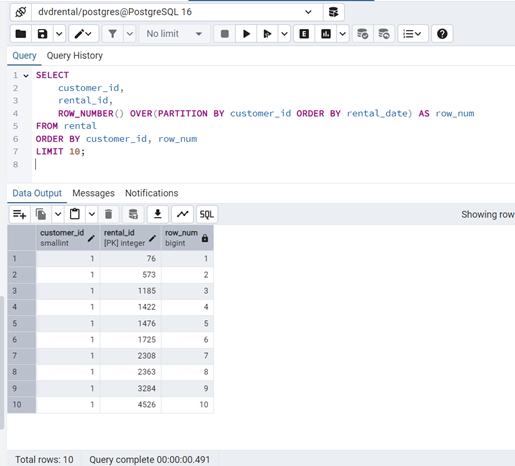
The ROW_NUMBER() function is the simplest of the ranking window functions in SQL. It assigns consecutive numbers starting from 1 to all rows in the table. The order of the rows needs to be defined using an ORDER BY clause inside the OVER clause.
ROW_NUMBER() does not require you to specify a variable within the parentheses.
Using the PARTITION BY clause will allow you to begin counting 1 again in each partition. The following query starts the count over again for each customer.
Question: List the first 10 customers with their rental order, assigning a unique number to each rental per customer.
SELECT
customer_id,
rental_id,
ROW_NUMBER() OVER(PARTITION BY customer_id ORDER BY rental_date) AS row_num
FROM rental
ORDER BY customer_id, row_num
LIMIT 10;
· RANK()
The RANK function in SQL server is used to assign rank to each row in a result set, based on a given ordering of data. The same rank is assigned to the rows which have the same values. The ranks in the RANK() function may not be consecutive because it assigns the same rank to rows with identical values.
After assigning the rank to the duplicate rows, the next rank is calculated by skipping the number of ranks that correspond to the duplicated rows, resulting in gaps in the ranking sequence. For example, if two rows are ranked 1st, the next row will be ranked 3rd (not 2nd).
Question: Rank films by their rental rate within each rating category.
SELECT
rating,
title,
rental_rate,
RANK() OVER(PARTITION BY rating ORDER BY rental_rate DESC) AS film_rank
FROM film
ORDER BY rating, film_rank
LIMIT 15;
· DENSE_RANK()
This function returns the rank of each row within a result set partition, with no gaps in the ranking values. The rank of a specific row is one plus the number of distinct rank values that come before that specific row.
Question: Rank films by their rental rate within each rating category without skipping ranks.
SELECT
rating,
title,
rental_rate,
DENSE_RANK() OVER(PARTITION BY rating ORDER BY rental_rate DESC) AS film_rank
FROM film
ORDER BY rating, film_rank
LIMIT 15;

· PERCENT_RANK()
In PostgreSQL, the PERCENT_RANK() function is used to evaluate the relative ranking of a value within a given set of values. This function is particularly useful for statistical analysis and reporting, providing insights into how values compare within a dataset.
Question: Find the percent rank of films within each rating based on rental rate
SELECT
rating,
title,
rental_rate,
PERCENT_RANK() OVER(PARTITION BY rating ORDER BY rental_rate DESC) AS percent_rank
FROM film
ORDER BY rating, percent_rank
LIMIT 15;

· LAG()
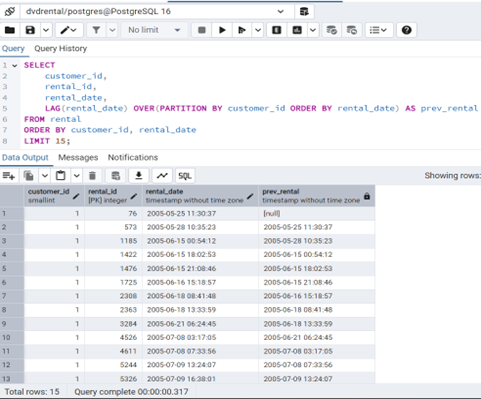
SQL LAG() is a window function that provides access to a row at a specified physical offset which comes before the current row.
In other words, by using the LAG() function, from the current row, you can access data of the previous row, or from the second row before the current row, or from the third row before current row, and so on.
The LAG() function can be very useful for calculating the difference between the current row and the previous row
Question: For each rental, show the rental date and the previous rental date of the same customer.
SELECT
customer_id,
rental_id,
rental_date,
LAG(rental_date) OVER(PARTITION BY customer_id ORDER BY rental_date) AS prev_rental
FROM rental
ORDER BY customer_id, rental_date
LIMIT 15;
· LEAD()
SQL LEAD() is a window function that provides access to a row at a specified physical offset that follows the current row.
For example, by using the LEAD() function, from the current row, you can access data from the next row, the second row that follows the current row, the third row that follows the current row, and so on.
The LEAD() function can be very useful for calculating the difference between the value of the current row and the value of the following row.
Question: For each rental, show the rental date and the next rental date of the same customer.
SELECT
customer_id,
rental_id,
rental_date,
LEAD(rental_date) OVER(PARTITION BY customer_id ORDER BY rental_date) AS next_rental
FROM rental
ORDER BY customer_id, rental_date
LIMIT 15;



